11 EN
5) Press REW/s or F. F WD /B. The VCR will automatically
stop when the counter returns to 0:00:00 (approx.).
To Exit the Counter Memory
Press TAPE COUNTER MEMORY so that the “M” disappears
from the TV screen.
Note: When you set the Auto Repeat mode to ON while the
Counter Memory mode is ON, the VCR exits the
Counter Memory mode automatically.
OTR (One Touch Recording)
This function enables you to set the duration of a recording
simply by pressing REC/OTR.
1) Follow steps
1) to 3) in “Viewing and Recording the Same
Programme” section.
2) Press
REC/OTR repeatedly until the desired recording
length appears in the upper left corner of the TV screen.
Recording stops when 0:00 is reached.
• To check time remaining during an OTR
Press
DISPLAY.
• To change the recording length during an OTR
Press
REC/OTR repeatedly until the desired length appears.
• To stop an OTR before recording is finished
Press STOP/L.
• To cancel the OTR but continue recording
Press REC/OTR repeatedly until “I” appears without the
recording length.
Auto Repeat Playback
The VCR has an auto repeat function that allows you to repeat
a tape indefinitely without touching
PLAY/K.
• Use the remote control for this procedure.
• Insert a pre-recorded tape.
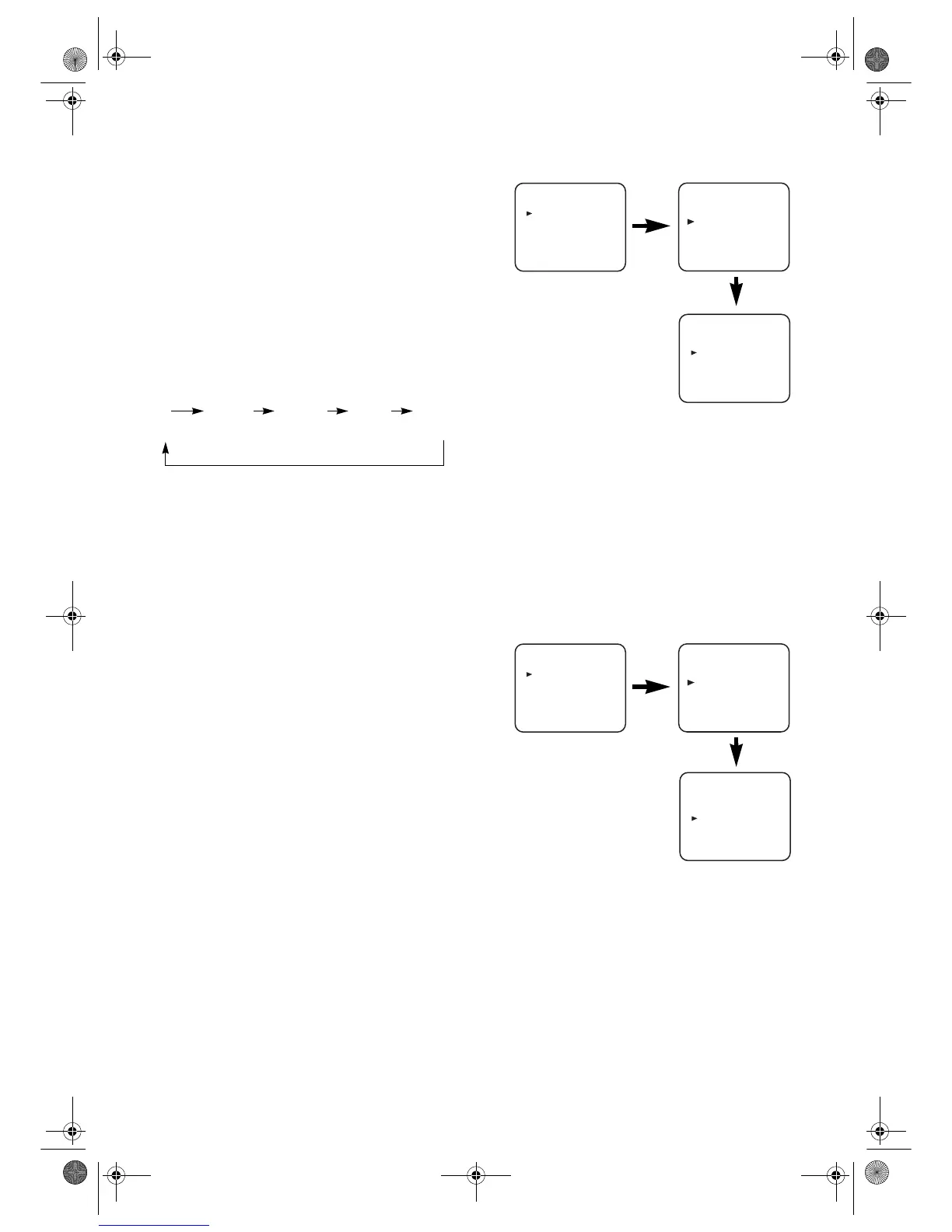
1) Press
MENU.
2) Press
PLAY/K or STOP/L to select “SET UP”, then press
F.F WD /B.
3) Press
PLAY/K or STOP/L to select “AUTO REPEAT”.
4) Press
F.FW D /B so that “ON” appears next to “AUTO
REPEAT” on the TV screen.
When in Stop mode, Auto Repeat mode will start
automatically.
If the on-screen menu still remains, press MENU to exit,
then press
PLAY/K.
Note: • Once you select the Auto Repeat mode, it stays in
effect even after you turn off the VCR.
• TAPE COUNTER MEMORY does not function if
the Auto Repeat mode is set to ON.
• When you set the Auto Repeat mode to ON while the
Counter Memory mode is ON, the VCR exit the
Counter Memory mode automatically.
To Stop Playback
Press STOP/L.
To Exit the Auto Repeat Mode
Repeat steps 1) to 3). Then, press F. F W D/B.
“OFF” will appear next to “AUTO REPEAT” on the TV
screen. Press MENU to exit.
Picture Select
This function enables you to select the picture quality of a
tape.
• Use the remote control for this procedure.
1) Press MENU.
2) Press
PLAY/K or STOP/L to select “SET UP”, then press
F.FW D /B.
3) Press
PLAY/K or STOP/L to select “PICTURE”.
4) Press
F.F WD /B until the desired mode (NORMAL,
SOFT, or SHARP) is indicated on the TV screen.
5) Press MENU to exit.
Note: Once you select the Picture Select mode, it stays in
effect even after you turn off the VCR.
Automatic Operations
Automatic Rewind, Eject, Off
When the end of a tape is reached during recording, playback,
or fast-forward, the tape will automatically rewind to the
beginning. After that, the VCR will eject the tape and turn
itself to off.
• The tape will not auto-rewind during timer recording or
One Touch Recording.
• When the Counter Memory is activated, the tape will
rewind to the M0:00:00 position and the VCR will enter
the Stop mode.
I I [0:30] I[1:00]... I[7:30] I[8:00]
(Normal (OTR:
recording) 30 minutes)
MENU
TIMER
SET UP
INITIAL
MENU
TIMER
SET UP
INITIAL
SET UP
AUTO REPEAT
[
ON
]
[
ON
]
PICTURE
[
NORMAL
]
AUTO RETURN
MENU
TIMER
SET UP
INITIAL
MENU
TIMER
SET UP
INITIAL
SET UP
AUTO REPEAT
[
ON
]
[
ON
]
PICTURE
[
NORMAL
]
AUTO RETURN
29A-650(EN).fm Page 11 Wednesday, October 27, 2004 10:40 AM


 To Next Page