10 EN
Recording
Viewing and Recording the Same Programme
1) Insert a cassette tape with its erase-prevention tab in place.
(If necessary, rewind or fast forward the tape to the point
at which you want to begin recording.)
2) Press the
number buttons or CHANNEL (K/L) to select
the channel to be recorded.
3) Press SPEED/SYSTEM to select the tape speed (SP/LP).
4) Press
REC/OTR to begin recording.
•The REC indicator on the display comes on.
5) Press STOP/L when recording is completed.
Skipping Unwanted Programme Material During
Recording
1) Press PAUSE/STILL when you want to temporarily halt
recording.
You can check the remaining pause time with
C
marks on
the TV screen. Each
C
mark represents 1 minute. After 5
minutes, the VCR will automatically switch to the Stop
mode to prevent tape damage.
2) Press
PAUSE/STILL or REC/OTR to resume recording.
Recording One Programme While Viewing Another
You can record one programme while viewing another. To
start recording, follow steps
1) to 4) under “Viewing and
Recording the Same Programme”. Then, set the TV to the
channel you want to watch.
To Monitor the Progress of Your Recording
Select the video channel on the TV.
Assemble Function
• You can record in continuation from previous programme
on a pre-recorded tape.
1) Insert a pre-recorded tape. Press PLAY/K to start playback.
2) Press
PAUSE/STILL at the desired point on the tape.
3) Press
REC/OTR. The VCR will be in the Recording Pause
mode.
4) Press CHANNEL (K/L) to select the channel to be
recorded.
5) Press
REC/OTR or PAUSE/STILL. The recording will
begin.
6) Press
STOP/L when recording is completed.
Hi-Fi Stereo Sound System
This VCR will record and playback Hi-Fi stereo sound. In
addition it has a A2 (29A-650 and 29A-654 only) or NICAM
(29A-750 and 29A-754 only) stereo sound decoder.
This equipment will receive stereo and bilingual broadcasts
and it is possible the several ways of recording and playing back
the sound.
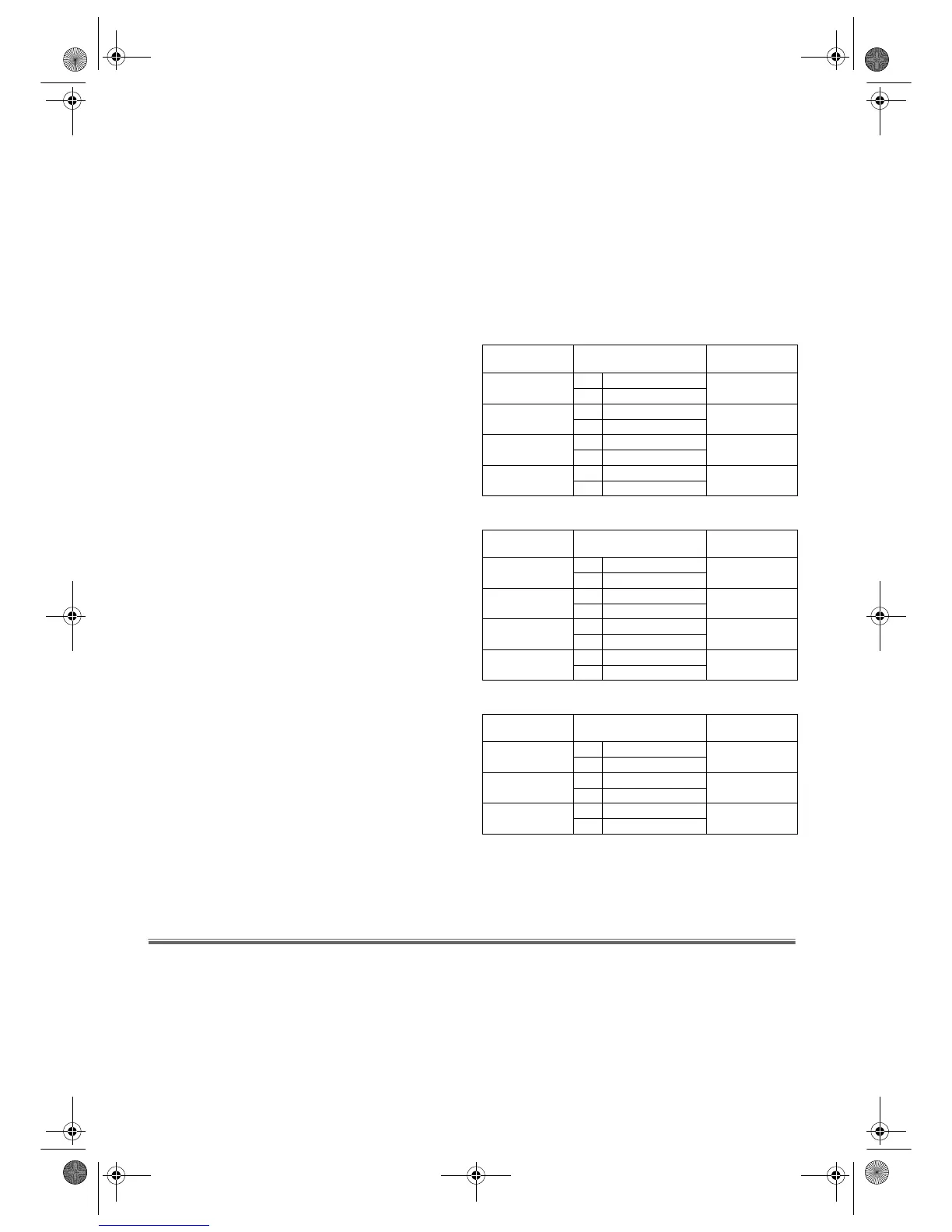
Selecting the Sound Mode
You can select each mode by pressing AUDIO SELECT on the
remote control. Each mode is indicated on the TV screen as
following.
• During playback of the recorded tape in Hi-Fi mode:
• Reception of stereo broadcasts:
• During reception of bilingual broadcasts:
Note: • If you play non-Hi-Fi tapes, the VCR will play
automatically in monaural even if you select any
mode.
• If the stereo signal becomes weak, the broadcast is
automatically recorded in monaural.
Advanced Operations
Counter Memory
This feature can be used to memorize a beginning point that
you want to watch again. Rewinding or fast forwarding makes
it easy to locate this point.
Note: • If a tape includes both programmes recorded in the
PAL system and ones recorded with NTSC system,
this function may not be operated correctly.
• TAPE COUNTER MEMORY does not function if
the Auto Repeat mode is set to ON. In this case, set
the Auto Repeat mode to OFF.
1) Stop the tape at the desired point.
2) Press
TAPE COUNTER RESET to display 0:00:00.
3) Press
TAPE COUNTER MEMORY so that “M” appears on
the TV screen.
4) Press REC/OTR or PLAY/K.
•Press
STOP/L when recording or playback is completed.
Mode AUDIO OUTPUT
Display on
the TV screen
Stereo
L Hi Fi L Audio
STEREO
R Hi Fi R Audio
L
L Hi Fi L Audio
LEFT
R Hi Fi L Audio
R
L Hi Fi R Audio
RIGHT
R Hi Fi R Audio
Normal
L Normal Audio
-None-
R Normal Audio
Mode AUDIO OUTPUT
Display on
the TV screen
Stereo
L L Audio
STEREO
RR Audio
L
L L Audio
LEFT
R L Audio
R
LR Audio
RIGHT
RR Audio
Monaural
LL+R Audio
-None-
RL+R Audio
Mode AUDIO OUTPUT
Display on
the TV screen
MAIN
L Main Audio
MAIN
R Main Audio
SUB
L Sub Audio
SUB
R Sub Audio
MAIN L Main Audio MAIN
SUB R Sub Audio SUB
29A-650(EN).fm Page 10 Wednesday, October 27, 2004 10:40 AM



 To Next Page