67
EN
Introduction Connections Playback Editing OthersFunction SetupRecording VCR Functions
Basic Setup /
TV View Operation
Note
• Your change to each settings stays on even when the power is switched off.
• An item which is not currently available is greyed in the settings.
General Setting
General Setting
DVB Setting Adult Lock
E Page 73
ON Set the Adult Lock and change Pincode.
Maturity Lock
E Page 73
Age 4 ~ Age 18
Lock each DVB programme.
Language
E Page 73
Audio
Czech
French
German
Italian
Spanish
Set the Audio language.
Subtitle
Czech
French
German
Italian
Spanish
Set the Subtitle language.
About
E Page 73
Check the current DVB system software version of the
unit.
Reset All
E Page 73
Set to the default setting.
Setup Items (highlight is the default) Contents
OFF
OFF
English
English
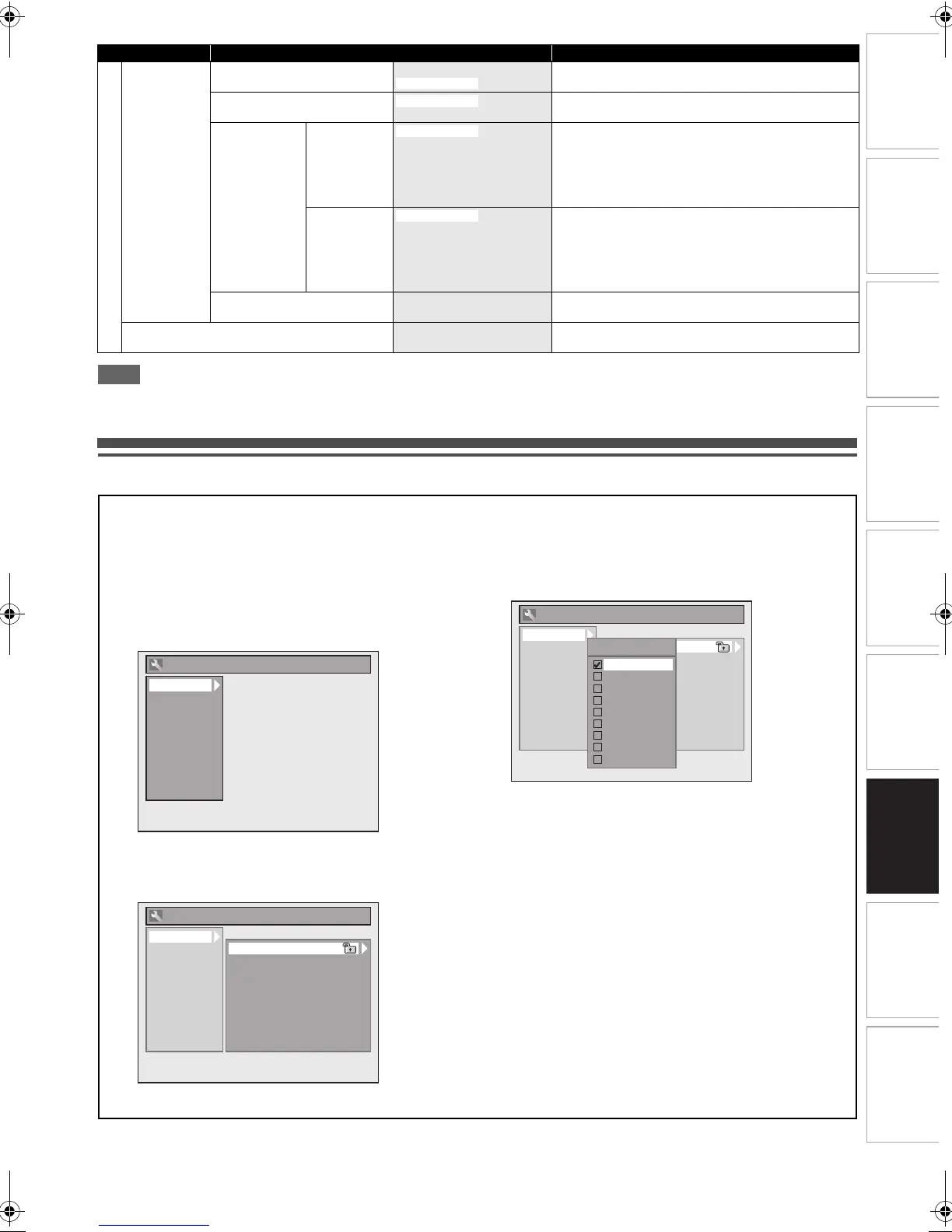
Common Procedures
1 In stop mode, press [SETUP].
2 Select “General Setting” using [K \ L], then
press [ENTER\OK].
3 Select a desired setup using [K \ L], then
press [ENTER\OK].
4 Select a desired item using [K \ L], then
press [ENTER\OK].
e.g.) Playback setup
5 Select a desired setting using [K \ L], then
press [ENTER\OK].
e.g.) Parental Lock item
Your setting is activated.
6 When you finish the setting, press [SETUP] to
exit.
To return to the previous screen
Press [RETURN\BACK].
Playback
Display
Video
Recording
Clock
Channel
DivX
HDMI
DVB Setting
Reset All
General Setting
Playback
Display
Video
Recording
Clock
Channel
DivX
HDMI
DVB Setting
Reset All
General Setting
Parental Lock
Audio Out
Disc Menu Language
Audio Language
Subtitle Language
Angle Icon
Still Mode
Variable Skip/Replay
TV System
Playback
Display
Video
Recording
Clock
Channel
DivX
HDMI
DVB Setting
Reset All
General Setting
Parental Lock
Audio Out
Disc Menu Language
Audio Language
Subtitle Language
Angle Icon
Still Mode
Variable Skip/Replay
TV System
Parental Lock
OFF
8
7
6
5
4
3
2
1
E3TF0ED_EN.book Page 67 Wednesday, March 17, 2010 11:20 AM









 To Next Page