26
EN
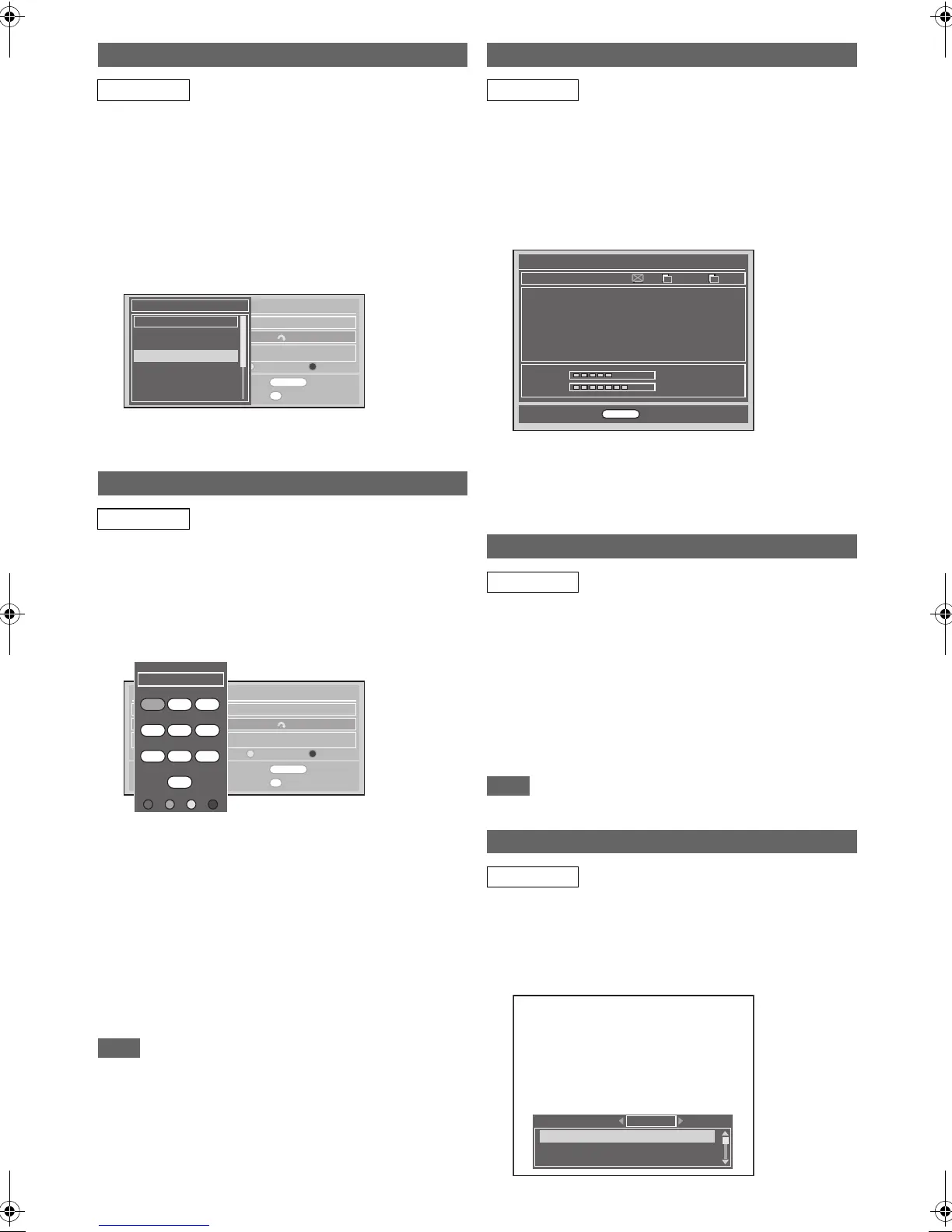
You can change the order of the DVB channels when you use
[PROG. G\H].
1 Follow steps 1 to 4 in “Edit Channels” on
page 24.
2 Select the DVB channel you want to change the
position using [K \ L], then press [ENTER\OK].
Pop up window will appear.
3 Select the channel you want to replace with
using [K \ L], then press [ENTER\OK].
• The channel will be replaced.
4 Press [RETURN\BACK] to exit.
You can edit the DVB channel names as you want.
1 Follow steps 1 to 4 in “Edit Channels” on
page 24.
2 Select the DVB channel you want to edit the
name using [K \ L], then press [RED].
• Name editing display will appear.
3 Edit the name using [the Number buttons].
•Press [the Number buttons] repeatedly until the
desired letter appears.
•Press [0 \ 1] to move the cursor left or right.
•Press [RED] to select alphabet or numbers.
•Press [GREEN] to select capital or small letters.
•Press [YELLOW] to move the letter on the cursor to the
right.
•Press [BLUE] to delete the letter on the cursor, and
move the cursor to the left.
4 After completion, press [ENTER\OK].
5 Press [RETURN\BACK] to exit.
Note
• You can enter up to 19 letters.
You can check the detailed information of the current DVB
channel.
1 Follow steps 1 to 3 in “Auto Tuning (DVB)” on
page 23.
2 Select “Signal Information” using [K \ L], then
press [ENTER\OK].
• “Signal Information” display will appear.
3 Press [RETURN\BACK] to exit.
• “Signal Information” is not available for analogue
channel and external input (AV1/AV2/DV(AV3)).
• “Signal Information” is also not available while the
Pincode input field for locked DVB channel is displayed.
If a broadcaster provides a DVB Teletext service, you can
enjoy it.
The DVB Teletext service includes news, weather forecast
and subtitles.
1 Press [TEXT] to display Teletext screen.
• Teletext for the TV channel will be displayed.
2 Use [RED] / [GREEN] / [YELLOW] / [BLUE] to
follow the instructions on screen.
3 Press [TEXT] to switch the Teletext display off.
Note
• [TEXT] is not available during recording.
Many DVB channels transmit Multi Audio information along
with their DVB channels. You can select the desired audio
mode and audio language.
1 While viewing a DVB programme, press
[AUDIO].
Channel Move
DVB
Edit Channel Names
DVB
Edit Channels
S.No. Channel Name
5
Five
Fav. Skip Lock Del.
France Réseau Numéril 562000kHz/8M
Re Name Skip Lock Delete
OK
Move
RETURN
Exit
1...8
Add To Fav.
0
Del. Fav.
S.No. Channel Name
Five
QVC
UKTV GOLD
bid tv
price - drop tv
UKTV STYLE
E4+1
5
16
17
23
24
26
34
S.No. Channel Name
Edit Channels
S.No. Channel Name
5
Five
Fav. Skip Lock Del.
France Réseau Numéril 562000kHz/8M
Re Name Skip Lock Delete
OK
Move
RETURN
Exit
1...8
Add To Fav.
0
Del. Fav.
@_
@$# ABC
A to Z
DEF
GHI JKL MNO
PQRS TUV WXYZ
SPACE
0-9
a-z
INS DEL
1 2 3
4 5 6
7
8
9
0
Signal Information
DVB
Teletext Reception
DVB
Multi Audio
DVB
51%
77%
Signal Information
5 Five
Réseau Numéri
Frequency
Bandwidth
20:00 - 20:58
20:58 - 21:00
France
594000KHz
8M
The Property List; Perfect Villa
Five News at 9
A.PID
V. PI D
P. PI D
6018
6017
6017
Signal
Quality
RETURN
Back
T I
11:53 MON
English
French
Spanish
Multi Audio
Stereo
30_BasicSetup.fm Page 26 Friday, April 9, 2010 4:20 PM









 To Next Page