23
EN
Introduction Connections
Basic Setup /
TV View Operation
Playback Editing OthersFunction SetupRecording VCR Functions
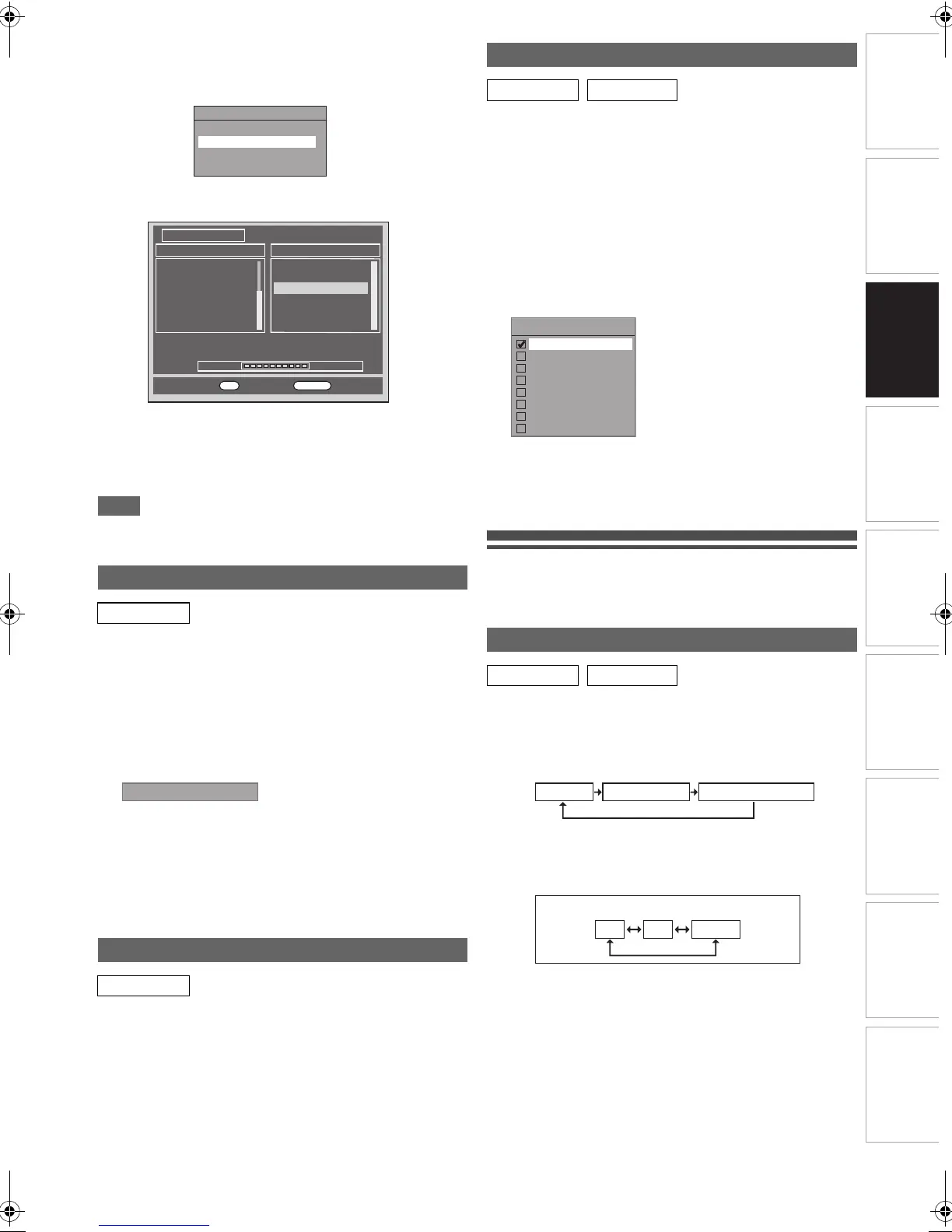
4 Select “Auto Tuning” using [K \ L], then press
[ENTER\OK].
The unit will start storing channels available in your area.
The tuner scans and memorises all the active DVB
channels (TV / Radio) in your area.
5 Press [ENTER\OK] to exit.
• After auto tuning is completed, the lowest memorised
DVB channels appears on the screen.
• You can use [PROG. G\H] to change the DVB
channels.
Note
• If you press [RETURN\BACK] or [SETUP] during the
scanning, auto tuning will be cancelled.
You can preset a DVB channel manually and individually.
1 Follow steps 1 to 3 in “Auto Tuning (DVB)” on
pages 22-23.
2 Select “Manual Tuning” using [K \ L], then
press [ENTER\OK].
3 Select your desired position number using
[K \ L], then press [ENTER\OK].
• The tuner will begin to search up or down automatically.
When a DVB channel is found, the unit will stop
searching.
• When “Auto” is selected, the unit will search for the
channels which have not been stored in channels
memory.
4 Press [SETUP] to activate the setting.
This unit has “Service Update” function which searches and
stores newly available digital channels automatically at 8:00. If
a new channel is found, a message will appear on the screen
when you turn on the DVB channel at first time after storing a
new channel. Press any button to clear the message.
You can set the country for receiving your local channels
properly. This setting is mainly for digital channels.
1 In stop mode, press [SETUP]. Select “General
Setting” using [K \ L], then press [ENTER\OK].
2 Select “Channel” using [K \ L], then press
[ENTER\OK].
3 Select “Country” using [K \ L], then press
[ENTER\OK].
4 Select your desired country using [K \ L], then
press [ENTER\OK].
Digital channels cannot be received properly for the
countries not listed above.
In such case, select “Other”.
5 Press [SETUP] to exit.
TV View Operation
The following operations are available while viewing TV
channels through this unit’s tuner.
To switch DVB, analogue and external input (AV1/AV2/
DV(AV3)) mode.
Press [INPUT SELECT] repeatedly to select DVB, analogue
or external input mode.
The mode changes as follows:
You can select external input mode (AV1/AV2/DV(AV3)) by
pressing [PROG. G\H] repeatedly.
The mode changes as follows:
You can select a channel using [PROG. G\H] or directly
enter the channel using [the Number buttons].
Notes on using [the Number buttons]:
• For one or two-digit number channels, the channels will be
identified for 2 seconds after you press the channel number.
You can only select channels 1~899 (Digital) or
1~99 (Analogue).
If you cannot get a “Station Name” of Analogue channel, it is
not indicated with a channel number.
Manual Tuning (DVB)
DVB
Service Update
DVB
DVB Channel Setup
Edit Channels
Auto Tuning
Manual Tuning
Signal Information
100%
Progress
Channel Search
S.No. TV Channel
14
13
32
28
75
34
E4
More4
Film4+1
ITV4
CITV
SETANTA SPORT
102
729
728
Teletext Cars
RadioMusicShop
Heart
S.No. Radio Channel
Channel 69 UHF 858000KHz/8M
OK
Exit
RETURN
Back
Channel Auto
Country Setting
DVB ANALOG
Select a Channel
DVB ANALOG
Country
France
Spain - Peninsula
Spain - Canary Islands
Germany
Italy
Switzerland
Czech Republic
Other
DVB mode Analogue mode External input mode
AV1 AV2 DV(AV3)
External input mode (with [PROG. G\H] buttons)
E9TF0ED_EN.book Page 23 Wednesday, March 17, 2010 1:32 PM



 To Next Page