6. Operation / Products / Calibration
6.2.
Performing Calibration
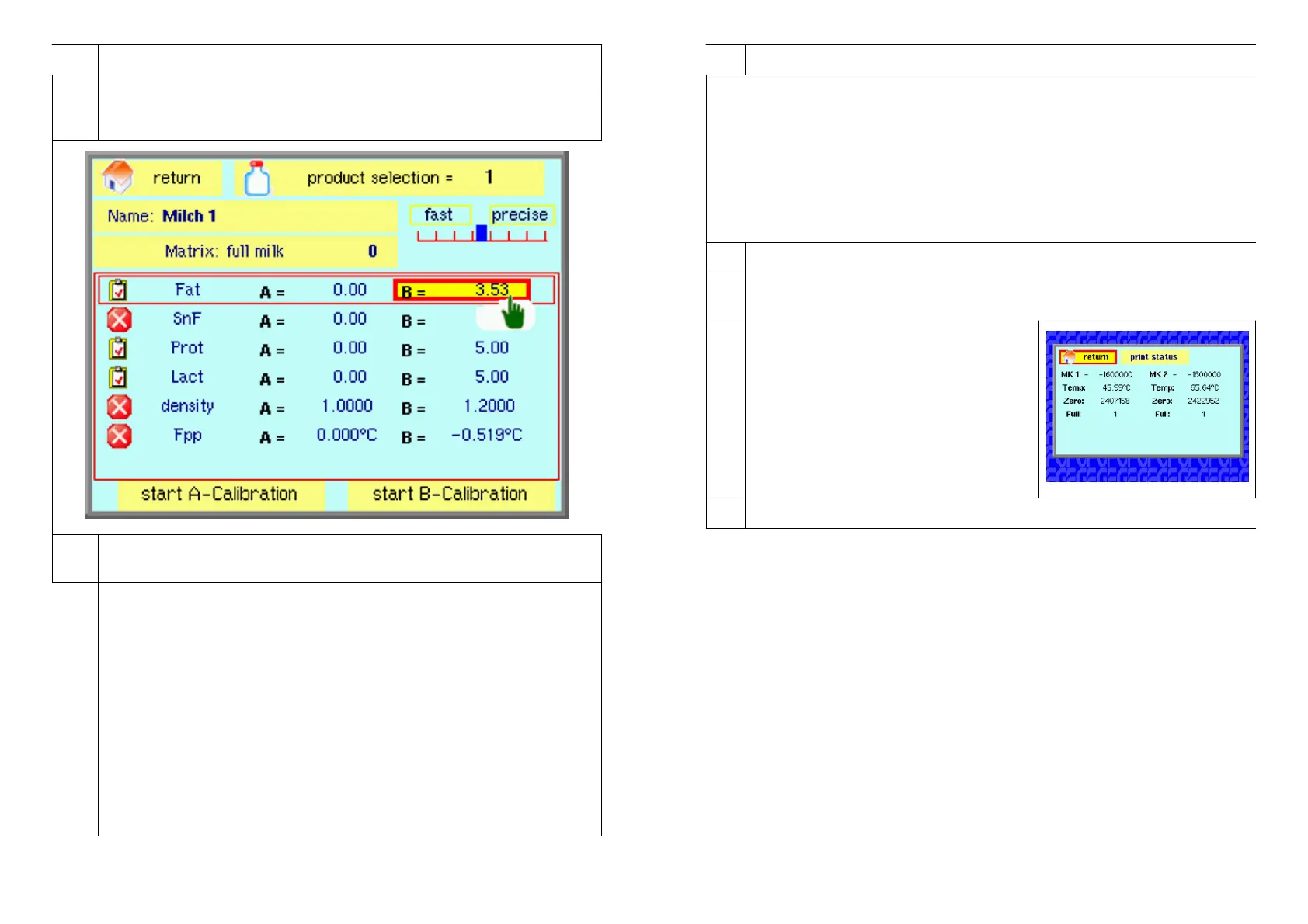
Use the arrow buttons to select the “products / calibration”. Then press
the Enter button – the following image appears:
6.2.
return: After the Enter button has been pressed, the display returns
to the main menu.
6.3.
Name: Profile name. Any name can be entered. With the help of the
arrow buttons it is possible to select and enter the respective letters.
Example: The profile name to be entered is “Milch 1”.
a) Press the “Enter” button
b) Keep the arrow button ”▲” or “▼” pressed until the desired letter
“M” appears.
c) Use the “right-hand” arrow button to position the next letter.
d) Keep the arrow button ”▲” or “▼” pressed down until the desired
letter “I” appears. Note: the capital letters are followed by the small
letters.
e) Continue the procedure until the entire word has been entered.
f) Press the “Enter” button. This confirms and stores what has been
entered.
12 LactoFlash 31. Januar 2013
4. Operation / Cleaning ca. 7 Minuten
For this approximately 100 ml of cleaning agent solution is required. Cleaning
takes around 7 minutes. The cleaning agent that we recommend is P3-topax
66 in a dilution of 2% (2% cleaning agent, 98% Water).
Cleaning procedure:
a) Use the arrow keys to select “Measure”.
b) Press the “Enter” button . - - The cleaning starts. Please ignore the
“measuring values” because it is insignificant. Please repeat the cleaning
approx. 3 times. After the cleaning the device should be rinsed 3-4 times with
destilled water.
5. Operation / Set up
5.1.
Return: After the Enter button has been pressed the display returns to
the main menu.
5.2.
System-Status: After the Enter button has
been pressed, the following image
appears:
The system status can be printed out if
necessary for error diagnosis.
5.3.
Intensive-Cleaning Approx. 1 hour
Performing Intensive Cleaning:
a) Place the sample suction hose in a sample vessel filled with approximately
200 ml of intensive cleaning agent. The intensive cleaning agent that we
recommend is “P3-topax 66" made by the firm “ECOLAB” in a dilution of 1:20
(19 parts water, 1 part P3-topax 66)
b) Also place the waste water hose in this sample vessel. This creates a
closed circuit.
c) Navigate to ”Intensive Cleaning”
d) Start the process with the “Enter” button -- intensive cleaning begins.
Intensive cleaning is continued until you stop it by pressing the Enter button or
an arrow button. After intensive cleaning the device has to be carefully rinsed,
i.e. start “Rinsing” (see Operation / Rinsing) five times. We recommend that
intensive cleaning should be carried out once a month.
LactoFlash 31. Januar 2013 9


 To Next Page