16
TV Settings
English
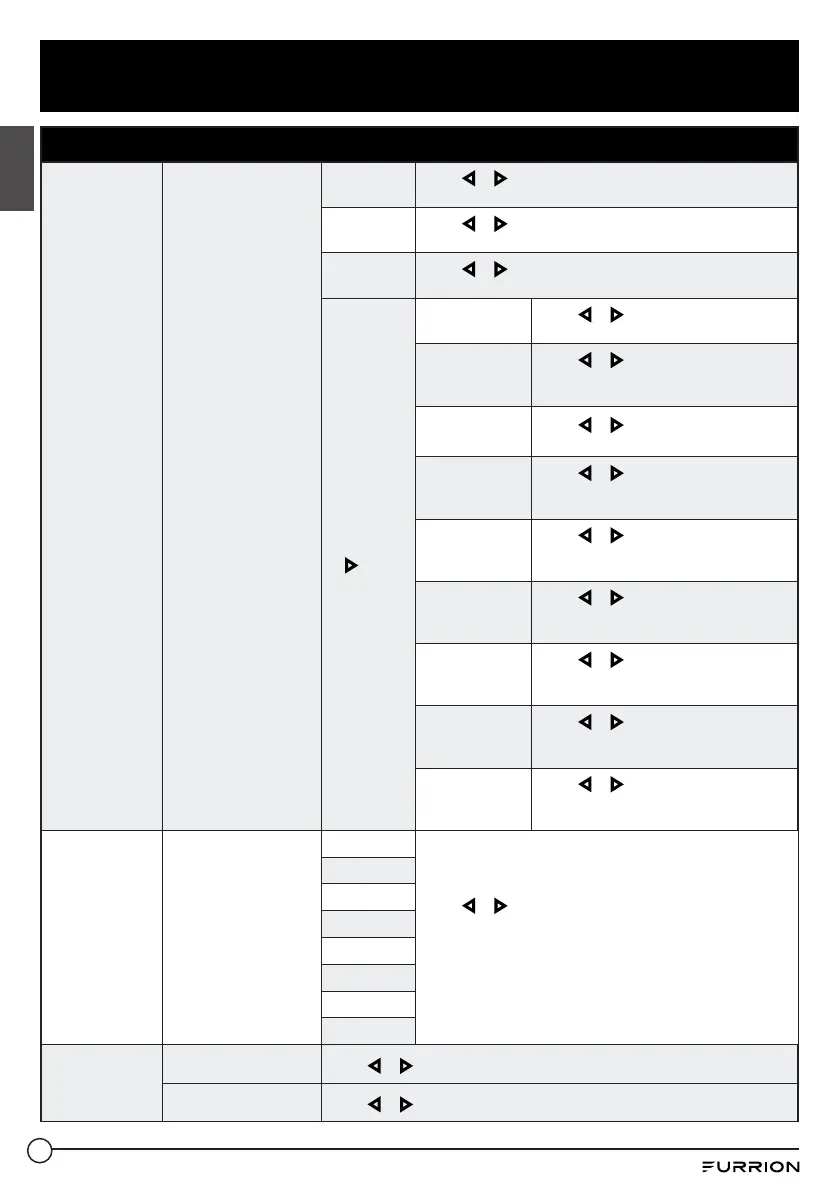
Setup Menu
Closed Caption
Configure Closed
Caption functions.
CC Mode
Press
or button to select CC Off, CC On or CC On
Mute.
Analog CC
Press
or button to select CC1, CC2, CC3, CC4, Text
1, Text 2, Text 3 or Text 4.
Digital CC
Press
or button to select Off, Service1, Service 2,
Service 3, Service 4, Service 5 or Service 6.
Option
* Press OK
or
to
enter the
sub menu
Mode
Press
or button to select Default
or Custom .
Font Style
Press
or button to select Default,
Font 0, Font 1, Font 2, Font 3, Font 4,
Font 5, Font 6 or Font 7.
Font Size
Press
or button to select Default,
Normal, Large or Small.
Font Edge
Style
Press
or button to select Default,
None, Raised, Depressed, Uniform,
Left Shadow or Right Shadow.
Font Edge
Color
Press
or button to select Default,
Black, White, Red, Green, Blue,
Yellow, Magenta or Cyan.
FG Color
Press
or button to select Default,
White, Red, Green, Blue, Yellow,
Magenta or Cyan.
BG Color
Press
or button to select Default,
Black, Red, Green, Blue, Yellow,
Magenta or Cyan.
FG Opacity
Press
or button to select Default,
Solid, Flashing, Translucent or
Transparent.
BG Opacity
Press
or button to select Default,
Solid, Flashing, Translucent or
Transparent.
Source Label
Allows labeling of input
sources.
TV
Press
or button to select Custom, Default, Antenna,
Cable, Satellite, DTV, DVD, Blu-ray, HD-DVD, XBOX, Wii,
PS3, Game, Computer, VCR or DV.
*The configuration of the connection ports may vary from
model to model.
AV
Component
HDMI1
HDMI2
HDMI3
PC
Media
Other Settings
Blue Screen
Press
or button to select On, Off.
Audio Only
Press
or button to select On, Off.
CCD-0005854 Rev. 01.26.2023


 To Next Page