17
TV Settings
English
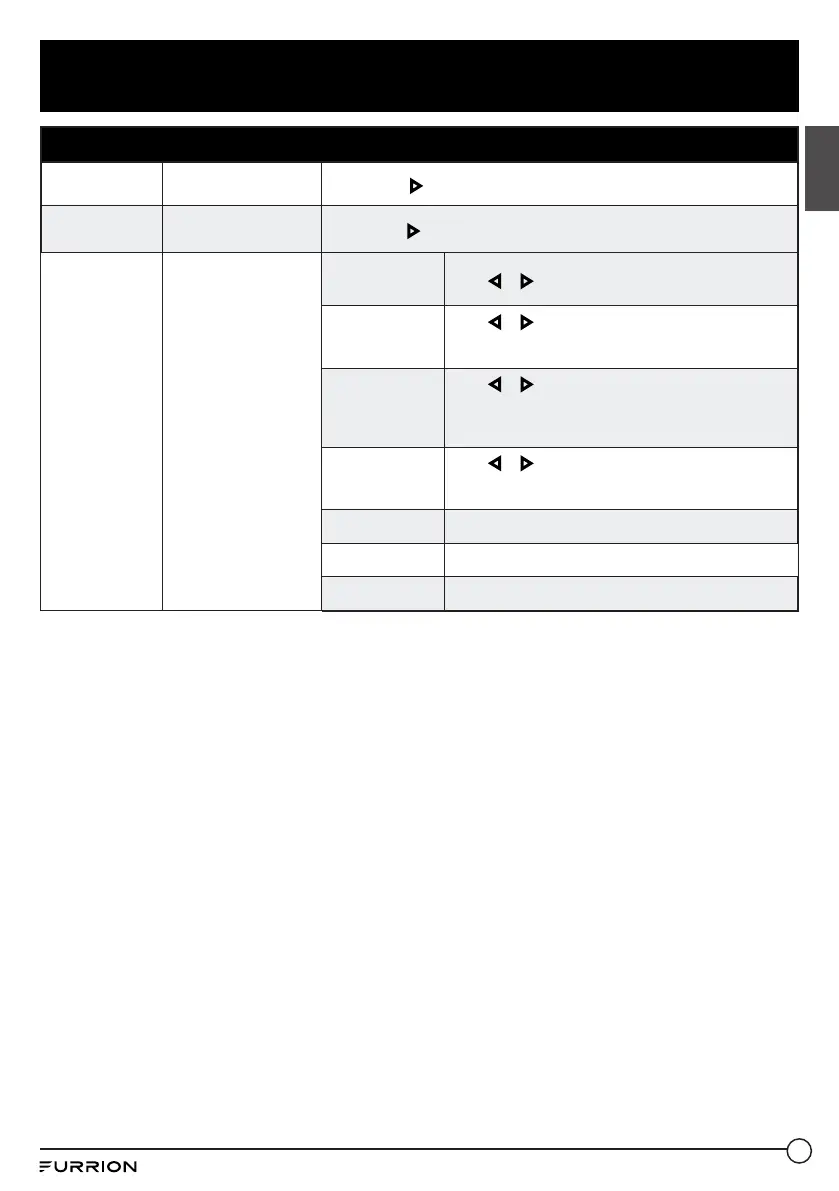
Setup Menu
Restore Default
Resets settings to
factory defaults.
Press OK or
button to select Yes or No.
Setup Wizard
Start the Setup Wizard.
Press OK or
button to enter Setup Wizard.
CEC
Configure CEC
functions.
CEC Control
Press
or button to select On / Off..
Device Auto
Power Off
Press
or button to select On / Off.
* If On, when the TV is turned off, all HDMI CEC
connected devices will go into standby.
TV Auto Power
On
Press
or button to select On / Off.
* If On, when a HDMI CEC connected device is turned,
the TV will turn on and switch to the source the device
is connected to.
Audio Receiver
(ARC)
Press
or button to select On / Off.
* If On, the TV will output audio to an ARC compatible
connected device.
Device lists
Lists all connected CEC devices.
Connect
Connects to devices on the CEC devices.
Root Menu
Shows the root menu of connected devices.
CCD-0005854 Rev. 01.26.2023


 To Next Page