1. OPERATION
15
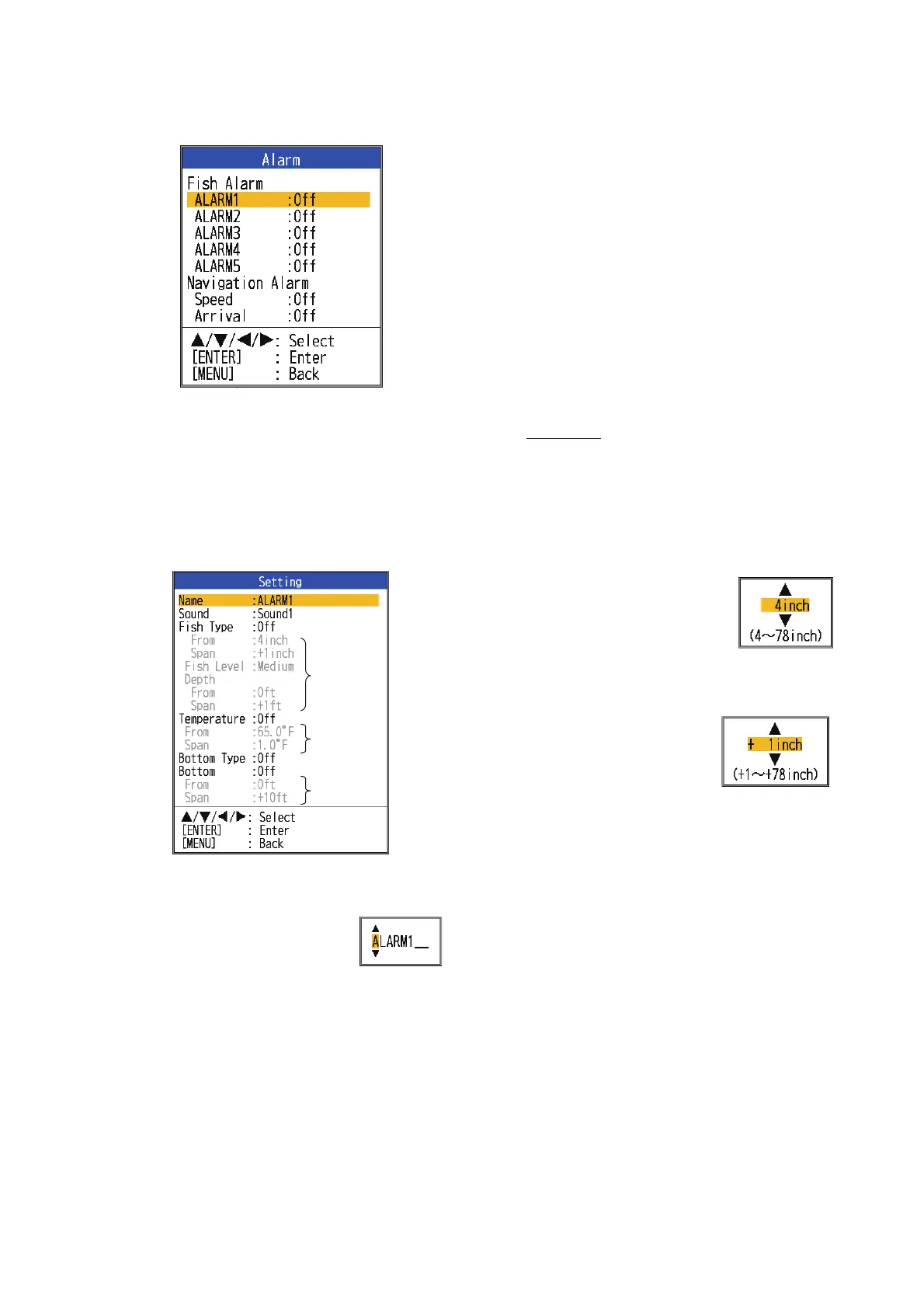
1. Open the menu, select [Alarm] and press
the ENTER key.
2. Select an alarm among [ALARM1] -
[ALARM5] (default alarm names) and
press the ENTER key.
3. Select [Setting] and press the ENTER
key. If you want to change the name of an
alarm, go to step 4. Otherwise go to step
6.
4. To change the name of the
alarm, select [Name] and
press the ENTER key.
5. Enter the name of the
alarm. (Max. of eight characters)
1) Use S or T to select a character. Use
S to select a character in numerical
order followed by alphabet order. Use
T to select a character in reverse or-
der of that with S.
2) Press X to move the cursor to the
next place.
3) Repeat steps 1) and 2) to complete
the name.
4) Press the ENTER key to finish.
6. Select [Sound] and press the ENTER
key.
7. Select desired alarm sound and press the
ENTER key.
8. Select [Fish Type], [Temperature], [Bot-
tom Type] or [Bottom] as applicable and
press the ENTER key.
9. Do one of the following according to the
item selected at step 8.
Fish Type
1) Select [ACCU-FISH], [Fish School],
[Bottom Fish(Only BL)] or [Bottom]
and press the ENTER key.
For [ACCU-FISH] go to step 2).
For other choices go to step 6).
2) Select [From] (under
[Fish Type]) and press
the ENTER key.
3) Set the minimum fish
length and press the
ENTER key.
4) Select [Span] (be-
low [Fish Type]) and
press the ENTER
key.
5) Set the width of the
alarm and press the ENTER key.
Go to step 8. (The maximum mea-
sureable fish length is 78 inch.)
6) Select [Fish Level] and press the EN-
TER key.
7) Select the echo strength that triggers
the alarm, referring to the information
below.
[Weak]: Echoes stronger than light-
blue trigger the alarm.
[Medium]: Echoes stronger than yel-
low trigger the alarm.
[Strong]: Echoes stronger than red
trigger the alarm.
*
*
*
* Operable when corresponding
alarm is activated.


 To Next Page