2. SYSTEM MENU
28
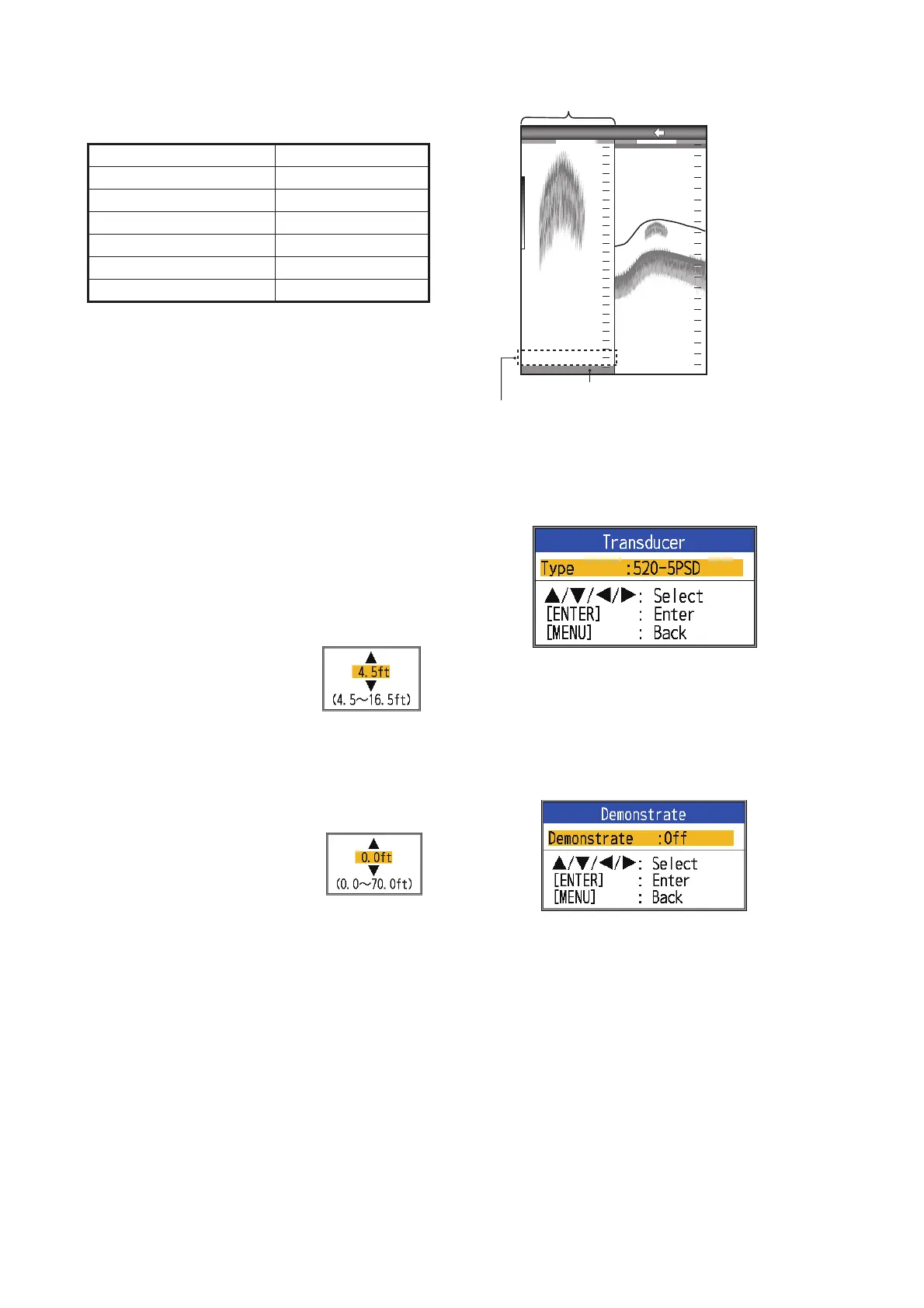
[Fish Size]: Compensate for wrongful indica-
tion of fish size.
[Water Type]: Select the water type with
which to use the equipment, from [Salt] or
[Fresh]. Select correct water type to get accu-
rate depth data.
[Zero Line Rejector]: Turn the zero line
(transmission line) on or off. When turned on,
the transmission line disappears, which al-
lows you to see fish echoes near the surface
clearly. The length of the transmission line
changes with the transducer used and instal-
lation characteristics. If the width of the trans-
mission line is 4.5 ft (default value) or more,
set the transmission line width with [Zero Line
Area], as below.
[Zero Line Area]: This fea-
ture adjusts the transmission
line so that the transmission
line disappears when the
menu item [Zero Line Rejec-
tor] is turned on. For a long tail, increase the
value. If the transmission line does not disap-
pear, lower the TX power.
[Bottom Detect]: In some in-
stallations the tail of the TX
line or the echo afterglow can
be mistaken for the bottom
echo. If this occurs, raise this
setting to solve the problem. Too low a setting
may prevent display of the bottom echo.
[Bottom Level]: In the default bottom level
setting (+0), the equipment judges consecu-
tive strong echoes to be bottom echoes. If, in
that setting, the depth indication is unstable,
adjust the bottom level. If vertical lines extend
upward from the bottom echo in the bottom
lock display, lower the bottom level to erase
the vertical lines. If the level is too low, howev-
er, it may be difficult to distinguish bottom fish
from the bottom echo.
2.7 Transducer Menu
[Type]: Select the transducer.
See section 4.10.
2.8 Demo Menu
[Demonstrate]: The demonstration mode
provides, without connection of the transduc-
er, simulated operation of the equipment, us-
ing internally generated echoes. All controls
are operative. The message [DEMO] appears
at the bottom right corner on the screen when
the demonstration mode is active.
• [Off]: Deactivate the demonstration mode.
• [Demo1], [Demo3]: Shallow depth demo
mode
• [Demo2], [Demo4]: Deep depth demo
mode
Compensation size Setting value
Double +100%
1.5 +50%
1/2 -50%
1/3 -65%
1/4 -75%
1/5 -80%
Bottom lock display
AUTO
_
R
G:AF
BL-LF
x1
0.0
0
10
20
30
40
5
4
3
2
1
0
21.7
m
Bottom
Set the bottom level so that these vertical lines
ust disappear.


 To Next Page