3. MAINTENANCE, TROUBLESHOOTING
31
3.7 Diagnostics
If you feel your unit is not working properly,
conduct the diagnostic test to find the prob-
lem. If you cannot restore normal operation,
contact your dealer for advice.
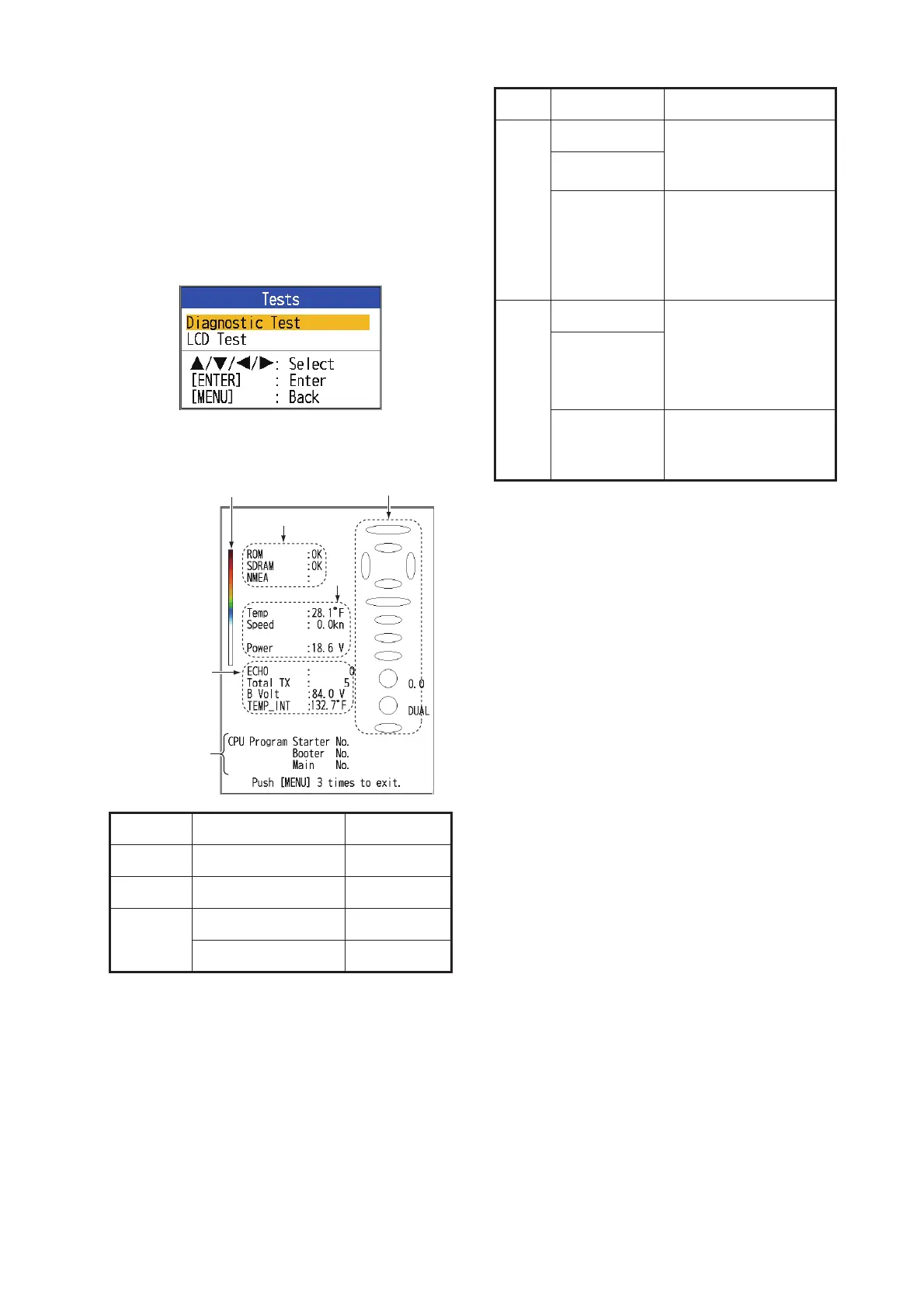
1. Open the menu and select [Tests] under
[System] and press the ENTER key.
2. Use S or T to select [Diagnostic Test]
and press the ENTER key.
3. The ovals and circles at the right side of
the test display are for checking the con-
trols.
How to check key and TrackPad: Press
each key and the arrows on the TrackPad
one by one. A key’s (or arrow’s) corre-
sponding on-screen oval "lights" in red if
the control is normal. Release hold and
the oval turns white.
How to check GAIN knob: Rotate the
knob. The indication goes higher with
clockwise rotation; lower with counter-
clockwise rotation. Press the knob. The
knob’s corresponding on-screen circle
"lights" in red if the knob is normal. Re-
lease hold and the circle turns white.
How to check MODE knob: Rotate the
knob. The corresponding on-screen circle
"lights" in red or white with each knob po-
sition selected and the name of the set-
ting selected appears.
4. To quit the test, press the MENU/ESC key
three times to close the test menu.
Item Program No. Type
Starter 0252388-XX-XX
Booter 0252389-XX-XX
Main 0252416-XX-XX CV-688-E
0252417-XX-XX CV-688-C
Program No.
Color bar
Factory use
1
2
0252388-XX.XX
0252389-XX.XX
0252416-XX.XX
Control check
No. Test item Content
1
ROM "OK" is shown if
check is normal; "NG"
for fault.
SDRAM
NMEA Reserved for factory
use. Special connec-
tor required. Nothing
appears unless the
connector is used.
2
Water temp. Water temp. and
speed from the re-
spective sensors. Up-
dated every three
seconds.
Speed
Power Voltage of power
source. Updated ev-
ery three seconds.


 To Next Page