1. OPERATION
22
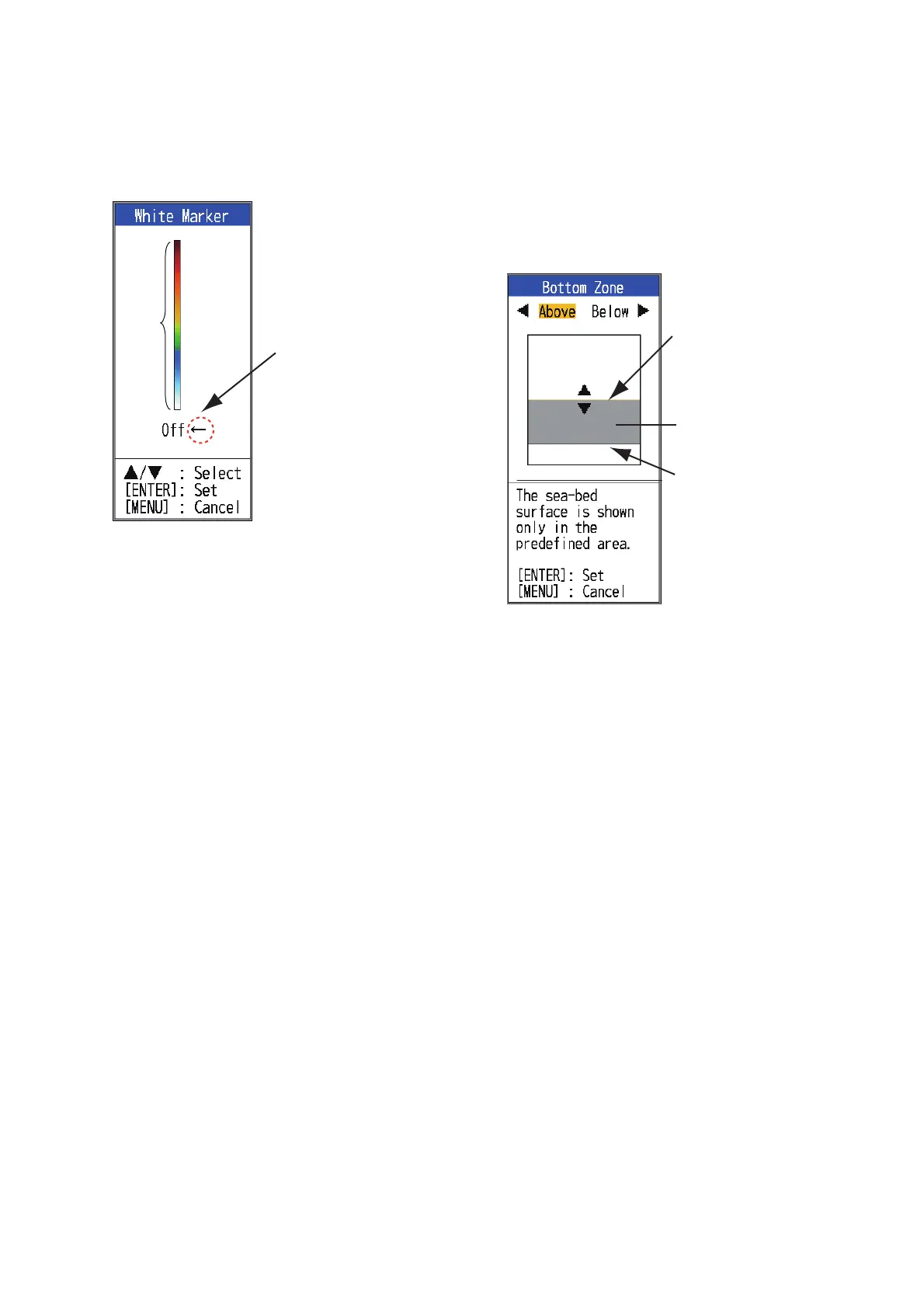
[White Marker]: Display the selected echo
color in white.
1. Select [White Marker] in the [Sounder]
menu and press the ENTER key.
2. Use S or T to select color desired. For
example, move the arrow to the top of the
color bar to display the bottom echo in
white. The echo color chosen on the color
bar is changed to white. That color is also
white on the color bar.
To turn off the white marker, select [Off].
3. Press the ENTER key.
4. To restore the original color, move the ar-
row to [Off] and press the ENTER key.
[TVG]: Two schools of fish of the same size
are displayed in different colors between deep
water and in shallow water because of the
feature of the ultrasound waves. TVG com-
pensates for propagation attenuation of the
ultrasound waves. It does this by equalizing
echo presentation so that the schools of fish
of the same size appear in the same color
(echo strength) in both shallow and deep wa-
ters. The gain is adjusted automatically de-
pending on the depth. The gain is low at short
distance and increases over distance. [High]
provides the greatest degree of gain reduction
against short range echoes.
Note: Auto gain must be disabled to use the
TVG.
[Smoothing]: Smooth echo presentation
when enabled. Turn smoothing on when
echoes appear "spotty" or “jagged”.
[Bottom Zone]: Set the area where to display
the bottom echo when selecting the [Auto]
mode on the RANGE key.
Note: The bottom discrimination feature must
be disabled to use this feature.
1. Select [Bottom Zone] and press the EN-
TER key.
[Bottom zone] setting window
2. Use W or X to select the border desired
([Above] or [Below]).
3. Use S or T to move upper or lower bor-
der and press the ENTER key.
[TX Power]: Interference may appear on the
screen when an echo sounder having the
same frequency as your own is being operat-
ed in the vicinity of your vessel. In this case,
lower your TX power and contact the vessel to
request them to reduce their TX power. The
higher the numeric, the greater the TX power.
The [Auto] setting automatically adjusts TX
power with depth.
Note: The bottom discrimination and ACCU-
FISH
™
features must be disabled to use this
feature. If one of those is On, the TX power
setting is automatically switched to Auto.
[TX Rate]: Change pulse repetition rate.
Normally, the highest rate (10) is used. When
in shallow waters second reflection echoes
may appear between the surface and actual
bottom echo. In this case, lower the TX rate
level. The setting [MAX] automatically adjusts
the frequency and pulse length with depth.
Color
bar
Select echo color
to display in white.
Border (above)
Seabed display
range
Border (below)


 To Next Page