5
1.6.4 LOGBOOK mode
The LOGBOOK shows time, depth and own ship
position in tabular form in a pop-up window. The
logging is selected with the INTERVAL option on
the menu among 5 s, 1 min and 2 min. (See
section 2.6.)
There are 60 pages and the total memory
capacity is 720 points. Page 60/60 is the latest
data and 1/60 is the oldest data. Pressing [
-
] or
[+] key changes the pages.
Note that if DEPTH BELOW KEEL is chosen,
DBK also appears together with depth indication
in the DEPTH column.
60/60
TIME DEPTH L/L
11:00:00 47.5 36 55.012'N
135 23.123'E
11:01:00 47.5 36 55.012'N
135 23.123'E
11:02:00 47.5 36 55.012'N
135 23.123'E
11:03:00 47.5 36 55.012'N
135 23.123'E
11:04:00 47.5 36 55.014'N
135 23.123'E
11:05:00 47.5 36 55.014'N
135 23.123'E
60/60
TIME DEPTH L/L
11:00:00 47.0 36 55.012'N
135 23.123'E
11:01:00 46.2 36 55.012'N
135 23.123'E
11:02:00 46.0 36 55.012'N
135 23.123'E
11:03:00 45.8 36 55.012'N
135 23.123'E
11:04:00 45.5 36 55.014'N
135 23.123'E
FORE 50kHz
11:00:00 45.1 36 55.012'N
135 23.123'E
11:01:00 45.0 36 55.012'N
135 23.123'E
11:02:00 44.9 36 55.012'N
135 23.123'E
11:03:00 44.6 36 55.012'N
135 23.123'E
11:04:00 44.5 36 55.014'N
135 23.123'E
AFT 200kHz
* Depth below keel shown when transducer
setting is DEPTH BELOW KEEL.
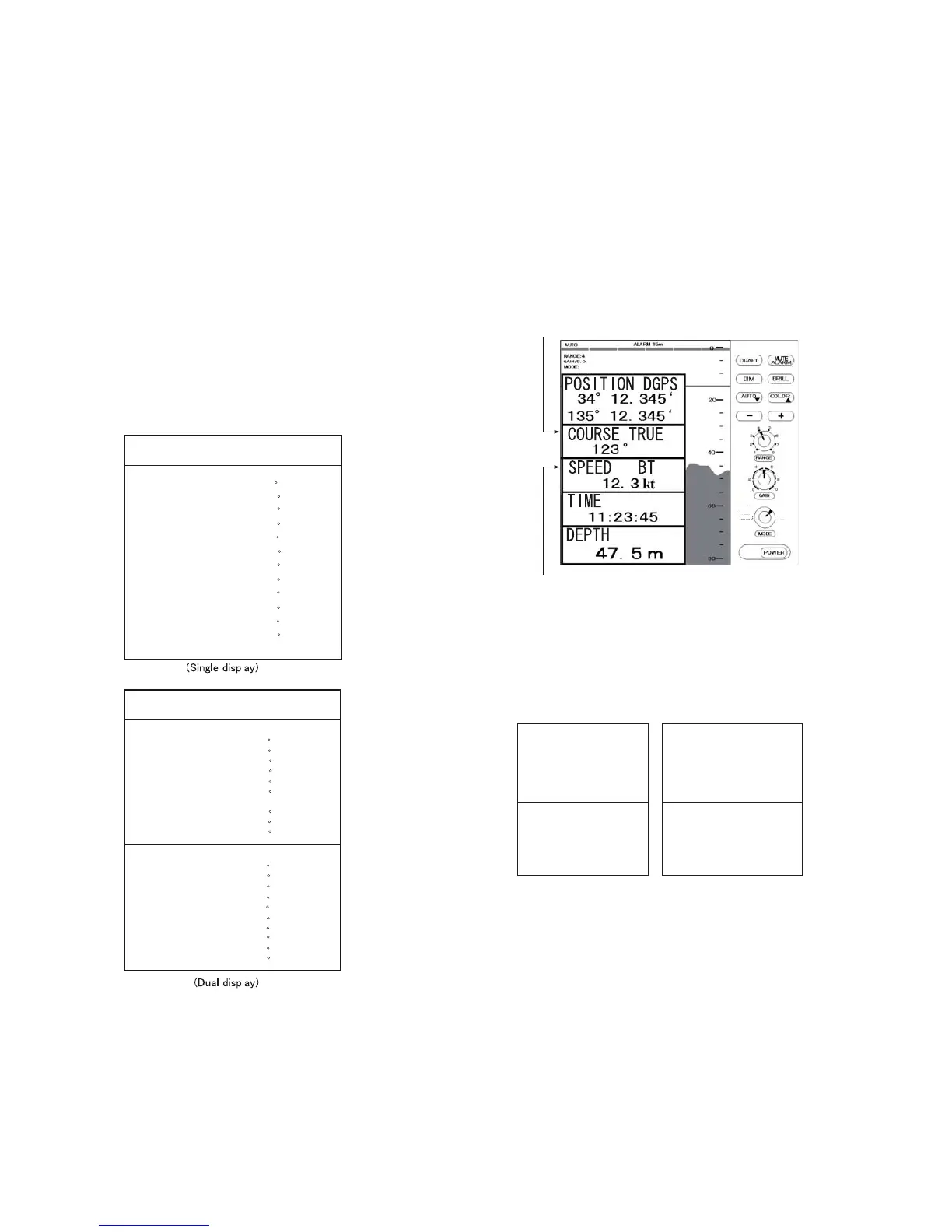
1.6.5 OS DATA mode
This display mode indicates own ship position,
GPS-derived course and speed, and time and
depth in digital form. You can read the data of
your particular interest in large characters. The
screen continues to display the sounding data in
the background. Part of graphical indication is
visible to the right of data slips.
BT means Bottom track
TRUE(true course) or
MAG (magnetic course) appears.
OS DATA
NAV
DBS
LOGBOOK
OS DATA
HELP
MENU
HISTORY
N
E
There are two kinds of OS DATA displays: DATA
1 and DATA 2, as selected on the system menu.
DATA 1 is shown in the figure above.
The DATA 2 display is as below.
TIME UTC
11:23:45
TIME UTC
11:23:45
DEPTH
17.2 m
DEPTH AFT FORE
17.2 m 17.2 m
(Single) (Dual)
Note: When lat/long data input error occurs in
the DATA 1 mode, “EPFS” ERROR
appears on the screen. (EPFS: Electronic
Position-Fixing System such as GPS
receiver)



 To Next Page
 Loading...










