To Next Page


C
colleencunninghamSep 8, 2025
How to improve range discrimination on Furuno FR-8062 Marine Radar?
- EEdgar JacksonSep 9, 2025
If you're experiencing poor discrimination in range with your Furuno Marine Radar, try adjusting the A/C SEA control.

How to improve range discrimination on Furuno FR-8062 Marine Radar?
If you're experiencing poor discrimination in range with your Furuno Marine Radar, try adjusting the A/C SEA control.
Why are the range rings not showing on my Furuno FR-8062 Marine Radar?
If the range rings are not displayed on your Furuno Marine Radar, adjust their brilliance on the Brill/Color menu. If that's unsuccessful, the associated circuit board may need to be replaced. If problems persist, replace the SPU Board.
How to fix Furuno FR-8062 Marine Radar if power cannot be turned on?
If your Furuno Marine Radar power won't turn on, the fuse may be blown, so replace it. Check the wiring and input voltage to ensure they are correct. If the problem persists, the power supply board may need replacement.
How to troubleshoot Furuno Marine Radar if you cannot turn on the power?
If your Furuno Marine Radar doesn't turn on, check the fuse to see if it's blown. Ensure the power connector is firmly fastened and inspect the power cable connector for corrosion. Also, check the power cable for damage and verify the battery's voltage output is within the range of 10.8-31.2 V.
Why is my Furuno FR-8062 sensitivity poor even when tuned properly?
If your Furuno Marine Radar is properly tuned but sensitivity is poor, turn off the 2nd-trace echo rejector from the Echo menu. Clean any dirt from the radiator face. If the issue persists, with the radar transmitting on 48 nm range, check the magnetron current; if it's below normal, replace the magnetron. Also, check the MIC detecting current; if it's below normal, the MIC may have become detuned.
What to do if Furuno FR-8062 Marine Radar key is not responding?
Turn off and on the power. If there still is no response the key may be faulty. Contact your dealer for advice.
Why is the interference rejector not working on my Furuno FR-8062?
If the interference rejector is not working, and the interference rejection level is not displayed on your Furuno Marine Radar, the SPU Board may need to be replaced.
Why is echo stretch not working on my Furuno FR-8062?
If the echo stretch is not working, and neither ES1, ES2, nor ES3 is displayed on your Furuno Marine Radar, the SPU Board may need to be replaced.
How to fix Furuno FR-8062 when target not tracked correctly?
If targets are not being tracked correctly on your Furuno Marine Radar, and there's poor definition of targets in sea clutter, adjust the A/C SEA and A/C RAIN controls.
Furuno FR-8062: marks appear, but no noise or echo. What to check?
If, when adjusting the GAIN with A/C SEA set to minimum on your Furuno Marine Radar, marks and indications appear but there's no noise or echo, check the continuity and isolation of the coaxial cable. If the cable is not the issue, the IF amplifier may need to be replaced. If the problem persists, check the coax line for a secure connection. If the connection is good, replace the SPU board.
Hazards from radar antenna RF energy.
Warnings about opening equipment and general electrical safety.
Importance of labels and general operational cautions.
Highlights of the FR-8xx2 series radar system.
Overview of radar types and feature availability.
Diagram showing components and connections for FR-8252.
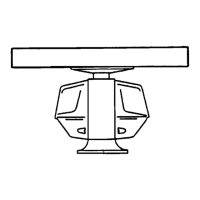
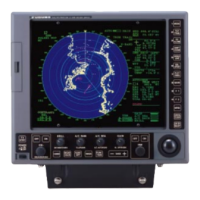
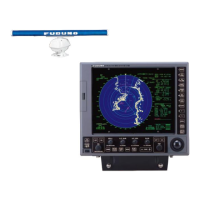
Diagram showing components and connections for FR-8122/FR-8062.
Description of display unit keys, knobs, and trackball functions.
Procedures for turning radar on/off and entering standby mode.
Understanding screen elements, adjusting brilliance, and radar tuning.
Presentation modes, pulse length, gain, clutter suppression, and auto anti-clutter.
Measuring range/bearing, target alarms, cursor use, interference control.
Zoom, echo stretch, target trails, and history display functions.
Parallel lines, custom setups, function keys, nav data, initial menu, remote display.
Minimum/maximum ranges, resolution, accuracy, and measurement.
Identifying multiple, sidelobe, virtual, and shadow echoes.
Detecting and interpreting SART and RACON signals.
Important considerations and controls for Automatic Radar Plotter.
Methods for acquiring and tracking radar targets.
Viewing target data and setting CPA/TCPA collision alarms.
Configuring target vectors for motion and collision risk assessment.
Managing AIS display and setting range and sorting.
Viewing AIS target details and understanding symbols.
Configuring target vectors and showing historical AIS data.
Setting proximity and CPA/TCPA alarms for AIS targets.
Configuring GPS navigator type and geodetic datum.
Monitoring GPS/WAAS satellites and receiving weather information.
Adjusting sensor position offset and performing cold starts.
Regular checks and cleaning for optimal radar performance.
Procedures for replacing fuses, magnetron, and backlight.
Basic steps to resolve common operational issues.
Troubleshooting requiring service personnel and running system diagnostics.
Testing the LCD display and GPS receiver functionality.
Detailed reference of menu items, options, and custom setup parameters.
Key parameters like range, resolution, and accuracy.
Specifications for antenna models, rotation, and beamwidth.
Statement confirming product conformity with EU directives and standards.
 General
| Brand | Furuno |
|---|---|
| Model | FR-8062 |
| Category | Marine Radar |
| Language | English |