14
Using ARPA
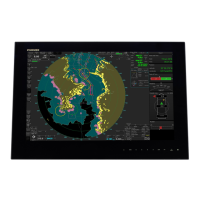
The Automatic Radar Plotting Aid (ARPA) is a radar function for target tracking and collision
avoidance. ARPA tracks and provides detailed information for up to 30 targets. You can track
targets automatically, manually or a combination of both.
Manually acquiring a target
ARPA target symbols
Showing target data
Place cursor
on target.
Show
Radar popup.
Acquire Target
is selected;
push RotoKey.
: Target being acquired.
: Target data being calculated.
: Acquired target.
: Lost target.
Place cursor on
ARPA target.
Simple
data
Detailed
data
ID 1
COG/SOG 56.2°T/6.8 kt
CPA/TCPA 3 m/55m03s
Range/Bearing 6.366 nm/26.7°T
ID 1
COG 56.2°T
SOG 6.8 kt
CPA 3 m
TCPA 55m03s
Range 6.366nm
Bearing 26.7°T
Position 34°37.1715'N; 135°10.2459
C
U
R
S
O
R
C
U
R
S
O
R


 To Next Page