EasyManua.ls Logo

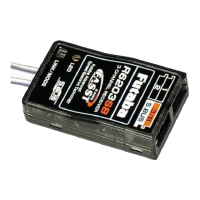
FUTABA R6208SB - User Manual

FUTABA R6208SB
2 pages
Print Icon
To Next Page IconTo Next Page
Loading...
Usa g e c ondit ion on " Hi g h Sp e e d m ode"
CAUTION
When using the high-speed mode, use a Futaba
digital servo (including brushless servo) or S.BUS servo
at conventional system use channels 1 to 6. Analog
servos cannot be used.
The use of analog servos may cause servo trouble.
When using analog servos, select the normal mode, and
use channel outputs 7 and 8.
A p p l i c a ble s y s t e m s :
T8FG 2 .4 GH z
(on 8 c h m ode )
, T M 8
(on 8 c h m ode )
, T 1 0CG 2.4GHz
(on
10 c h m o de)
, T M 10
(on 1 0 c h m ode )
, T M 14
(on m u lt i-c h m o d e)
R6208SB
S.BUS compatible/FASST-2.4GHz (Multi-ch) system
8 channels/high-speed receiver
Co m p l i a n c e Infor m at i o n St at em ent
(for U.S.A.)
This device, trade name Futaba Corporation, model number
R6208SB, complies with part15 of the FCC Rules. Operation is
subject to the following two conditions:
(1) This device may not cause harmful interference, and
(2) This device must accept any interference received, including
interference that may cause undesiredoperation.
The responsible party of this device compliance is:
FUTABA Corporation of America
2681 Wall Triana Hwy Huntsville, AL 35824, U.S.A.
Phone:1-256-461-9399 FAX:1-256-461-1059
E-mail: service@futabaUSA.com
56%6SHFLÀFDWLRQV
S.BUS compatible/FASST-2.4GHz (Multi-ch) system/8 channels/
high-speed receiver
• Dual antenna diversity
• Size: 0.98 x 1.86 x 0.56 in. (24.9 x 47.3 x 14.3 mm)
• Weight: 0.49 oz. (13.8g)
• Power requirement: 3.7V to 7.4V
(Voltage range: 3.5 to 8.4V)
* Be sure that when using ESC's regulated output the capacity of the ESC
must meet your usage condition.
* The Battery F/S voltage is set for 4-cell NiCd/NiMH battery. Battery F/S
function doesn't work properly when other type battery is used.
Thank you for pu rchasing a Futaba
R6208SB
S.BUS
compatible receiver.
The
R6208SB
has an
S.BUS
system output port and a
conventional system channel output. It can also be used with
conventional system servos, etc. in addition to
S.BUS
system
compatible servos and gyros, etc.
In addition, the operating mode (high-speed mode/normal
mode) can be selected.
* However, channel outputs 7 and 8 for conventional system oper-
ate in the normal mode even if set to the high-speed mode.
Link/Mode
switch
LED
R6 208SB
DATA
port
• Channel outputs
for conventional
system (
1
to
8
)
Battery terminal (
B
)
S.BUS
Port (
S.BUS
)
S.BUS
8CH/Battery(8/B)
8CH/Battery(8/B)
7CH
7CH
S.BUS c onnec t or inser t ion prec aut ion
DA N GER
Do not insert a connector, as shown right.
• It will occur short-circuit, by inserting this way. A short
circuit across the battery terminals may cause abnormal
heat, fire and burning.
Wh at i s S.BU S?
Different from conventional radio control systems the
S.BUS
system uses data communication to transmit control signals from
a receiver to a servo, gyro, or other
S.BUS
compatible device. This
data includes commands such as “move the channel 3 servo to
15 degrees, move the channel 5 servo to 30 degrees” to multiple
devices. The
S.BUS
devices execute only those commands for their
own set channel. For this reason, it can be used by connecting
multiple servos to the same signal line.
[Con nec t i on by S.BUS sy st e m ]
*
Can also be used together with conventional servos.
*
When using servos with a remote battery pack, use S.BUS Hub
with Cable (2-way/remote battery pack use).
Please refer to the instruction manual of S.BUS Hub with Cable
(2-way/remote battery pack use) for the connection method.
S.BUS hub S.BUS hub
S.BUS output
S.BUS
Ch output/
Battery terminal
R6208SB
Battery
S.BUS servo
Conventional
servo
2ch 4ch
3ch 5ch
6ch
Do not insert either a switch
or battery in this manner.
5HFHLYHU
DA N GER
1M23N17476

Other manuals for FUTABA R6208SB

Question and Answer IconNeed help?

Do you have a question about the FUTABA R6208SB and is the answer not in the manual?

Summary

High Speed Mode Usage Conditions

S.BUS Connector Insertion Precautions

FCC Compliance Information

R6208 SB Receiver Specifications

Understanding S.BUS Technology

Operation Mode Selection

LED Indication for Mode Status

Explains LED indicators for receiver operational modes (Normal, High Speed, Signal Reception).

S.BUS Servo Channel Setting

Channel Setting Modes A and B

Details on setting S.BUS servo channels via Mode A (ch 1-8) or Mode B (ch 9-16).

Transmitter Linking Procedure

Failsafe (F;S) Position Adjustment

Overview

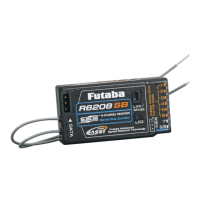
The Futaba R6208SB is an S.BUS compatible/FASST-2.4GHz (Multi-ch) system 8-channel high-speed receiver. It features a dual antenna diversity system for enhanced signal reception.

Function Description:

The R6208SB serves as a central component in radio control systems, receiving control signals from a Futaba FASST-2.4GHz transmitter and relaying them to servos, gyros, and other S.BUS compatible devices. It offers both an S.BUS system output port and conventional system channel outputs (1 to 8), allowing for compatibility with both S.BUS compatible devices and traditional servos. The receiver supports two operating modes: "Normal mode" and "High-speed mode." In high-speed mode, channels 1 to 6 can be used with Futaba digital servos (including brushless servos) or S.BUS servos. Channels 7 and 8, however, operate in normal mode regardless of the selected speed setting.

The S.BUS system, unlike conventional radio control systems, utilizes data communication to transmit control signals. This means that multiple S.BUS devices can be connected to the same signal line, and each device will execute only the commands designated for its specific channel. This simplifies wiring and reduces clutter in the model. The R6208SB can also be used in conjunction with conventional servos. For setups requiring servos with a remote battery pack, the S.BUS Hub with Cable (2-way/remote battery pack use) is recommended.

Important Technical Specifications:

  • System Compatibility: S.BUS compatible/FASST-2.4GHz (Multi-ch) system
  • Channels: 8 channels
  • Operating Modes: High-speed receiver
  • Antenna System: Dual antenna diversity
  • Dimensions: 0.98 x 1.86 x 0.56 inches (24.9 x 47.3 x 14.3 mm)
  • Weight: 0.49 oz. (13.8g)
  • Power Requirement: 3.7V to 7.4V (Voltage range: 3.5 to 8.4V)
    • Note: When using ESC's regulated output, the capacity of the ESC must meet the usage condition.
  • Battery F/S Voltage: Set for 4-cell NiCd/NiMH battery. The Battery F/S function may not work properly with other battery types.

Usage Features:

Operating Mode Selection:

The receiver ships in "Normal mode." To change the mode:

  1. Turn off the receiver.
  2. Press and hold the Link/Mode switch while turning on the receiver. Keep the switch held for more than one second. The LED will flash, indicating the current status.
  3. Release the switch.
  4. Turn off the receiver. This process toggles between "Normal mode" and "High-speed mode." The LED status indicates the mode: Red Blink for Normal mode, Green/Red Blink for High-speed mode. After the mode change, the LED will be solid Red for Normal mode or solid Green/Red (Orange) for High-speed mode (changing to Red after two seconds).

High-Speed Mode Caution:

When using high-speed mode, only Futaba digital servos (including brushless servos) or S.BUS servos should be connected to conventional system channels 1 to 6. Analog servos are not compatible with high-speed mode on these channels and their use may cause servo trouble. If analog servos are used, select "Normal mode" and use channels 7 and 8.

S.BUS Servo Channel Setting:

S.BUS servo channels can be set directly at the R6208SB receiver:

  1. Connect the accessory short-plug to the DATA port of the receiver. Important: Only connect the short-plug for S.BUS servo channel setting; do not connect it normally.
  2. Connect an S.BUS servo to the conventional system output connector (1 to 8) corresponding to the desired channel.
  3. Turn on the receiver. The channel setting is completed in Mode A upon power-on. To switch to Mode B (channels 9-16), press the Link/Mode button until the red and green LEDs blink simultaneously.
    • Mode A (channels 1-8) is indicated by the red LED blinking three times.
    • Mode B (channels 9-16) is indicated by the green LED blinking three times.
  4. Turn off the receiver.

Linking to the Transmitter:

To link the receiver to the transmitter:

  1. Press and hold the Link/Mode switch for more than two seconds.
  • Warning: Do not perform the linking procedure with the motor's main wire connected or the engine operating, as this may result in serious injury.
  • After linking, cycle receiver power and verify that the receiver is under the control of the linked transmitter.

Re-adjusting F/S Position (for TM-8 only):

To re-adjust the Fail-Safe (F/S) position for the TM-8 transmitter:

  1. Press and hold the Link/Mode switch for between one and two seconds.

S.BUS Connector Insertion Precaution:

It is crucial to insert connectors correctly into the S.BUS port. Inserting a connector incorrectly (e.g., reversed or misaligned) can cause a short-circuit across the battery terminals, potentially leading to abnormal heat, fire, and burning. Always ensure proper orientation.

Compliance Information (for U.S.A.):

The Futaba R6208SB complies with Part 15 of the FCC Rules. Operation is subject to two conditions: (1) the device may not cause harmful interference, and (2) the device must accept any interference received, including interference that may cause undesired operation. The responsible party for compliance is FUTABA Corporation of America.

Maintenance Features:

The receiver does not have specific user-serviceable maintenance features beyond proper handling and connection. Regular checks of the LED indicators provide diagnostic information about the receiver's status:

  • Solid Green/Solid Red: Initializing
  • Off/Solid Red: No signal reception
  • Solid Green/Off: Receiving signals
  • Blink Green/Off: Receiving signals but ID is unmatched (indicating a need to re-link).

Ensuring the correct battery type (4-cell NiCd/NiMH) is important for the proper functioning of the Battery F/S feature. Using other battery types may prevent this function from working correctly.
FUTABA R6208SB Specifications

General IconGeneral
BrandFUTABA
ModelR6208SB
CategoryReceiver
LanguageEnglish

Related product manuals