55
Commonfunction
Function
Method
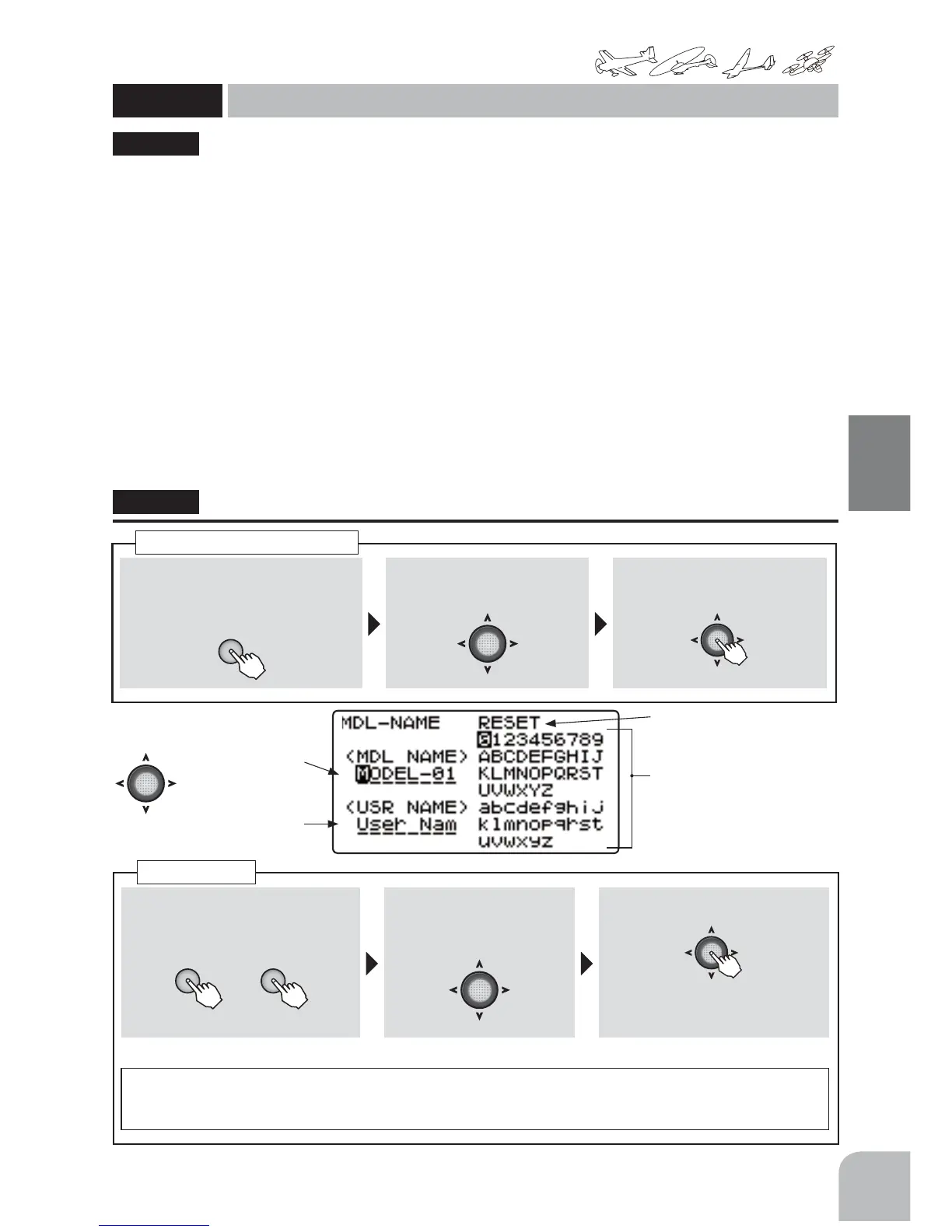
①Callthemenuscreenfromthe
homescreenbypressingthe+key
for1second.
+
② Select
fromthemenuwiththeJog
key.
③Openthesettingscreenby
pressingtheJogkey.
(1second)
Callingthesettingscreen
①Movethecursortothemodel
namedigityouwanttochangeby
pressingthe+keyor‒key.
+ −
or
②Movethecursortothe
candidatecharacteryou
wanttochangewiththe
Jogkey.
③ Changethecharacterbypressing
theJogkey.
Setthemodelnamebyrepeatingsteps①to③above.
Resetmethod:
Whenthecursorismovedtoanydigitofthemodelnameby+keyor‒keyandthe
JogkeyispressedinthestateinwhichthecursorwasmovedtoRESETbyJogkey,themodelname
returnstoitsinitialsetting.
Modelname
MDLNAM
Modelname / Username
(Common)
Modelnamesetting(MDLNAME)
Thisfunctionassignsanametothemodeldata.Themodelnameisdisplayedonthetoprowofthe
homescreen.Thisservestopreventmodelmemorymistakesifthecurrentaircraftnameorother
nameisentered.
● Upto8characterscanbeset.
Usernamesetting(USRNAME)
Theusernamedisplayedonthehomescreencanbeset.(Whenausernameisnotset,theFutaba
logoisdisplayed)WhenthehomescreendisplayischangedtoUSR-NAMEbyPARAMETER,theset
usernameisdisplayedonthehomescreen.
● Upto8characterscanbeset.
Modelname
Username
(Reset)
(Candidatecharacters)
● Charactersthatcanbeentered;
Numeric/uppercasealphabet/
lowercasealphabet
"MDLNAM"
A model name is inputted into each model in
T6K.
User name is inputted into T6K.



 To Next Page