- 16 -
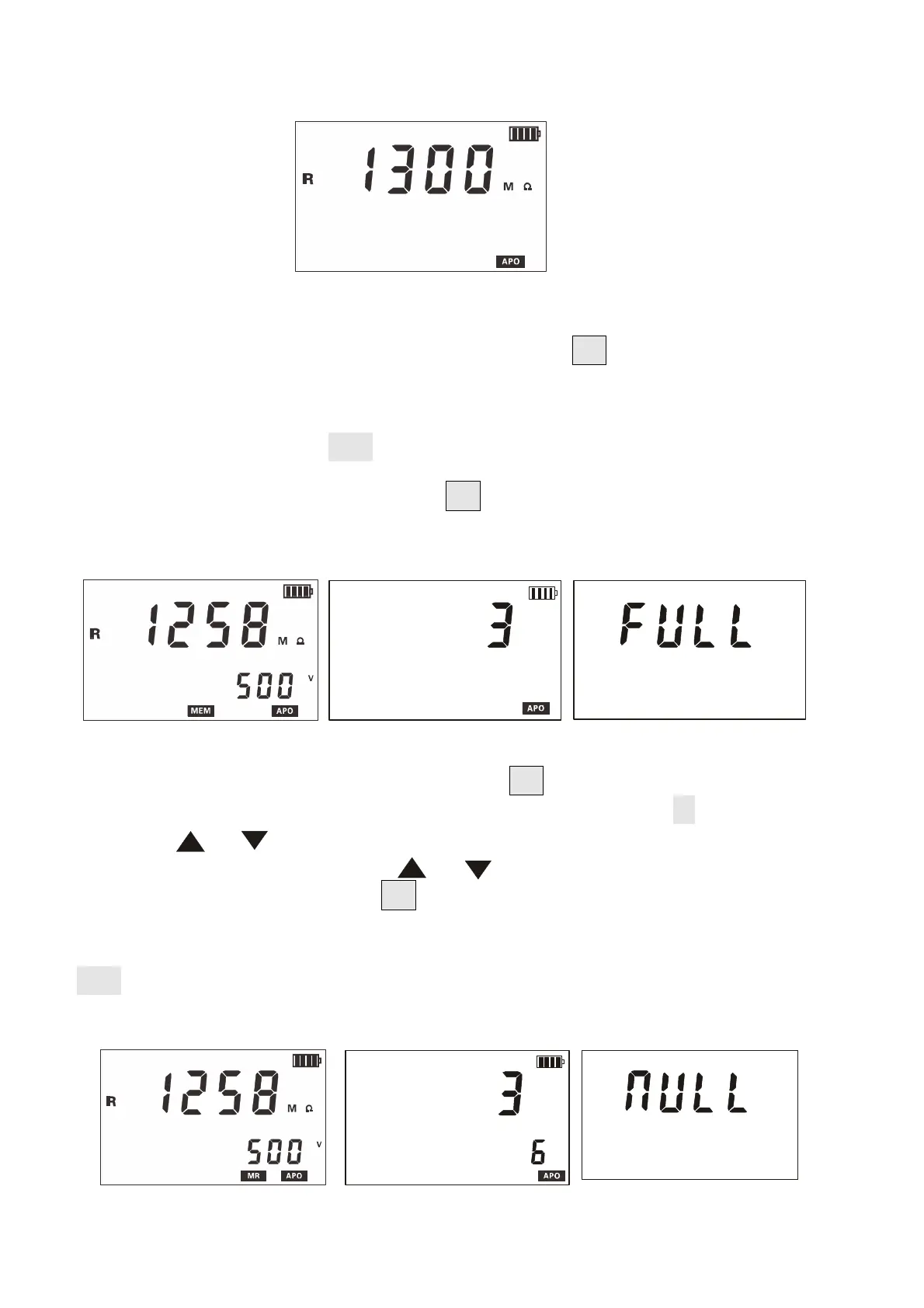
resistance alarm setting is 9999MΩ. As shown below
10.Data Lock/Storage
After the measurement is completed, short press " MEM" key to lock the current
display data, and automatically serial storage. If the storage is full, the
instrument displays the "FULL" symbol. As shown in the following figure: the
measured data is 1258m ω, and the "MEM" display is stored as the third set
of data.
11.Data Review/Deletion
After booting or measuring, press the "MEM" button (more than 3 seconds)
to enter the data lookup, and store the data read interface " MR" symbol display.
Press the " "or" "key to select the data corresponding to the array number
with a step value of 1, press " "or" "to select the array number with a
step value of 10, and press "MEM" to exit. See below
In the following figure, the number 3 is the current number of groups
and 6 is the total number of groups. If there is no stored data, LCD display
"NULL", see the figure below.


 To Next Page