8
4. User Interface: AeroSphère App
In this chapter you’ll learn how to use FM, DAB+ and the Audio CD with the remote control and the AeroSphère
app. There is no additional setup needed because the AeroSphère Base will find all AeroSphère speakers
automatically.
4.1. OVERVIEW
How to download the AeroSphère app
See the links on the AeroSphère Support page.
App Functions
• Automatic discovery of all AeroSphère products in your home network
• Change volume on all AeroSphère speakers
• Adjust bass and treble on all AeroSphère speakers
• Change the input sources on the speakers
• Start another streaming application
• Control the FM, DAB+ and Audio CD functionality of the AeroSphère Base
• Change names of all the speakers
About the AeroSphère System
The AeroSphère App (iPhone, Android) controls all Geneva AeroSphère products. AeroSphère Small and
AeroSphère Large are wireless active speakers that play music from AirPlay (via Wi-Fi), DLNA and Bluetooth. The
speakers can be controlled via remote control and the AeroSphère app (iPhone or Android). By adding the
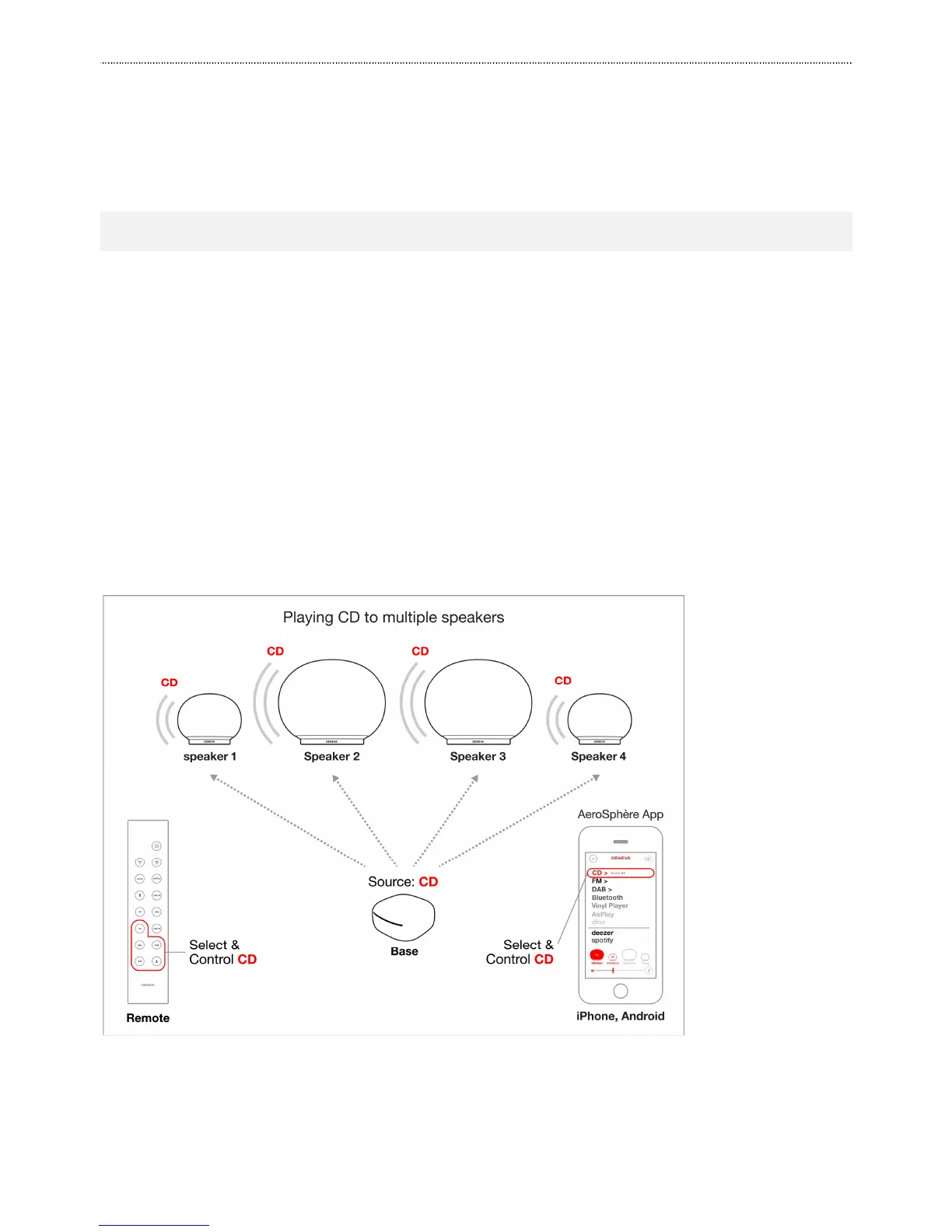
AeroSphère Base to your home network, the following functions will be added: FM, DAB+ and audio-CD. Up to four
speaker play then the same music at the same time over the Wi-Fi network to the speakers.
Figure 5: Example configuration of four AeroSphère speakers and an AeroSphère Base. A remote control or the
AeroSphère App can be used to control the system.



 To Next Page