6
Banks, presets and modifiers
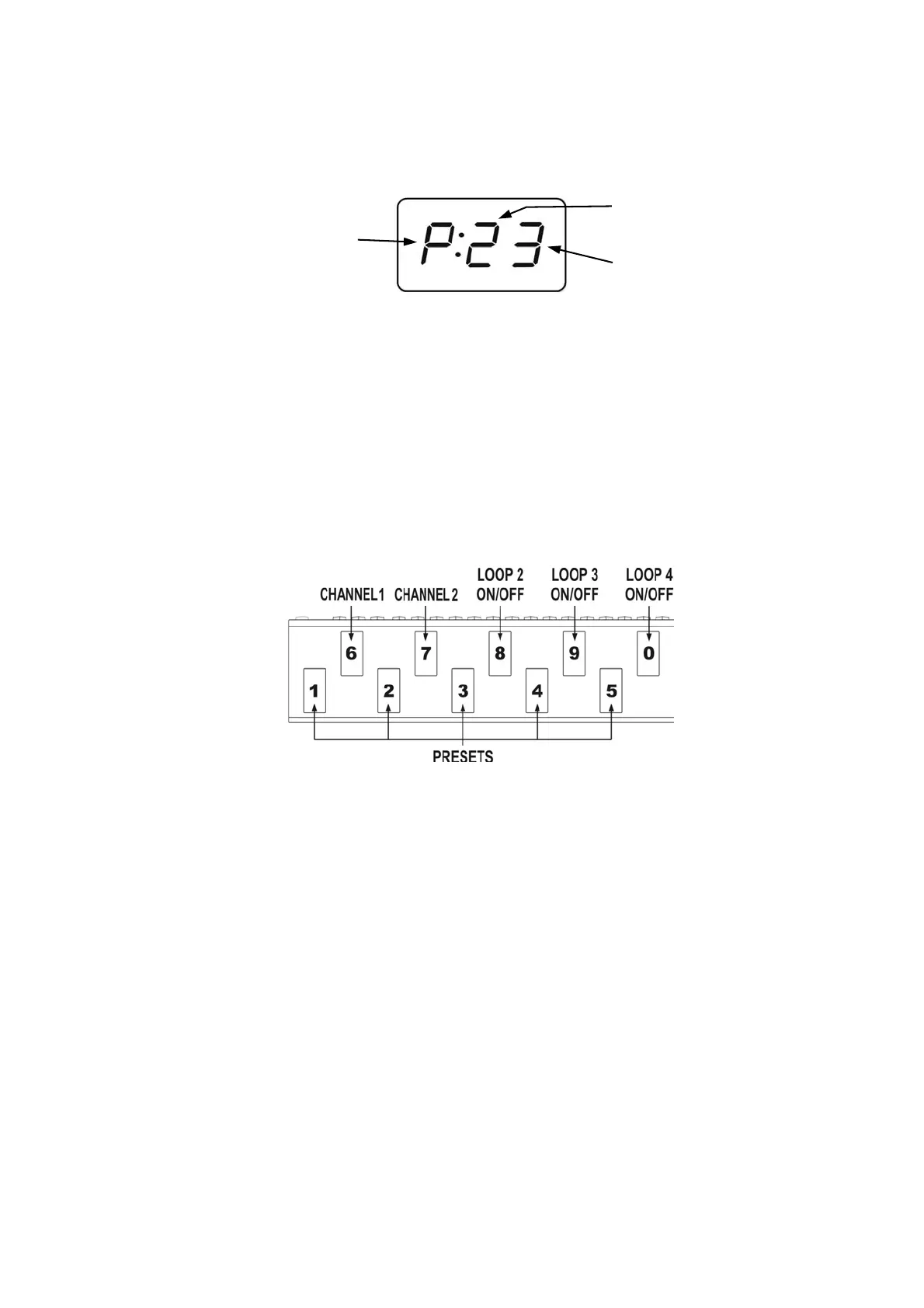
Controller enables to program 10 presets (or 8 ones) in each of its 10 banks. There is information on the
display about the bank and preset numbers. Banks and presets have got numbers from 0 to 9 range.
The P character in front of double dot says that the given footswitch in the given bank is a preset. The L
character says that the given footswitch is a loop modifier (similarly S character for a SWITCH modifier and
n character for a MIDI modifier). The loop modifier switches on and off the selected effects’ loop. The
SWITCH modifier sets the amp’s channel. The MIDI modifier sends the Program Change and/or Control
Change MIDI commands to selected MIDI devices. Such solution enables to program banks only with
presets to switch all the system just by pressing a single footswitch and to program the banks where
particular footswitches perform the selected functions e.g. to switch on the single effect, to set the amps
channel. Also it is possible to program some banks where a part of footswitches are presets and the other
are modifiers.
Below you will find the example of using presets and modifiers.
Preset selection
Press shortly (less then 1 second) the preset footswitch numbered from 1 to 5 (in the cb1 mode banks
change from 0 to 9; in the cb2 mode banks change from 1 to 4 or from 6 to 9).
Bank selection
At the cb1 mode (pressing and holding preset footswitch).
Press and hold (more then 1 second) the desired preset footswitch numbered from 0 to 9.
During switching there will be activated for 1 second the preset adequate to the previously selected bank.
Choosing this method enables to use 10 presets in each bank. It is recommended to organise presets in
banks in such a way that all necessary presets used in a particular song will be located into just one bank.
At the cb2 mode (using BANK UP / BANK DOWN buttons).
Select the bank number using BANK UP (footswitch 0) or BANK DOWN (footswitch 5) and then press the
preset footswitch (from range 1 to 4 or 6 to 9).
Till the moment the preset footswitch is pressed the previous preset is active. It enables switching presets
from the different banks while a song is played.
Choosing this method enables to use 8 presets in each bank.
bank number 2
preset number 3
preset mode


 To Next Page