7
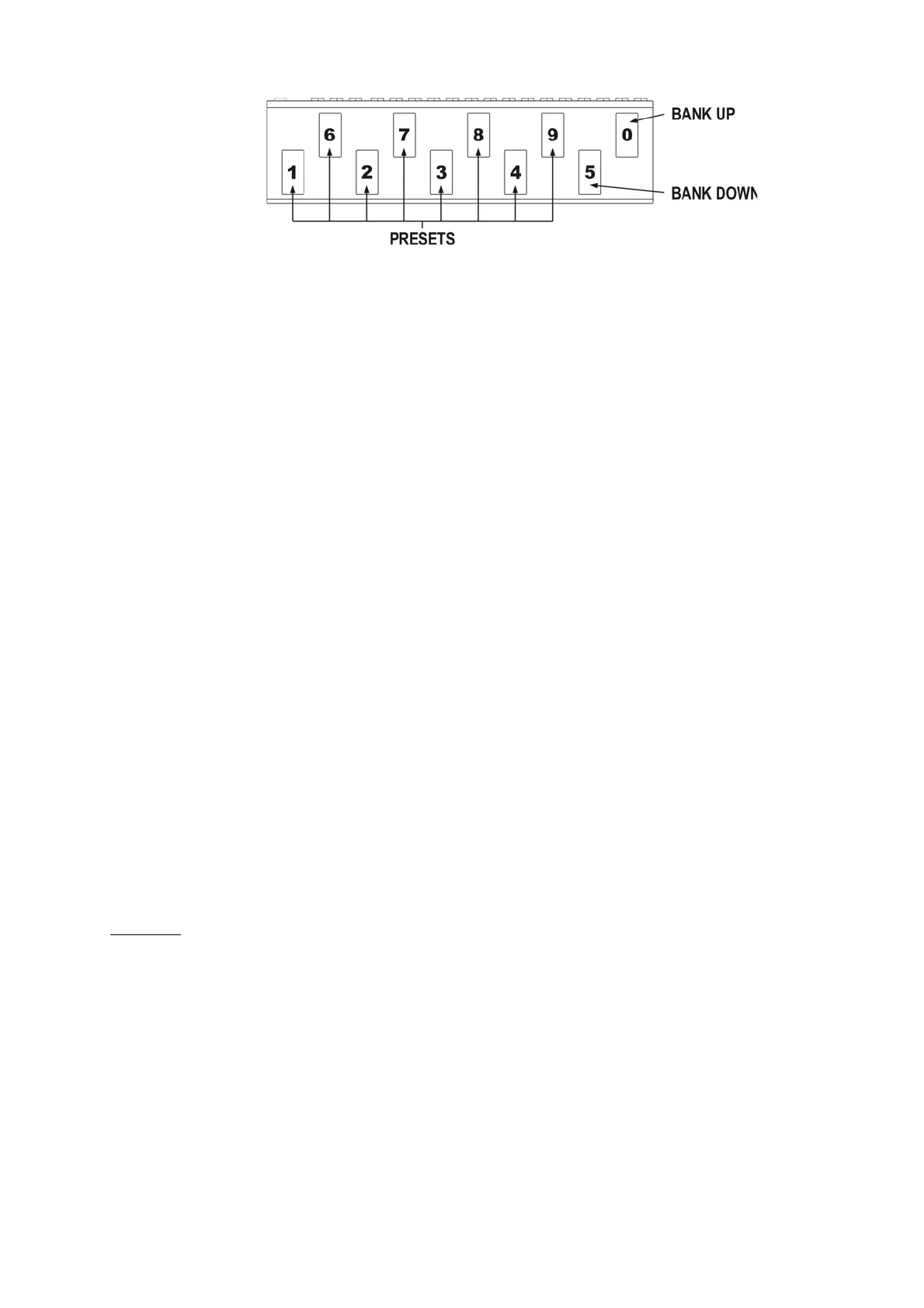
To escape from the bank selecting function press and hold 0 or 5 footswitch longer then 1 second.
At the cb3 mode (directly by using BANK UP/BANK DOWN footswitches for firmware 2.20 and higher).
At this mode BANK UP and BANK DOWN footswitches cause correspondingly lowering and increasing
bank number with immediate preset recalling (preset number in bank remains unchanged).
Silent tuning (MUTE)
Press simultaneously the footswitch No. 1 and 2 (blinking tun text will appear on the display).
To exit from MUTE press the preset footswitch intended to be used.
Preset programming
A preset is defined by:
– switched on effects (connected to LOOP1 to LOOP6) and buffer switched on or off;
– amp’s setting (amp channel and/or effect selecting) controlled by SW1 to SW4 outputs;
– MIDI Program Change numbers (and Control Change commands) transmitted to MIDI devices.
Loops (LOOP1 to LOOP6) programming
a) Select bank and preset.
b) Memory access lock switch to UNLOCK position (LOCK indicator not lit).
c) Press LOOP button (LOOP indicator and preset number start to blink).
d) Check if P character is displayed before the double dot. If not set it by footswitch No. 7 (PRESET
MODE)
e) By presets footswitches 1 to 5 and 0 set loops (effects) which should be active (indicators LOOP 1
to 6 lit mean effects are activated). Switch on/off the buffer by footswitch No. 6 (BUFFER indicator
lit means the buffer is active).
f) Press LOOP button to save. Displaying text Stored confirm saving.
In case of necessity of escape without saving while the point d) or e) it should be pressed SWITCH or
MIDI 1 or MIDI 2 button.
REMARK:
In case of not plugging in a connector to a particular effect’s loop RETURN the signal will skip such a loop
despite of activating this loop. It allows to use presets despite of not connecting effects to such a loop.
Amp settings programming
a) Select bank and preset.
b) Memory access lock switch to UNLOCK position (LOCK indicator not lit).
c) Press SWITCH button (SWITCH indicator and preset number start to blink).
d) By footswitches 1 to 4 set SWITCH outputs (SW1 to SW4 indicators signalise amp settings).
e) Press SWITCH button to save. Displaying text Stored confirm saving.
In case of necessity of escape without saving while the point d) it should be pressed LOOP or MIDI 1 or
MIDI 2 button.


 To Next Page