-20-
6. Operating mode for all models
6.1 Line mode
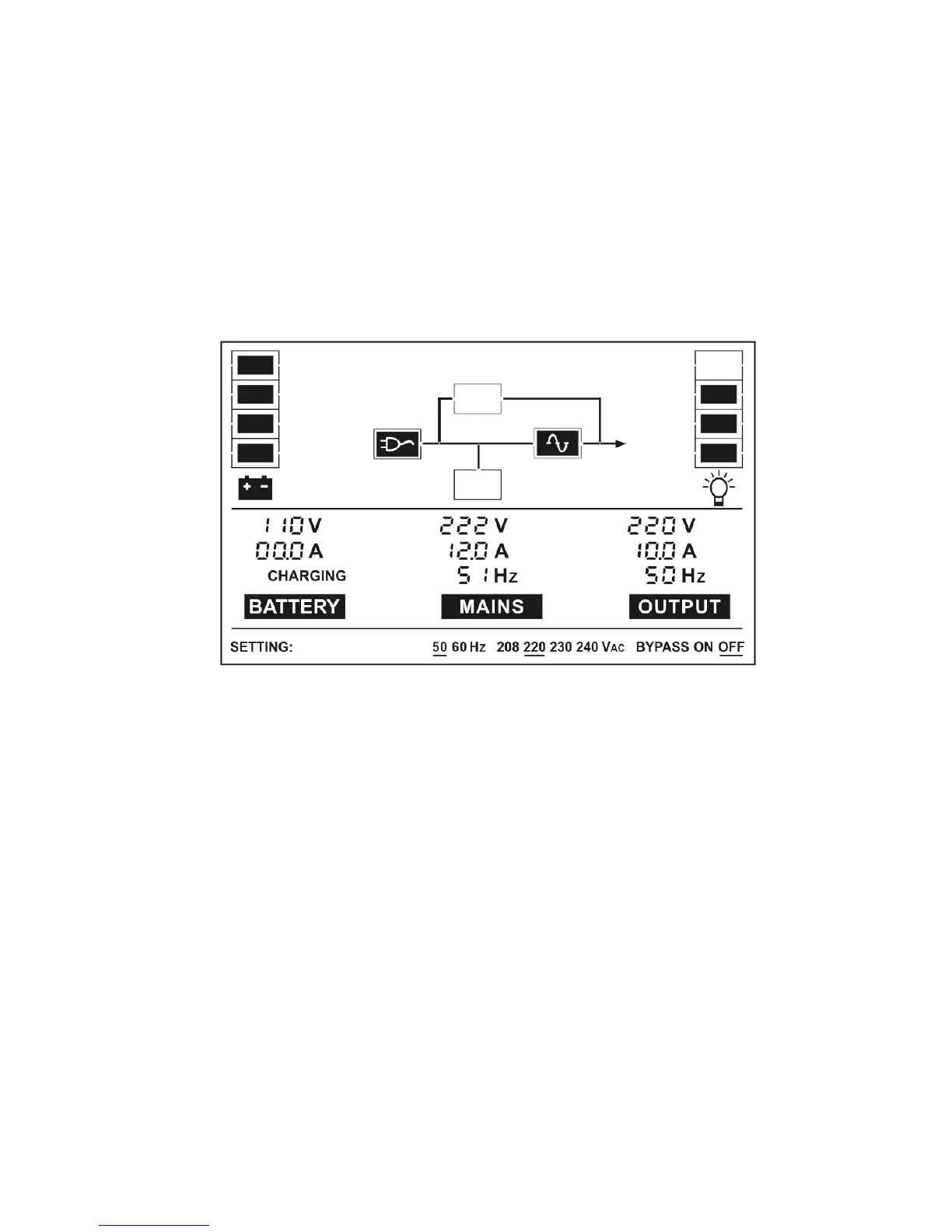
The LCD display in Line mode is shown in the following diagram.
The information about the utility power, the battery, the UPS output
and the load could be displayed.
If output overloaded, the load percent is shown and alarm will keep
twice every second. You should get rid of some unnecessary loads
one by one to decrease the loads connected to the UPS less than
90% of its nominal power capacity.
Note: Please follow the following steps to connect the generator:
● Activate the generator and wait until the operation is stable before
supplying power of the generator to the UPS (be sure that the
UPS is in idle mode). Then turn on the UPS according to the
start-up procedure. After the UPS is turned on, then the loads can
be connected to the UPS one by one.
●
The power capacity of the AC generator should be at least twice of
the UPS capacity.


 To Next Page