Administrative Tool
p. 57
The following table describes the labels on the screen:
Name The name of the RAID
Level The level of the RAID
Devices Choose the physical disk to be removed from
the RAID
NOTE: The minimal number of drives for different RAID levels is:
• RAID 5 - minimum 3 physical disks
• RAID 6 - minimum 4 physical disks
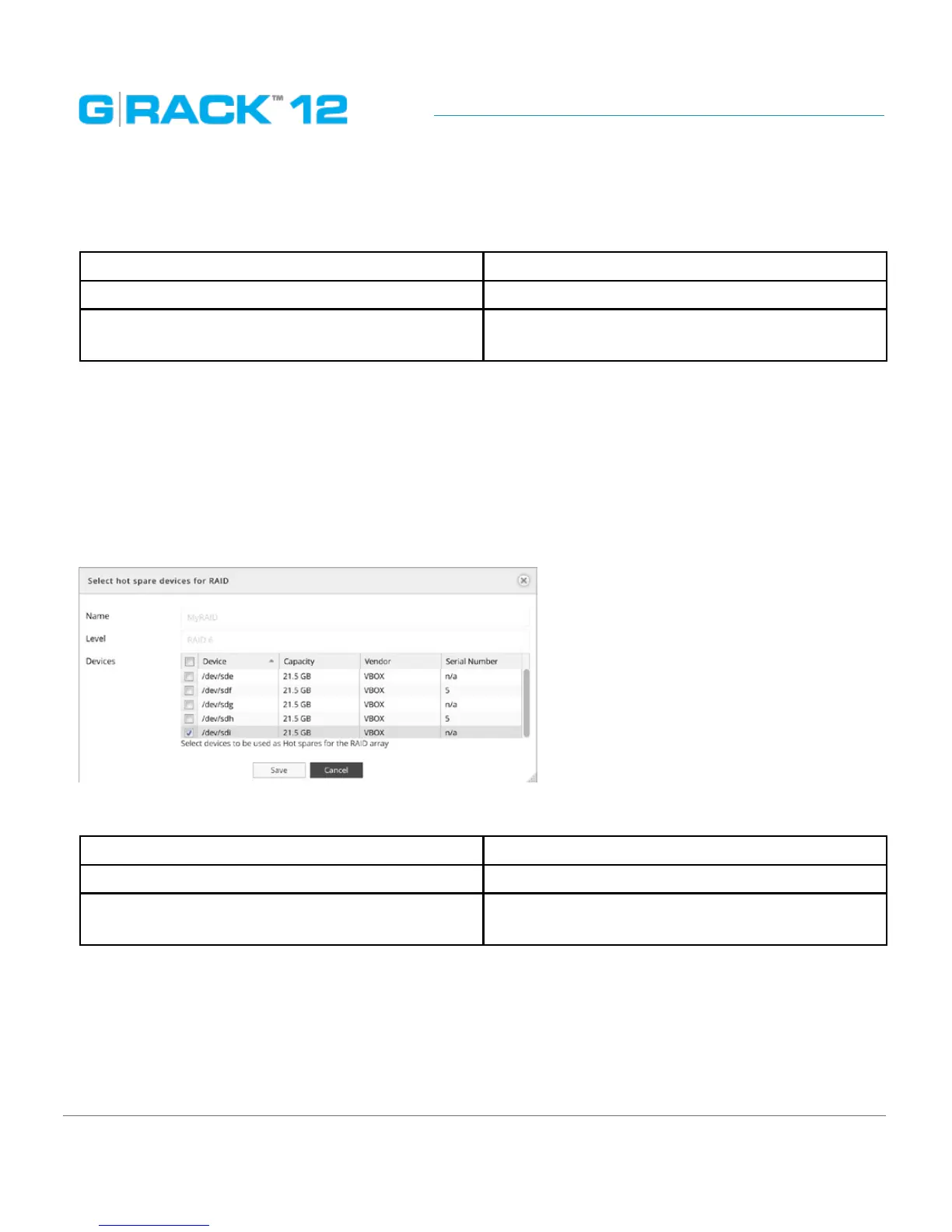
Select hot spare devices for RAID
Hot spare is a standby physical disk that can repair a degraded RAID device by automatically
replacing a failed disk. Setting a hot spare will minimize degraded array state.
Click the Hot spare button to call the dialog to set a hot spare for a RAID. Select devices to be added
as a hot spare to the selected RAID device
The following table describes the labels on the screen:
Name The name of the RAID will be displayed here
Level The level of the RAID will be displayed here
Devices Choose the physical disk to be set as a hot spare
It is possible to assign one standby physical disk as a hot spare to be shared by several RAID devices.
Once the the data rebuilding finishes, the administrator can take out the faulty physical disk, insert a
new one and assign it to be a new hot spare.
For best practice we recommend using a drive of the same capacity as the faulty drive.


 To Next Page
 Loading...