Features en
27
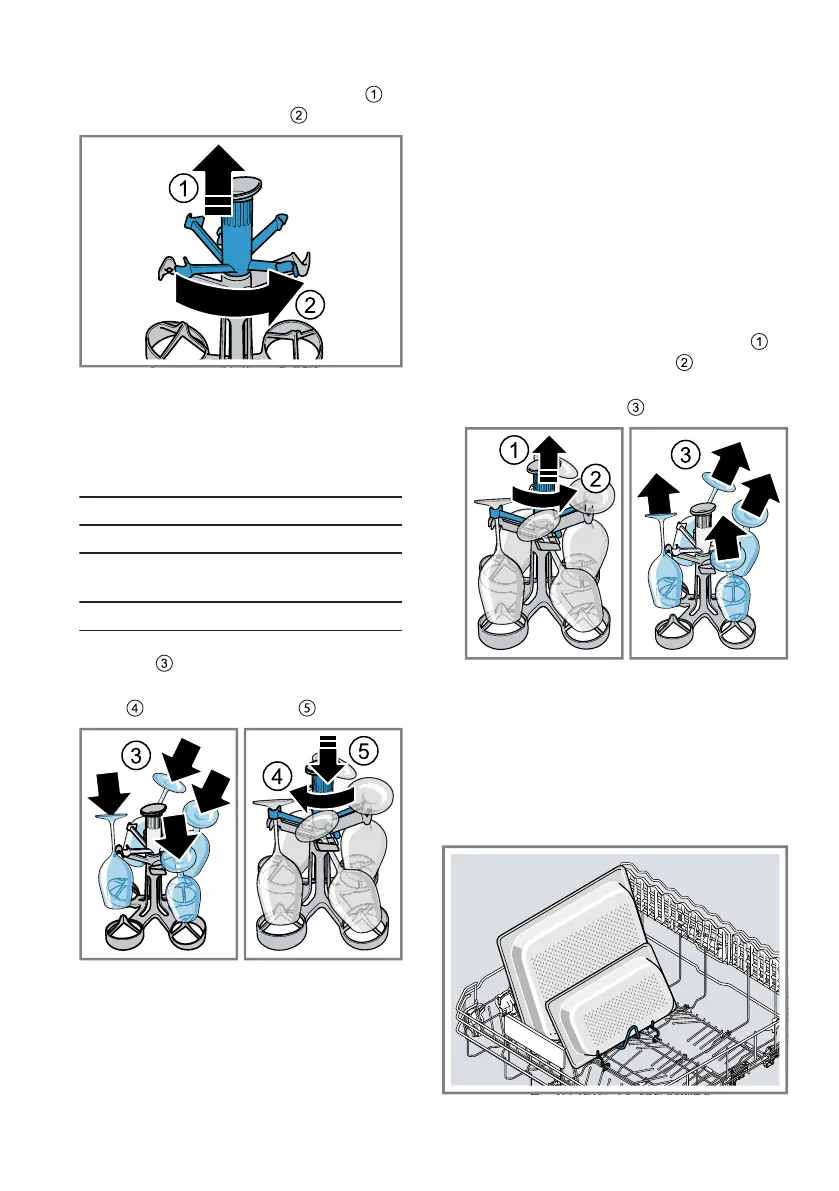
1. Pull up the rotating fixing arms
and turn anticlockwise .
2. Place the stemware with the open-
ing facing down on the shelf.
You can load stemware with the
following dimensions in the stem-
ware basket.
Dimensions Max. size
Height 245 mm
Opening dia-
meter
105 mm
Stem diameter approx. 8-9 mm
3. Position the stem in the lower fix-
ing arm .
4. Turn the rotating fixing arm clock-
wise and push down .
a The fixing arm clicks into position.
a The stemware is securely posi-
tioned in the stemware basket.
5. Lift the stemware basket by the
handle and place in the bottom
basket.
To stop the stemware falling out,
make sure the stemware basket
cannot tip over.
→"Arrange tableware", Page37
Unloading stemware basket
Note:Observe the information on
how to unload tableware.
→"Removing tableware", Page38
1. Take the stemware basket by the
handle out of the bottom basket.
2. Pull up the rotating fixing arms
and turn anticlockwise .
3. Take the stemware out of the
stemware basket .
9.7 Gastronorm container in-
sert
Use the standardised Gastronorm
container insert to position large flat
items securely, e.g. Gastronorm con-
tainers or dishes.




 To Next Page