3.9 Special functions
Display of the current oven temperature
(Thermotest)
Child lock
The current oven temperature will appear on the
display for a few seconds when you press the
(confirmation) key.
Note: during the pyrolysis process, it is not
possible to display the current oven temperature.
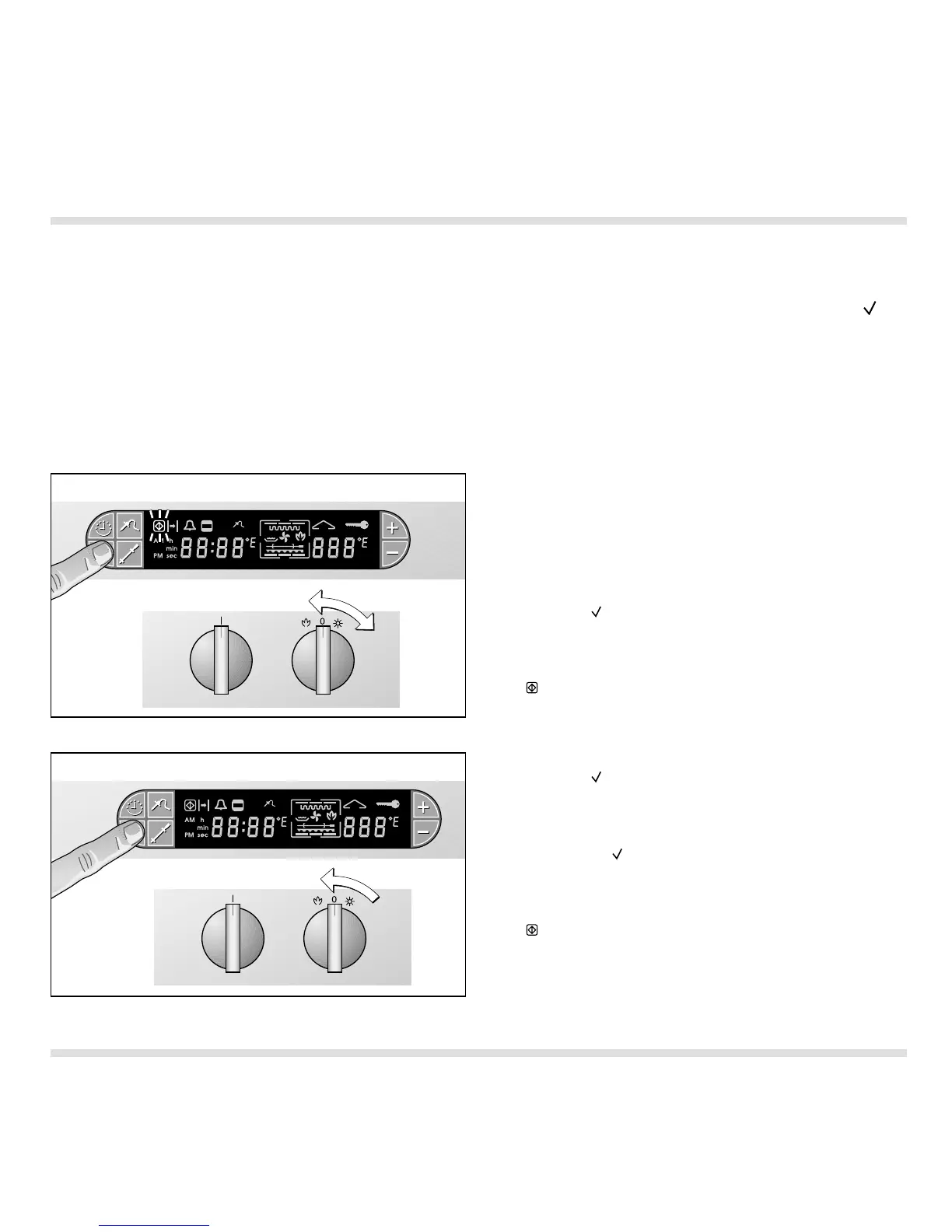
The child lock prevents inadvertent activation of the
oven.
Proceed as follows:
Switching on:
– Turn the “Temperature” control knob to any
position on the right.
– Press the (Confirm) key and keep it pressed.
– Turn the “Temperature” control knob to the 0
position (Fig. 41).
The (Child lock) symbol on the display flashes.
Switching off:
– Press the (Confirm) key and keep it pressed.
– Turn the “Temperature” control knob to any
position on the right.
– Release the (Confirmation) key.
– Turn the “Temperature” control knob to the 0
position (Fig. 42).
The (Child lock) symbol on the display goes off.
23
Fig. 41
Fig. 42




 To Next Page