NAME OF PARTS
4
REMOTE CONTROLLER
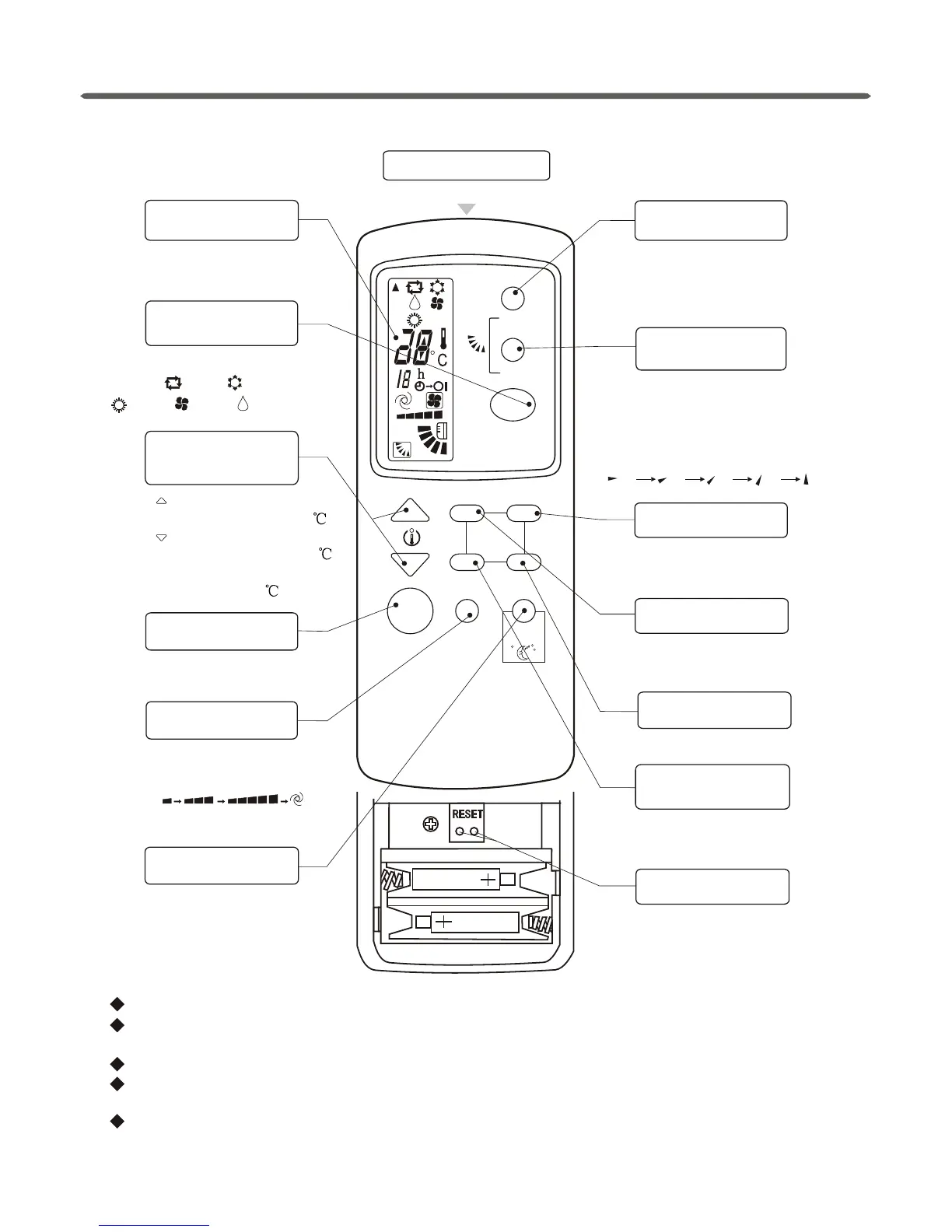
Cool only type has no HEAT mode.
SWING
MANUAL
OFF
ON
CANCEL
SET
SLEEP
FAN SPEED
OPERATION
MODE
I/O
TIME
MANUAL
SWING button
SWING button
TIMER ON button
TIMER OFF button
TIMER SET button
TIMER
CANCEL button
RESET pieces
Remove the batteries if the remote controller is not to be used for long periods of time.
In this illustration, all displays are ON for the purpose of explanation. Some models
may not show all these indications.
NOTICE:
Press it to change up/down air
flow direction and the deflector
automatically swings up and
down.
Please see“AUTO-ON/OFF
timer operation”.
Press it to fix the timer setting.
Press it to cancel the timer
setting.
If the remote controller can't
work normally, short the two
RESET pieces, it will be OK.
It sends signals to the indoor unit.
(1) (2) (3) (4)
(5)
Press it to change up/down air
flow direction and the deflector
moves at a certain angle. You
can change the moving angle
in the order of:
Signal ejecting window
TEMPERATURE
ADJUSTMENT buttons
RUN/STOP button
OPERATION DISPLAY
FAN SPEED button
OPERATION
MODE button
SLEEP button
COOL
HEAT FAN DRY
AUTO
Press once, the setting
temperature increases by 1.
Press once, the setting
temperature decreases by 1.
The range of setting
temperature is 16-31 .
It displays the current
settings.
Press it to select operation
mode:
Turns unit ON/OFF.
Press it to change the fan speed
in the order of low-medium-high
-auto ( ).
Don't tear the batteries apart or throw them into fire, which will lead to irreparable damage.
Press it to start sleep function
and press again to stop it.
Please see“AUTO-ON/OFF
timer operation”.
To operate, the distance should be within 6 meters from the indoor unit with a clear
line of sight.


 To Next Page