EasyManua.ls Logo

Galcon 11000BT - User Manual

Galcon 11000BT
21 pages
Print Icon
To Next Page IconTo Next Page
Loading...
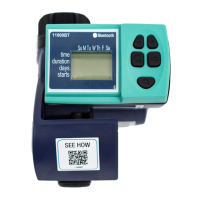
11000BT Bluetooth
Hose-End Battery Operated
Irrigation Controller
Kfar-Blum 1215000, Tel. 972-4-690-0222, Fax. 972-4-690-2727
E - M a i l : i n fo@galconc.com, www. g a l c o n c . c o m
Question and Answer IconNeed help?

Do you have a question about the Galcon 11000BT and is the answer not in the manual?

Summary

Parts Identification

Hose-End Timer Components

Identifies key parts of the irrigation controller, including body, display, buttons, and connections.

Battery Installation

Replacing the 9 V Battery

Steps for installing and replacing a 9V alkaline battery, emphasizing dryness.

Controller Installation

Connecting to Faucet and Hose

Instructions for securely attaching the controller to a faucet and connecting the hose.

Irrigation Programming

Programming Button Functions

Explains the use of four buttons for setting time, duration, and days.

Setting Clock and Day of Week

Guide for configuring the controller's clock and day of the week.

Weekly Irrigation Schedule Setup

Details on programming watering days, duration, and start times.

Manual Operation Mode

Initiating Manual Irrigation

How to manually activate the irrigation valve for a set period.

Status and Error Indicators

Low Battery Warning

Explains the blinking battery icon and low power behavior.

Missing Program Definition Error

Describes the 'noPr' error and its implications for manual operation.

Maintenance

Routine Care and Battery Life

Recommendations for filter cleaning and battery lifespan.

Limited Warranty Certificate

Warranty Coverage and Terms

Outlines the 24-month warranty, service eligibility, and product conformity.

Warranty Exclusions and Limitations

Details actions and conditions that void the warranty.

Customer Responsibilities and Liability

Lists customer obligations and Galcon's disclaimers.

FCC Compliance Statement

Radio Frequency Exposure Guidelines

Specifies minimum distance for human exposure to RF fields.

Summary

Parts Identification

Hose-End Timer Components

Identifies key parts of the irrigation controller, including body, display, buttons, and connections.

Battery Installation

Replacing the 9 V Battery

Steps for installing and replacing a 9V alkaline battery, emphasizing dryness.

Controller Installation

Connecting to Faucet and Hose

Instructions for securely attaching the controller to a faucet and connecting the hose.

Irrigation Programming

Programming Button Functions

Explains the use of four buttons for setting time, duration, and days.

Setting Clock and Day of Week

Guide for configuring the controller's clock and day of the week.

Weekly Irrigation Schedule Setup

Details on programming watering days, duration, and start times.

Manual Operation Mode

Initiating Manual Irrigation

How to manually activate the irrigation valve for a set period.

Status and Error Indicators

Low Battery Warning

Explains the blinking battery icon and low power behavior.

Missing Program Definition Error

Describes the 'noPr' error and its implications for manual operation.

Maintenance

Routine Care and Battery Life

Recommendations for filter cleaning and battery lifespan.

Limited Warranty Certificate

Warranty Coverage and Terms

Outlines the 24-month warranty, service eligibility, and product conformity.

Warranty Exclusions and Limitations

Details actions and conditions that void the warranty.

Customer Responsibilities and Liability

Lists customer obligations and Galcon's disclaimers.

FCC Compliance Statement

Radio Frequency Exposure Guidelines

Specifies minimum distance for human exposure to RF fields.

Overview

The Galcon 11000BT is a Bluetooth-enabled, hose-end, battery-operated irrigation controller designed for managing watering schedules.

Function Description:

This digital controller allows users to program a weekly irrigation schedule to water at specific times and for defined durations. It supports multiple irrigation start times per day and can be set for specific days of the week. The device also features a computerized manual operation mode, which allows for immediate, temporary irrigation without altering the programmed schedule. An emergency irrigation function is activated if no buttons are pressed after battery installation, initiating a 5-minute irrigation cycle on a 24-hour basis after 10 minutes. The controller is designed to simplify irrigation management for residential, turf, landscape, agriculture, and waterworks applications.

Important Technical Specifications:

The controller operates using a 9V alkaline battery. It features a digital display and four programming/operation buttons. The device connects to a faucet or hose end via a female swivel hose thread adapter and to the irrigation system via a male hose thread connection. The programming allows for setting the current time and day of the week, as well as defining irrigation duration in 15-minute intervals after the initial 15 minutes. It supports multiple irrigation start times (START I, START II, START III, START IV), with the ability to cancel individual start times.

Usage Features:

  • Programming Steps: The controller uses four buttons for programming:
    • Programming Step Button: Used to select the appropriate programming mode (e.g., clock setting, duration, days, start times).
    • Parameter Selection Button: Used to select the specific parameter (e.g., hour, minute, day) to be changed. The selected parameter blinks to indicate it's ready for adjustment.
    • Data Increment Button (+): Increases the value of the selected parameter (e.g., adds an hour or minute).
    • Data Decrement Button (-): Decreases the value of the selected parameter (e.g., deducts an hour or minute).
  • Setting Current Time & Day of the Week:
    • To set the clock, press the programming step button until the clock icon appears. Use the parameter selection button to make the hour digits blink, then use the increment/decrement buttons to set the current hour. Repeat for minutes.
    • To set the day of the week, press the parameter selection button until a blinking drop appears at the top of the display. Use the increment/decrement buttons to move the drop to the current day.
    • For a 24-hour clock display, press the increment and decrement buttons concurrently when the hour digits stop blinking. Pressing them again reverts to AM/PM display.
  • Programming Duration of Irrigation: Press the programming step button until the "Duration" icon appears. The digits will blink. Use the increment/decrement buttons to set the desired watering duration. After the first 15 minutes, duration is set in 15-minute intervals.
  • Programming Irrigation Days: Press the programming step button until "Days" appears. If programming for the first time, "OFF" will blink. Press the parameter selection button, and a blinking marker will appear under Monday. Use the parameter selection button to move the marker to the desired irrigation days, and press the increment button to select them.
  • Setting Irrigation Start Time/Date: Press the programming step button until "START I" appears. Press the parameter selection button to make the hour digits blink. Use the increment/decrement buttons to set the start time. Repeat for "START II," "START III," and "START IV." To cancel a start time, use the increment/decrement buttons until "OFF" appears.
  • Computerized Manual Operation: Press the programming step button until "Manual" appears. The valve will open for the defined irrigation period and close automatically. The programmed schedule will continue to function at its set times. This feature cannot be used when the display is blinking.
  • Low Battery Warning: A blinking battery icon indicates low battery. The battery should be replaced promptly. The controller will operate the valve 8 more times before suspending the program and displaying "OFF." Program data is retained for 30 seconds during battery replacement.
  • Missing Definition Warning: If no irrigation days are specified, "noPr" will appear, and the valve cannot be opened during manual operation.

Maintenance Features:

  • Battery Replacement: Use alkaline batteries only. When changing batteries, ensure the battery compartment remains dry. Always turn the controller back to its original position (display covered by the base) after battery installation.
  • Filter Cleaning: The controller contains an internal filter that needs to be removed and cleaned every few months. Failure to clean the filter regularly can cause problems.
  • Storage: Remove batteries if the irrigation controller will not be used for a prolonged period.
  • Battery Life: The life span of the battery is at least one year.

Compliance and Warranty:

The device complies with FCC Part 15 for Class B digital devices and FCC Section 1.310 for human exposure to radio frequency electromagnetic fields, requiring a minimum distance of 20 cm between the equipment and persons during operation. Changes or modifications not expressly approved by the responsible party could void the user's authority to operate the equipment.

Galcon provides a limited warranty of 24 months from the retail purchase date for its "Galcon Smart" irrigation controllers (including models GSI, CYBER RAIN, 7101BT, 9001BT, 11000BT) and associated product software and services. The warranty covers defects in material and workmanship, with the sole remedy being repair or replacement. The warranty is conditional on the customer presenting a valid contract and purchase receipt. It does not cover misuse, unauthorized modifications, external damage, or failure to comply with instructions. The warranty is also dependent on the customer operating and maintaining the product according to Galcon's instructions and fulfilling payment obligations. Galcon's liability is limited to the consideration received from the customer for the product. The services are provided "AS IS" without warranties of any kind. The customer is solely responsible for the selection, use, efficiency, and suitability of the product. The warranty is governed by the laws of the State of Israel.

Galcon 11000BT Specifications

General IconGeneral
BrandGalcon
Model11000BT
CategoryController
LanguageEnglish

Related product manuals