Chapter 4 -- Installation--USB Cabling
4 - 4
If the power LED goes on, then turns off and does not come on, the eQCM 10M is not working properly!
Contact Gamry Instruments or your local Gamry Instruments representative as soon as possible if this power up
test fails.
USB Cabling
The eQCM 10M connects to the computer using a standard High Speed USB A/B cable. A suitable cable was
shipped with your instrument. If this cable has been lost, you can get a replacement at almost any computer
retailer. The replacement cable should be rated for USB 2.0 high speed USB operation.
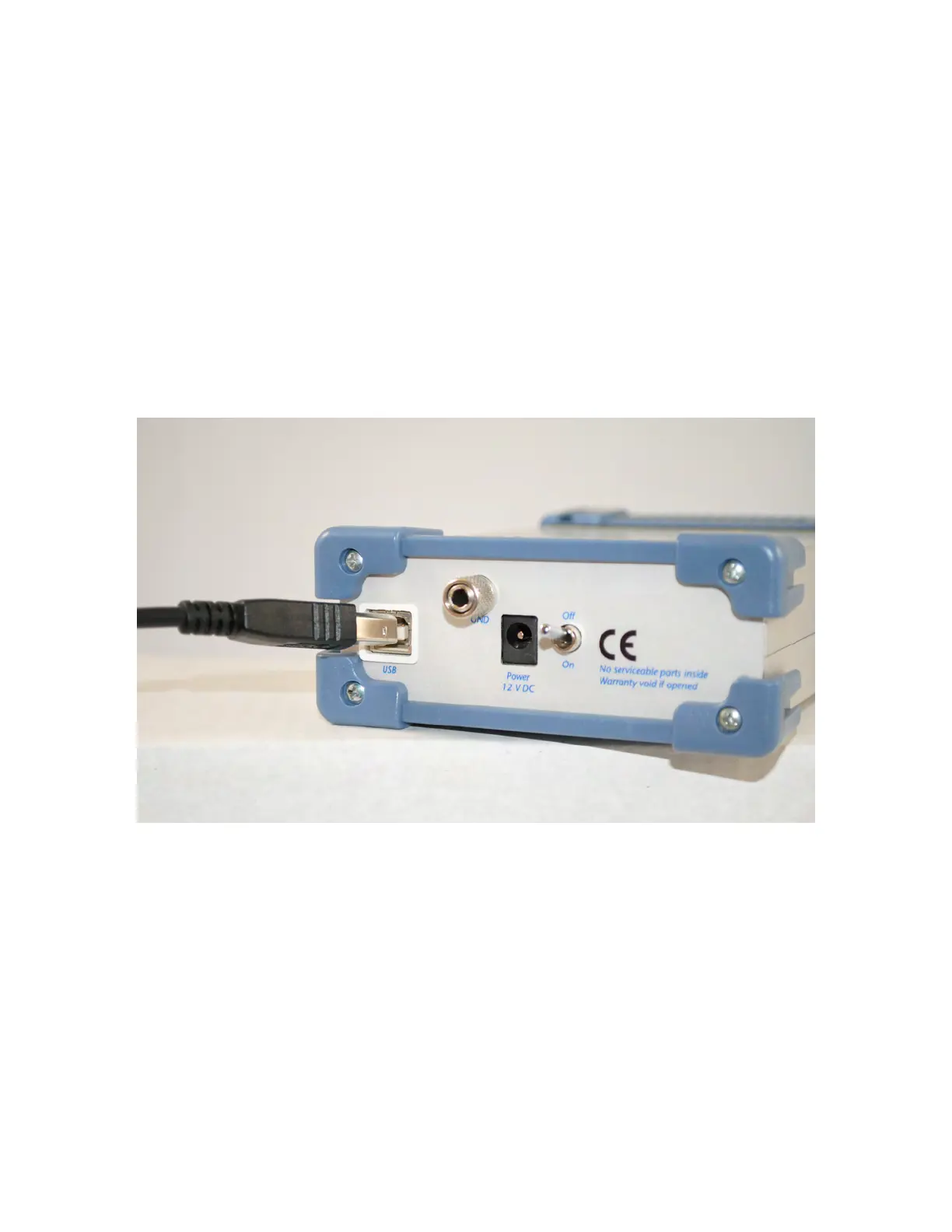
An A/B USB cable has different connectors on each end. The end with a wider, rectangular shaped connector
plugs into a USB port on your computer (or a similar port on a USB hub). The end with a nearly square
connector plugs into the USB port on the eQCM 10M (see Figure 4 - 3).
Figure 4 - 3
Rear Panel of the eQCM 10M with USB Cable
The USB connection can be “hot-plugged”. This means, both the computer and the eQCM 10M can be
powered-up before the USB cable is plugged in. Unlike many other instrument system connections, you need
not power down the system before plugging in the USB.
You can also safely remove the USB cable without powering down the eQCM 10M and your computer. Be
aware however, that this may have undesirable consequences if the system is currently taking data or
performing an electrochemical experiment.


 To Next Page