Chapter 4 -- Installation--1st Time Device Installation in Windows
4 - 5
1
st
Time Device Installation in Windows
Installation in Windows 7 is automated once the proper drivers have been installed. No user interaction is
necessary.
When an eQCM 10M is first connected to a computer running Windows XP SP3 or Windows Vista™, the
Windows Plug and Play Manager will see the new device, but will be uncertain what device it is. The message
that will appear is something like “New device found” or “Unknown USB device Detected”.
When this occurs after you’ve connected an eQCM 10M, tell Windows that you would like to install the new
device.
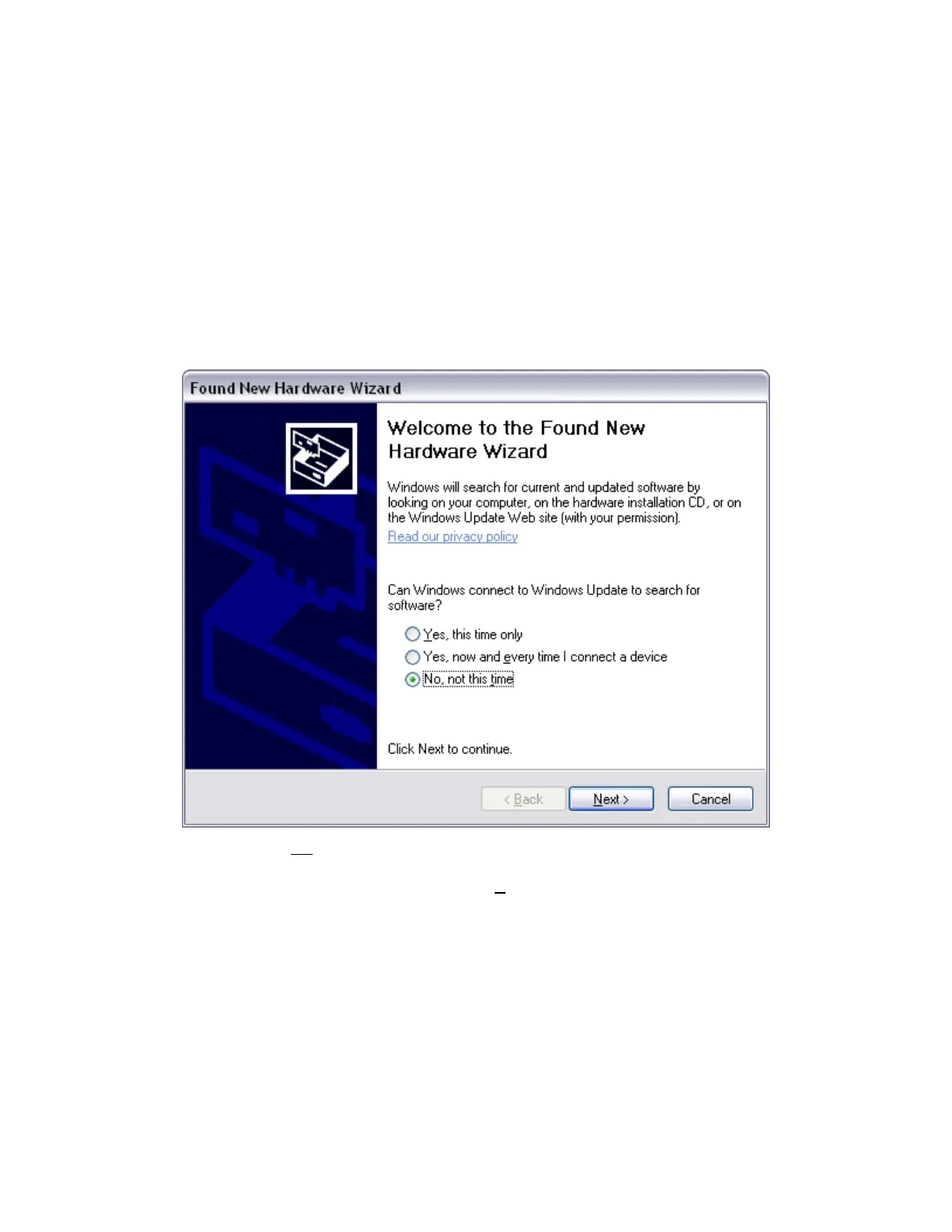
You should see a screen that looks something like this:
Figure 4 - 4
Welcome to the Found New Hardware Wizard
As shown in this Figure, do not choose to let Windows Update find the device driver that you need. The
Windows Update web site has no knowledge of the Gamry Instruments eQCM 10M.
Make sure you select No, not this time. After you select, Next, you should see a screen that looks like this:


 To Next Page