37
SYSTEM SETUP
SYSTEM
From the ‘System Setup’ menu, click the SYSTEM menu.
SYSTEM - DATE / TIME
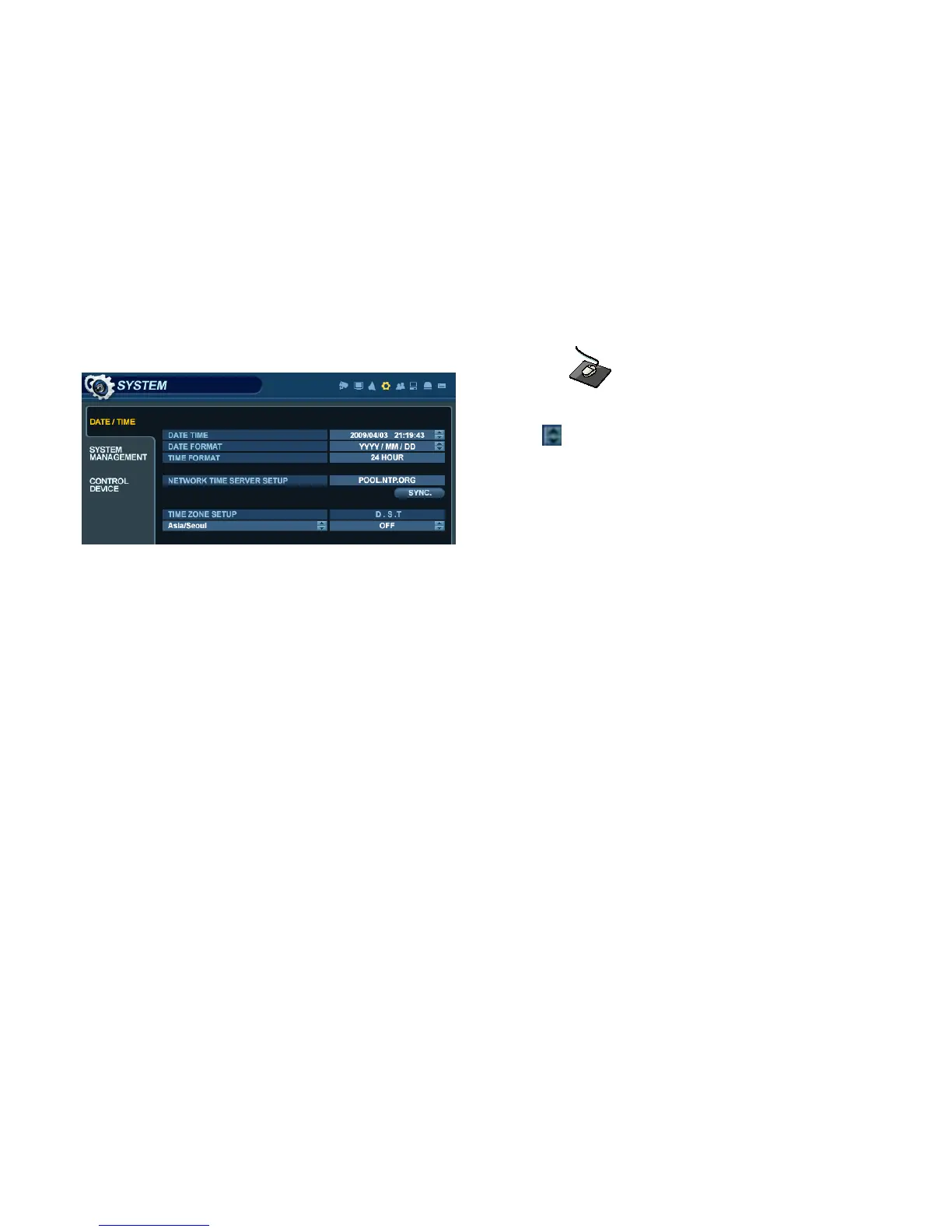
Click the DATE / TIME menu, and click on any field.
Use the button to modify any value.
DATE TIME : Allows the operator to set or modify the current system date & time.
DATE FORMAT : Determines the format in which the date is displayed. (MM / DD / YYYY)
TIME FORMAT : Determines how the time is displayed. (AM/PM or 24-hour)
NETWORK TIME SERVER SETUP : If the DVR is connected to the Internet, the time and date can be
accurately set by selecting SYNC and pressing ENTER.
TIME ZONE SETUP : should be set according to the region that the DVR is used in.
D.S.T. : When enabled, the DVR will automatically adjust for daylight savings time changes in the spring and autumn.


 To Next Page