38
SYSTEM SETUP
SYSTEM-SYSTEM MANAGEMENT
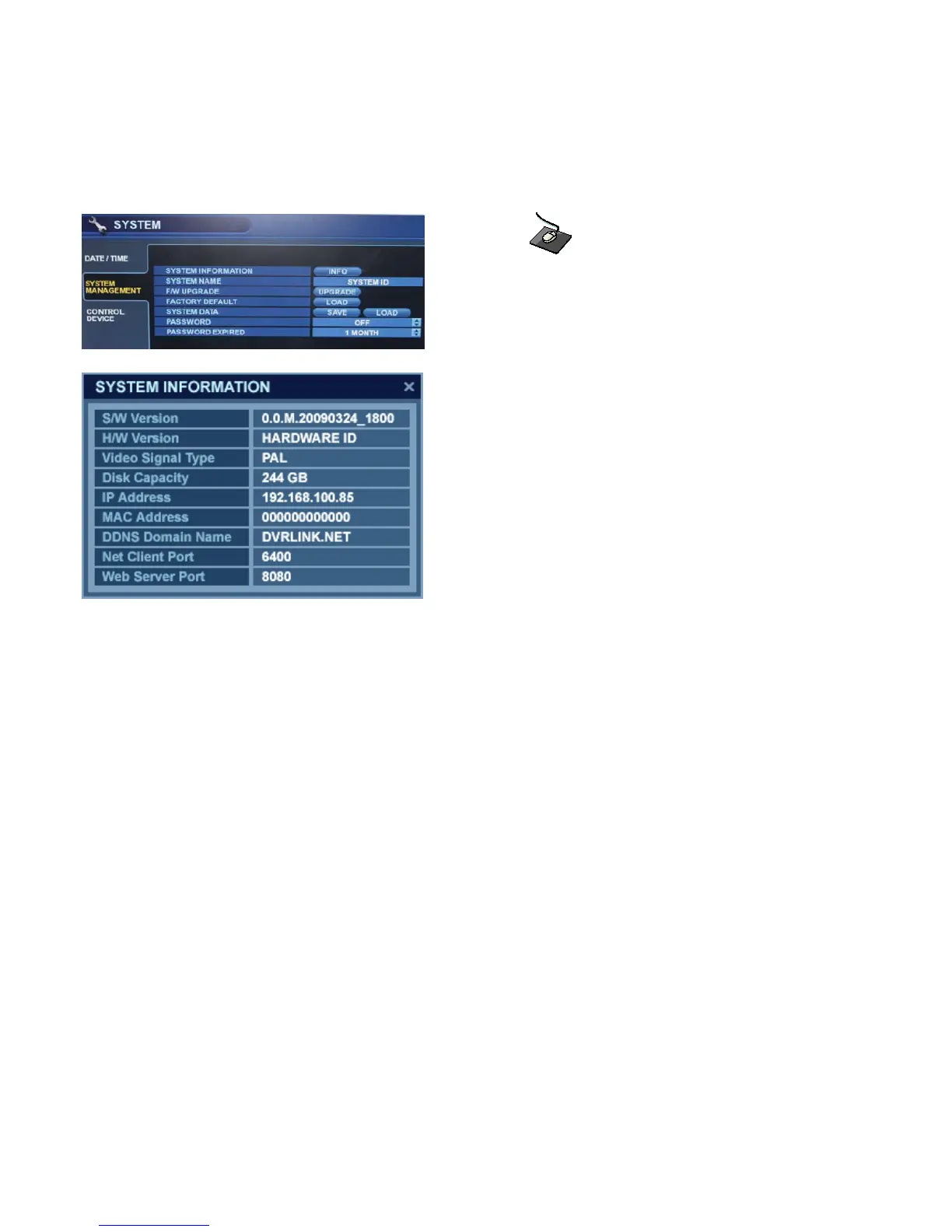
Click on the ‘SYSTEM MANAGEMENT’ menu.
F/W version: Shows the current firmware version of the DVR.
H/W version: Shows the hardware version of the DVR.
VIDEO SIGNAL TYPE: The DVR automatically switches between PAL and NTSC depending on the
video format of the Channel 1 input signal at the time of power on.
DISK CAPACITY: The first value shows the amount of hard drive capacity used by recorded footage.
The second value shows the total hard drive capacity installed.
IP ADDRESS: Shows either the manual IP address entered in the ‘NETWORK’ menu, or the automatic
IP address assigned by a DHCP server, if enabled.
MAC ADDRESS: Shows the MAC (Media Access Control) address of the DVR. It is a unique identifier –
no other network device has the same MAC address.
DDNS DOMAIN NAME: If DDNS is enabled, the host DDNS server is specified here.
NET CLIENT PORT : The port number that the DVR uses to support remote connection from the client software.
WEB SERVER PORT : The port number that the DVR uses to support remote connection from Internet Explorer
or other web browsers.
SYSTEM NAME : This field is used so that notification e-mails can be identified by system name.


 To Next Page