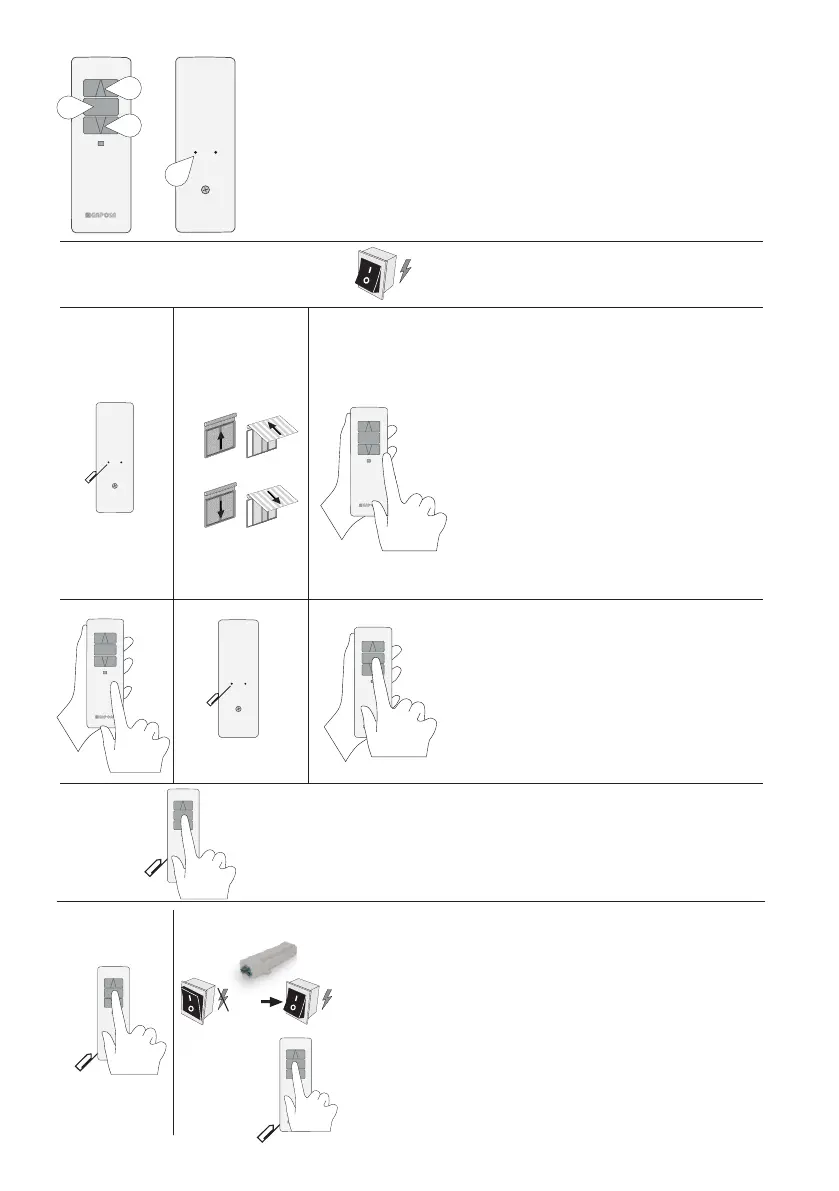
UP (1) the motor lifts the rolling shade/awning up
STOP (2) the rolling shade/awning stops
DOWN (3) the rolling shade/awning goes down
Prog-TX (4) program the transmitter
1
3
2
4
ON
1 2 3
1 2 3
Prog-TX (4)
Prog-TX (4)
1
2
Prog-TX (4)
Option 1 Option 2
CONNECT POWER TO THE MOTOR
PROGRAMMING A TRANSMITTER
ADDING A NEW TRANSMITTER
1 Press and hold PROG-TX button on the back of
transmitter till the motor starts moving
2 Check the motor rotation then release PROG-TX
button (the motor stops)
3 Within 5 seconds, press the corresponding button
(UP if the motor turns upwards or DOWN if the
motor turns downwards)
Transmitter is now programmed
1 Press and hold PROG-TX button on the back of the
transmitter already paired till the motor starts
moving in one direction
2 Release PROG-TX button (the motor stops)
3 Within 5 seconds, press the corresponding button
on the new transmitter being added
Additional transmitter is now added
CHECKING / CHANGING DIRECTION
1 Press UP or DOWN the motor goes UP or DOWN
accordingly, otherwise to change direction of
operation:
2 Press and hold PROG-TX button on the back of
transmitter till the motor starts moving
3 Press STOP: The motor makes a brief jog. Direction
of the motor has been reversed
IMPORTANT: the change of direction of operation
must be performed before initiating limit setting
procedure otherwise limits must be reset
DELETING A TRANSMITTER OR A CHANNEL
Using the transmitter to be deleted press and hold both Prog-TX and STOP buttons till the
motor makes a small jog
Only the transmitter used for this procedure has been deleted from motor memory
RESET TRANSMITTER MEMORY
(DELETING ALL THE TRANSMITTERS OR CHANNELS
OR SENSORS)
Option 1 - Using a programmed transmitter
Press and hold both Prog-TX and STOP buttons for at least 15 seconds:
as confirmation feedbacks the motor makes first a brief jog and after 5
seconds an additional long jog
Memory is now empty
Option 2 - Using a new transmitter without ID (not paired).
1 Switch the motor power supply OFF. Then switch it ON.
2 Within 8 seconds, using any Gaposa transmitter, press and hold both
Prog-TX and STOP buttons until the motor makes a long jog
Memory is now empty
ON
OFF


 To Next Page