have selected. If you need to operate more than one lifter at the same time, you can
create groups.
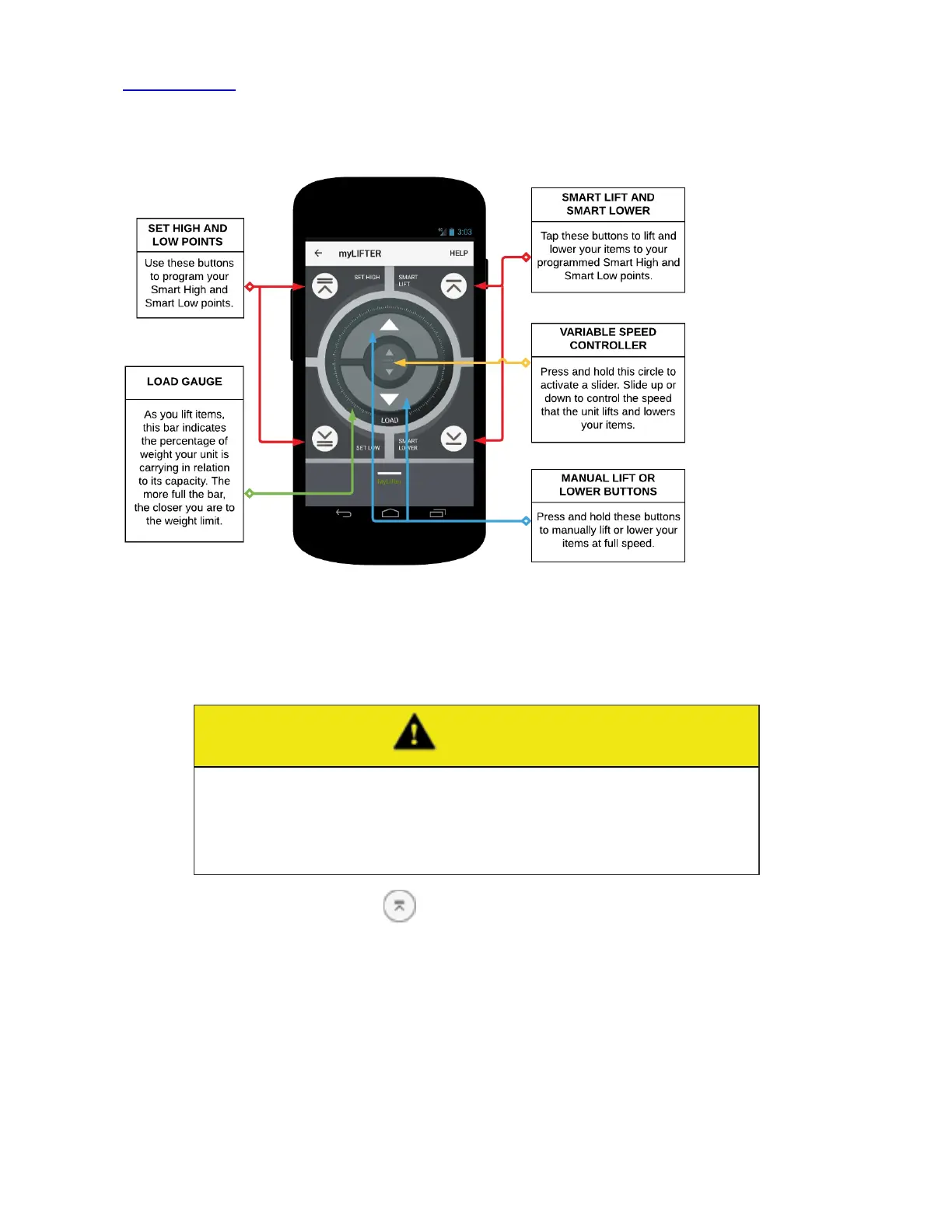
The following graphic gives you an overview of the Device Control screen interface
and its manual operation features.
Set the smart high and low points
1. On the Device Control screen, press and hold the Manual Lift button to lift an
item to the garage ceiling.
CAUTION
When lifting manually, make sure that you leave at least six inches
between the item and the lifter. Do not run the item into the MyLifter unit.
Running the item into the lifter can cause damage to the lifter motor, dam-
age personal property, or cause personal injury.
2. Tap the Set High button ( ) to set your smart high point.
An alert is displayed asking, "Are you sure you want to set the smart high at this
position?"
3. Tap SET to set the smart high position.
4. Press and hold the Manual Lower button to lower an item to the floor.


 To Next Page