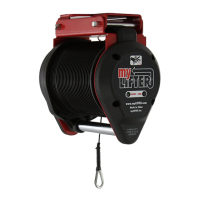
The Device Control screen opens with one of the lifters from the group selected
(indicated by a rectangle around the lifter's name). At this point, you can control
each lifter individually so you can raise or lower their cables to set a reference
point for the group. The reference point is used to indicate that the length of each
cable is level relative to all the cables in the group.
5. On the Device Control press the Up or Down arrow to move the cable to the
desired position.
6. Tap the name of another lifter repeat step 5 until all of the cables on all lifters in
the group are at the same position.
7. Tap SET REFERENCE to set the current position of all cables as the reference
point.


 To Next Page