EasyManua.ls Logo

Garmin 182/182C - User Manual

Garmin 182/182C
126 pages
Print Icon
To Next Page IconTo Next Page
Loading...
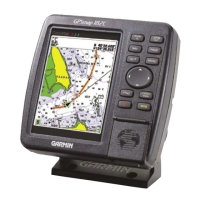
GPSMAP
®
182/182C
chartplotting receiver
owner’s manual
(GPSMAP 182C shown)

Table of Contents

Question and Answer IconNeed help?

Do you have a question about the Garmin 182/182C and is the answer not in the manual?

Summary

Basic Operation

Initializing the GPS Receiver

Steps to initialize the GPS receiver for first-time use.

Creating and Using Waypoints

Man OverBoard (MOB) Function

Marks current location and sets course for emergency response to MOB situations.

Navigating to a Destination

Navigating Using the NAV Key

Introduces Go To, Follow Route, and Follow Track navigation methods.

Selecting a Go To Destination Graphically

How to select an existing waypoint or map item as a destination from the map display.

TracBack Navigation

Retraces your path using the stored track log to navigate back.

Routes

DSC (Digital Selective Calling)

Main Pages Overview

Map Page Details and Controls

Comprehensive display of electronic cartography, plotting, and navigation.

Main Menu Tabs

GPS Tab and WAAS Capability

Provides GPS status, accuracy, and WAAS information.

Using Sonar

Sonar Page Display and Adjustments

Sonar page display, adjustment menu, and basic controls.

Appendix

GPSMAP 182;182 C Specifications

Technical details including physical, performance, power, and accuracy.

Installation and Mounting Guidance

Instructions for proper installation, mounting, and cable connections.

Data Cards and Satellite Information

Managing data cards and understanding satellite information display.
Summary

Basic Operation

Initializing the GPS Receiver

Steps to initialize the GPS receiver for first-time use.

Creating and Using Waypoints

Man OverBoard (MOB) Function

Marks current location and sets course for emergency response to MOB situations.

Navigating to a Destination

Navigating Using the NAV Key

Introduces Go To, Follow Route, and Follow Track navigation methods.

Selecting a Go To Destination Graphically

How to select an existing waypoint or map item as a destination from the map display.

TracBack Navigation

Retraces your path using the stored track log to navigate back.

Routes

DSC (Digital Selective Calling)

Main Pages Overview

Map Page Details and Controls

Comprehensive display of electronic cartography, plotting, and navigation.

Main Menu Tabs

GPS Tab and WAAS Capability

Provides GPS status, accuracy, and WAAS information.

Using Sonar

Sonar Page Display and Adjustments

Sonar page display, adjustment menu, and basic controls.

Appendix

GPSMAP 182;182 C Specifications

Technical details including physical, performance, power, and accuracy.

Installation and Mounting Guidance

Instructions for proper installation, mounting, and cable connections.

Data Cards and Satellite Information

Managing data cards and understanding satellite information display.

Garmin 182/182C Specifications

General IconGeneral
BrandGarmin
Model182/182C
CategoryGPS
LanguageEnglish

Related product manuals