DRAFT
24 nüvi 705 Series Owner’s Manual
Using Media Players
Listening to Audible
Books
To purchase books from Audible.com,
go to http://garmin.audible.com.
Listening to a Book
1. Touch Tools > Media Player.
2. Touch Source to open the audible
book player.
3. Touch Browse.
4. Touch a category, and then touch a
book title.
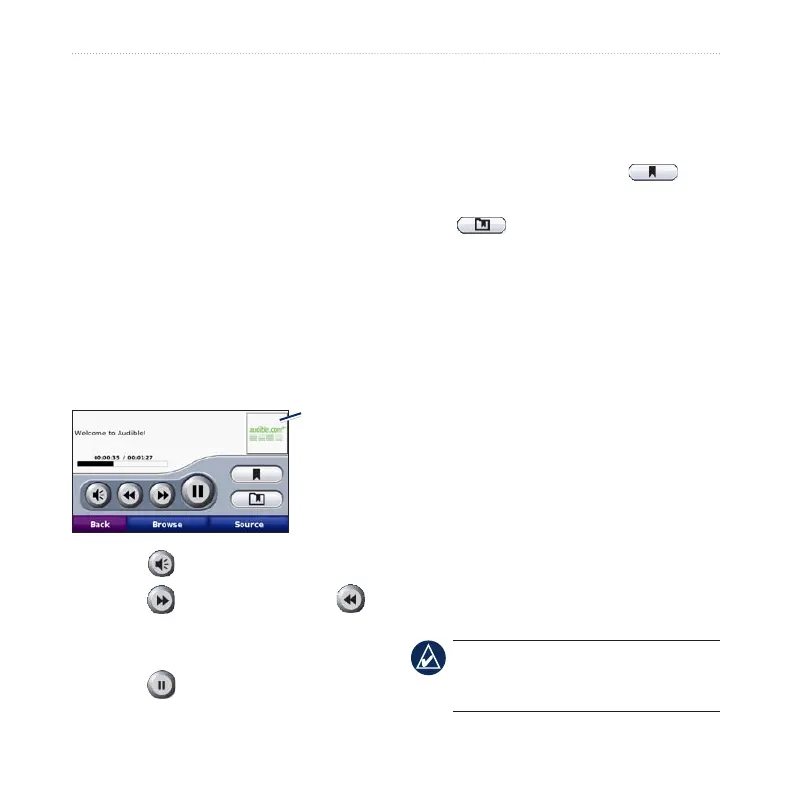
Book cover
art
Touch to adjust the volume.
Touch to skip a section and
to jump back. Press and hold to move
forward or backward.
Touch to pause the book.
•
•
•
Touch the book cover art to view
more detailed information.
Using Bookmarks
To create a bookmark, touch and
Bookmark. To view your bookmarks,
touch , and then touch a
bookmark. Touch Play to listen to the
book from the bookmark.
Loading Audible Books
1. Create an Audible.com account at
http://garmin.audible.com.
2. Download AudibleManager
®
.
3. Open AudibleManager. Follow the on-
screen instructions to activate your
nüvi (one-time process).
4. Purchase a book at http://garmin
.audible.com, and download the book
to your computer.
5. Use AudibleManager to transfer the
book to your nüvi or SD card.
TIP: Refer to AudibleManager’s Help
le for detailed instructions. Select
Help > Help.
•



 To Next Page