EasyManua.ls Logo

Garmin A03113 - User Manual

Garmin A03113
60 pages
Print Icon
To Next Page IconTo Next Page
Loading...
A03113
Owner’s Manual

Table of Contents

Question and Answer IconNeed help?

Do you have a question about the Garmin A03113 and is the answer not in the manual?

Overview

This document is an owner's manual for a Garmin chartplotter, identified by model number A03113. The device is a marine navigation and fishfinding system designed to assist users with various on-water activities.

Function Description

The Garmin chartplotter serves as a comprehensive marine navigation and information system. Its primary functions include:
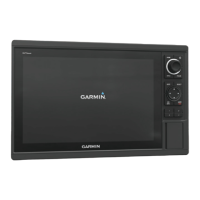
  • Navigation: Providing detailed charts (Navigation, Fishing, Perspective 3D, Mariner's Eye 3D, Fish Eye 3D) for planning courses, following routes, and navigating to destinations. It supports Go To, Route To, and Auto Guidance features for automated navigation, considering vessel parameters and chart data to suggest optimal paths while avoiding obstacles.
  • Fishfinding (Sonar): When connected to an optional Garmin sounder module and transducer, the device functions as a fishfinder, offering various sonar views (Traditional, Garmin ClearVü, SideVü, Split-Screen, Split-Zoom, Split-Frequency, Panoptix LiveVü Down/Forward, RealVü 3D Forward/Down/Historical, FrontVü) to visualize underwater environments, fish, and structures in real-time.
  • Radar: Integrating with optional Garmin marine radar systems (e.g., GMR Fantom, GMR 24 xHD) to display radar information, detect moving targets using MotionScope™ Doppler Radar Technology, enable guard zones for collision avoidance, and track MARPA targets.
  • Autopilot Control: When connected to a compatible autopilot system, the chartplotter allows for engaging heading hold, adjusting heading, and executing preset steering patterns (U-Turn, Circles, Zigzag, Williamson Turn, Orbit, Cloverleaf, Search) for fishing or maneuvering.
  • Digital Selective Calling (DSC): Interfacing with NMEA 0183 or NMEA 2000 VHF radios to transfer GPS position, receive distress and position information, track vessels sending position reports, and initiate individual routine calls or man-overboard distress calls.
  • Weather Information (SiriusXM Weather): With a compatible SiriusXM satellite weather receiver and active subscription, the device displays various weather data, including precipitation, storm cells, lightning, hurricane information, forecasts, sea conditions (winds, wave height/period/direction), and buoy reports.
  • Gauges and Graphs: Displaying engine and fuel data (when connected to a NMEA 2000 network with appropriate sensors), wind information (with a wind sensor), trip data (odometer, speed, time, fuel), and graphs for depth and water temperature over time.
  • Media Player: Controlling compatible NMEA 2000 networked stereos, allowing users to browse and play music from various sources, scan radio stations (AM, FM, SiriusXM, DAB), and manage presets.
  • Digital Switching: Monitoring and controlling compatible digital switching circuits on the vessel, such as lights and live well circuits.
  • Wireless Connectivity: Creating a Wi-Fi network for connecting wireless devices (e.g., smartphones with Garmin Helm™ app, quatix® watches, Garmin Nautix™ devices) to view or control the chartplotter and share data.

Important Technical Specifications

  • Memory Cards: Supports optional memory cards for map data, sonar recording, and data transfer. Estimated 1,500 hours of sonar data can be recorded on a 2 GB memory card.
  • GPS Receiver: Internal GPS receiver for satellite signal acquisition and current location determination. Can use external GPS antennas.
  • Sonar Transducers: Compatible with Garmin ClearVü™, GT transducers, and various dual-beam/dual-frequency transducers. Panoptix transducers are supported for advanced sonar views.
  • Network Connectivity: Integrates with Garmin Marine Network (Ethernet) for sharing user data (waypoints, tracks, routes) and peripheral device data. Supports NMEA 0183 and NMEA 2000 networks for communication with various marine electronics (VHF radios, autopilots, engine sensors, weather receivers).
  • Display: Features a screen with adjustable backlight and color modes. Supports split-screen views for displaying multiple data types simultaneously.
  • Power: Operates on DC voltage, recommended 12V.

Usage Features

  • Customizable Home Screen: Allows users to add frequently used features to a Favorites screen and organize SmartMode™ layouts for specific activities (e.g., cruising, docking).
  • Customizable Pages: Users can customize combination screens and SmartMode layouts by changing names, symbols, screen layouts, data overlays, and assigning presets.
  • Shortcuts: Create shortcuts to commonly used screens using shortcut keys.
  • Presets: Save and manage collections of settings optimized for different activities (e.g., fishing, cruising) for charts, sonar, and radar views.
  • User Data Management: Create, edit, save, and delete waypoints, routes, and tracks. Copy user data to/from memory cards and synchronize across the Garmin Marine Network.
  • Garmin Quickdraw™ Contours: Create custom contour maps with depth labels for any body of water, add labels for hazards, and share/download maps via the Garmin Quickdraw Community (Garmin Connect™).
  • Timed Arrival: Set a timed arrival for routes or Auto Guidance paths to coordinate with events like bridge openings or race start times.
  • Screenshot Capture: Save screenshots of any screen to a memory card.
  • Image Viewer: View .jpg, .png, and .bmp image files from a memory card.
  • Multilingual Support: Adjustable on-screen text language.
  • Keyboard Layout: Customizable on-screen keyboard layout.
  • Simulator Mode: Turn on/off a simulator to set time, date, speed, and simulated location.

Maintenance Features

  • Software Update: Update device software and media player software via memory card or USB flash drive.
  • System Information: View system software version, basemap version, unit ID number, and event log for troubleshooting.
  • Factory Settings Reset: Restore original chartplotter factory settings for all displays or specific layouts.
  • Screen Cleaning: Instructions for cleaning the anti-reflective coated screen using eyeglass lens cleaner and a soft, lint-free cloth.
  • Compass Calibration: Calibrate the internal compass of Panoptix transducers.
  • Water Speed Device Calibration: Calibrate speed-sensing transducers for improved accuracy.
  • Keel Offset: Compensate for the depth of a keel to measure depth from the bottom of the keel instead of the transducer location.
  • Water Temperature Offset: Compensate for water temperature readings from sensors.
  • Troubleshooting Guide: Provides solutions for common issues like GPS signal acquisition problems, device not turning on, and incorrect waypoint locations.
  • Product Registration: Online registration for product support.

Garmin A03113 Specifications

General IconGeneral
BrandGarmin
ModelA03113
CategoryGPS
LanguageEnglish

Related product manuals