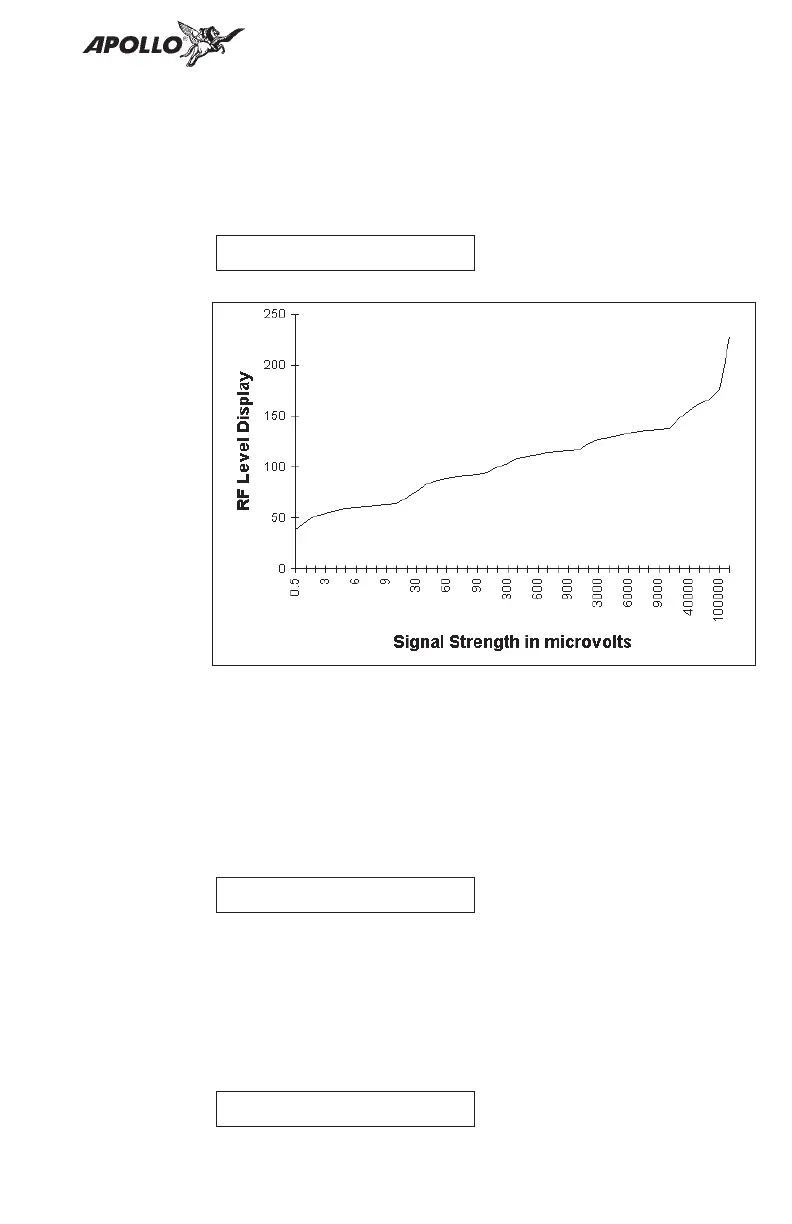
RF Level The RF Level function shows the relative signal strength
of the frequency you are listening to. The range
displayed is between 0 and 255. The value will
constantly change as you are viewing it as signal
conditions change.
Noise Level The Noise Level function shows the relative received
noise level of the frequency you are listening to. The
range displayed is between 0 and 255. The value will
constantly change as you are viewing it as signal
conditions change.
Headphone
Level
The Headphone Level function allows you to adjust the
headphone audio level. Turn the Small knob to change
the value. Setting the value to 0 slaves the headphone
audio level to the volume control knob. The range is
from 0 to 255.
11
System Functions
NOISE 017
Hdphon Lvl
RFLVL 123


 To Next Page