Navigation Lights Option A
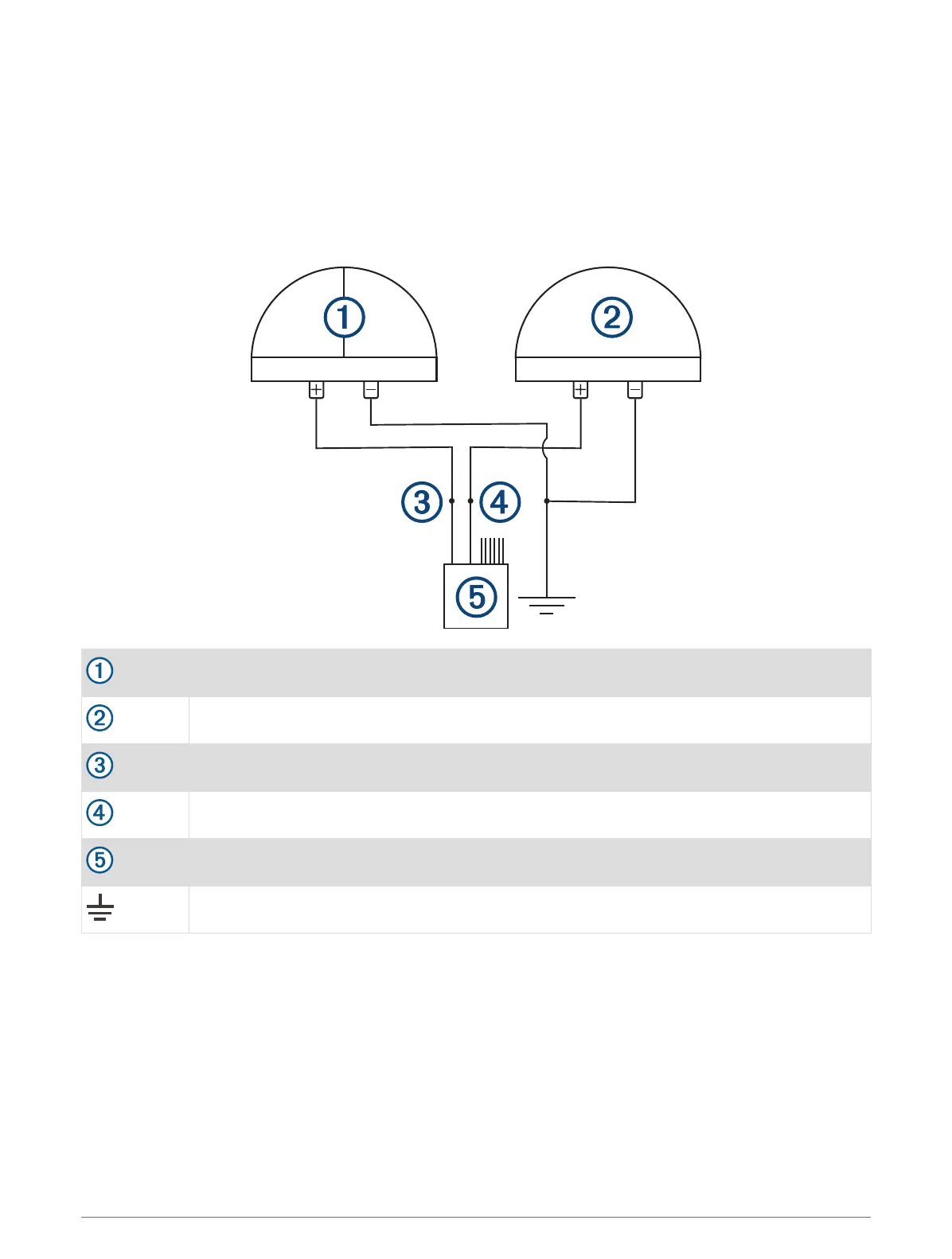
By default, the device is set to this option. Channels 1 and 2 are interlocked and intended for one connection to
red and green navigation lights and one connection to white navigation/anchor lights.
When the device is connected properly using this option, it functions as described below.
• When underway, pressing the switch for channel 1 turns on and off both channel 1 and channel 2 (both red
and green navigation lights and white navigation/anchor lights).
• When at anchor, pressing the switch for channel 2 turns on and off channel 2 only (white navigation/anchor
lights), and turns off channel 1 (red and green navigation lights) if it is already on.
Red and green navigation lights
White navigation/anchor light(s)
CH 1-TOGGLE 1(5A) wire
CH 2-TOGGLE 2(5A) wire
X1 wiring harness
Power ground
13



 To Next Page