Locking and Unlocking the Touchscreen
You can lock the touchscreen to prevent inadvertent screen touches.
1 Hold to view the controls menu.
2 Select .
The touchscreen locks and does not respond to touches until you unlock it.
3 Hold to unlock the touchscreen.
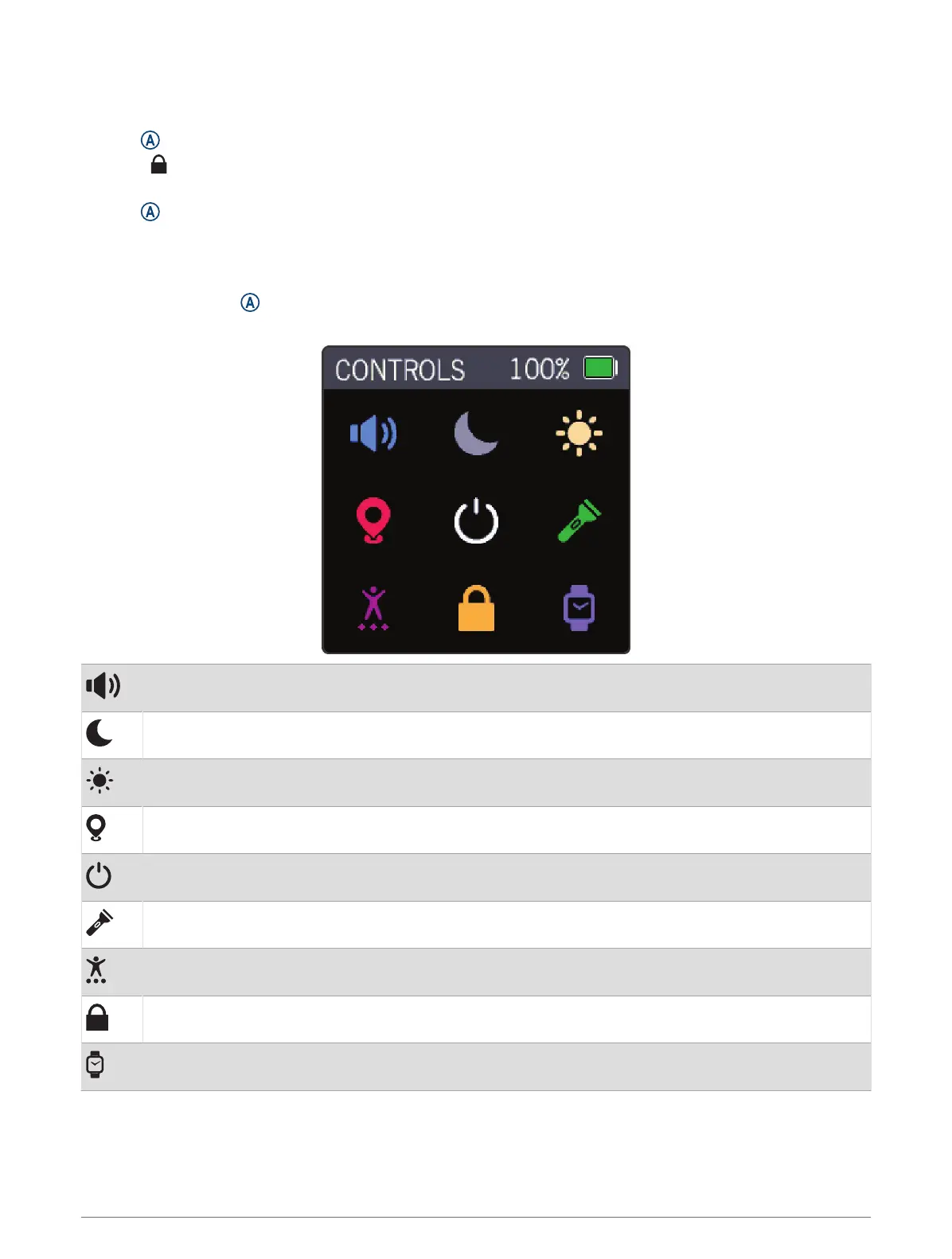
Controls
The controls menu contains shortcuts, such as locking the touchscreen and turning the watch off.
From any screen, hold for 2 seconds.
NOTE: You cannot access the controls menu while you are recording an activity.
Displays the volume settings (Sound and Vibration Settings, page19).
Enables do not disturb mode (Using Do Not Disturb Mode, page9).
Displays the brightness settings (Display Settings, page18).
Displays the check-in feature (Checking in From the Watch, page14).
Turns the watch off.
Turns on the flashlight (Using the Flashlight, page12).
Displays activities (Starting an Activity, page15).
Locks the touchscreen (Locking and Unlocking the Touchscreen, page2).
Displays the clocks menu (Clocks, page17).
2 Introduction











 To Next Page