Need help?
Do you have a question about the Garmin DELTA CANINE REMOTE and is the answer not in the manual?
Details the process of connecting the remote to your device via the Garmin Canine app.
Explains how to wake the remote from power save mode and reconnect it.
Describes how to attach the remote to various objects using available mounts.
Guides users through the steps to replace the remote's battery.
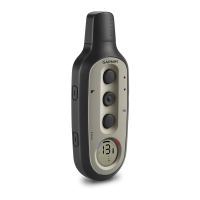
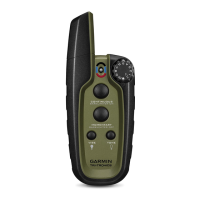
The Garmin Delta Canine Remote is a device designed to assist with dog training, functioning as a remote control for a compatible Delta Smart™ device. It allows users to deliver various training commands to their dog from a distance.
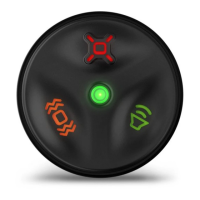
The remote features three primary keys for training:
A Status LED on the remote provides visual feedback. It flashes green when a key is selected, indicating that a training command is being sent. This green flash lasts for a maximum of 8 seconds, which is the typical duration for training actions. The LED flashes red when the remaining battery power is low, alerting the user that the battery needs to be replaced soon.
To use the remote, it must first be paired with a compatible Delta Smart™ device, which in turn needs to be connected to the Garmin Canine™ app on a smartphone. The pairing process involves installing and opening the Garmin Canine app, navigating to the "My Family" section, selecting the dog to pair with the remote, and then following the in-app instructions. Once paired, the remote automatically connects to the Delta Smart device whenever it is within range and powered on.
The remote is designed with a power-save mode to extend battery life. After 5 minutes of inactivity, it enters this mode. To reactivate it, the user simply needs to select any key. It's important to note that there might be a brief delay of a few seconds for the remote to reconnect with the Delta Smart device before a training command can be initiated after reactivation.
The Delta Canine Remote is designed for portability and convenience during training sessions. It comes with various mounts, either included with the product or available as optional accessories. These mounts allow the user to attach the remote to their body, a bike, or other objects, ensuring it's always accessible during training. Attaching the remote to a mount is straightforward: the user aligns two notches on the remote with the sides of the mount and presses the remote into the mount until it clicks securely into place. To remove the remote from the mount, the user gently presses on a release tab and lifts the remote away.
One of the key maintenance features is the user-replaceable battery. The remote uses a CR2032 (3 V) lithium coin-cell battery, which can last up to 1.5 years with 1 hour of use per day. Replacing the battery requires a small Phillips screwdriver and a small flat screwdriver.
The steps for battery replacement are as follows:
This straightforward battery replacement process ensures that the remote can be easily maintained by the user, minimizing downtime and ensuring continuous functionality for dog training.
 General
| Brand | Garmin |
|---|---|
| Model | DELTA CANINE REMOTE |
| Category | Pet Care Product |
| Control Type | Remote |
| Water Resistance | Yes |
| Water rating | IPX7 |
| Stimulation levels | 18 |
| Bark correction | Yes |
| Product Type | Dog Training Collar Remote |
| Training Modes | Tone, Vibration |
| Battery type | Rechargeable Lithium-ion |
| Stimulation types | Static |
| Vibration Levels | 1 |
| Compatibility | Garmin Delta Smart Collar |

 To Next Page