EasyManua.ls Logo

Garmin Delta Inbounds - User Manual

Garmin Delta Inbounds
16 pages
Print Icon
To Next Page IconTo Next Page
Loading...
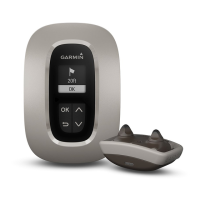
DELTA INBOUNDS™
Owner’s Manual
Question and Answer IconNeed help?

Do you have a question about the Garmin Delta Inbounds and is the answer not in the manual?

Summary

Getting Started

Setting Up the Delta Inbounds System

Tasks to set up the Delta Inbounds system, including charging and installation.

Charging the Dog Collar Device

Instructions for charging the dog collar device and its battery.

Setting up a Boundary

Steps to establish a wireless boundary for the containment system.

Dog Training

Guidance on training methods for using the containment system effectively.

Dog Training

Setting the Intensity Level Using the Base Unit

How to adjust the stimulation intensity level via the base unit.

Choosing the Correct Intensity Level

Steps to determine the appropriate initial stimulation intensity for training.

Introducing Your Dog to the Boundary

First phase of training to familiarize the dog with the boundary.

Reinforcing Boundary Awareness Using Stimulation

Second phase of training using stimulation or vibration for correction.

Testing Boundary Awareness Using Distraction

Third phase of training to test boundary awareness with distractions.

Supervising Your Dogs Boundary Awareness

Final phase of training to test boundary awareness off-leash.

BarkLimiter

Automatic Intensity

How the device automatically adjusts stimulation intensity for barking.

Enabling the BarkLimiter Feature

Steps to activate and configure the BarkLimiter feature.

Garmin Canine App

Pairing Your Smartphone with the Dog Collar Device

Connecting your smartphone to the dog collar device via Bluetooth.

Syncing the Dog Collar Device with the Garmin Canine App

Daily syncing of device data with the mobile application.

Pairing a Dog Collar Device with the Base Unit

Adding an additional dog collar device to the base unit.

Keep Away Tag Sensor

Pairing the Sensor with Your Device

Connecting the Keep Away Tag sensor to your dog collar device.

Troubleshooting

Summary

Getting Started

Setting Up the Delta Inbounds System

Tasks to set up the Delta Inbounds system, including charging and installation.

Charging the Dog Collar Device

Instructions for charging the dog collar device and its battery.

Setting up a Boundary

Steps to establish a wireless boundary for the containment system.

Dog Training

Guidance on training methods for using the containment system effectively.

Dog Training

Setting the Intensity Level Using the Base Unit

How to adjust the stimulation intensity level via the base unit.

Choosing the Correct Intensity Level

Steps to determine the appropriate initial stimulation intensity for training.

Introducing Your Dog to the Boundary

First phase of training to familiarize the dog with the boundary.

Reinforcing Boundary Awareness Using Stimulation

Second phase of training using stimulation or vibration for correction.

Testing Boundary Awareness Using Distraction

Third phase of training to test boundary awareness with distractions.

Supervising Your Dogs Boundary Awareness

Final phase of training to test boundary awareness off-leash.

BarkLimiter

Automatic Intensity

How the device automatically adjusts stimulation intensity for barking.

Enabling the BarkLimiter Feature

Steps to activate and configure the BarkLimiter feature.

Garmin Canine App

Pairing Your Smartphone with the Dog Collar Device

Connecting your smartphone to the dog collar device via Bluetooth.

Syncing the Dog Collar Device with the Garmin Canine App

Daily syncing of device data with the mobile application.

Pairing a Dog Collar Device with the Base Unit

Adding an additional dog collar device to the base unit.

Keep Away Tag Sensor

Pairing the Sensor with Your Device

Connecting the Keep Away Tag sensor to your dog collar device.

Troubleshooting

Garmin Delta Inbounds Specifications

General IconGeneral
BrandGarmin
ModelDelta Inbounds
CategoryPet Care Product
LanguageEnglish

Related product manuals