
 Need help?
Do you have a question about the Garmin DELTA SE and is the answer not in the manual?
Steps to set up the Delta SE system, including attaching the collar, charging, and pairing devices.
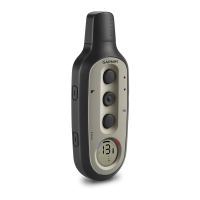
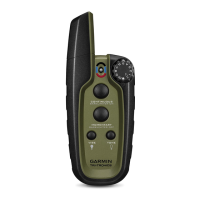
Identifies key components of the Delta SE Handheld Device with numbered labels and descriptions.
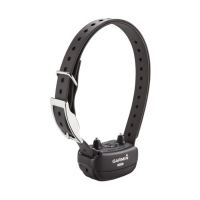
Identifies components of the Delta SE Dog Collar Device with numbered labels and descriptions.
Step-by-step instructions for securely attaching the dog collar device to the collar strap.
Instructions on how to charge the handheld device, including LED status indicators.
Instructions for charging the dog collar device, including LED status and clip removal.
Procedures for powering on both the handheld and dog collar devices.
Instructions for turning off the dog collar device; handheld cannot be turned off.
Step-by-step guide on how to pair a dog collar device with the handheld unit.
How to select which dog collar device to control using the handheld switch.
Guide to choosing and attaching the correct contact points based on dog coat type.
Instructions on proper collar fitting for optimal performance and dog comfort.
Explanation of different stimulation levels and training methods available on the system.
How to determine the appropriate stimulation intensity level for a dog.
Steps to adjust the stimulation intensity level using the device's knob.
Guidance on teaching basic commands like 'heel,' 'sit,' and 'here' before using collar.
Step-by-step instructions for teaching the 'heel' command using a leash.
Instructions for teaching the 'sit' and 'stay' commands using a leash.
Steps to teach the 'come here' command, emphasizing its importance for control.
How to introduce collar stimulation for training and progress.
Tips to prevent the dog from obeying only when wearing the collar.
Applying collar training for 'heel' and 'sit' commands after basic training.
Applying collar training for the 'come here' command.
Information on updating device software using Garmin Express.
Steps to install and set up Garmin Express software on a computer.
Instructions for connecting the handheld device to a computer via USB.
Instructions for connecting the dog collar device to a computer via USB.
Detailed technical specifications for the Delta SE handheld device.
Detailed technical specifications for the Delta SE dog collar device.
How to check the battery status of the handheld device using the LED indicator.
How to check the battery status of the dog collar device using the LED indicator.
Instructions for resetting the handheld device by holding specific buttons.
General guidelines for maintaining and protecting the device from damage.
Steps for cleaning the handheld and collar devices safely.
Resources for additional support, manuals, and accessories.
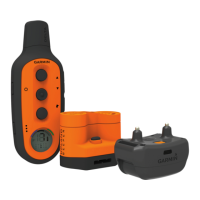
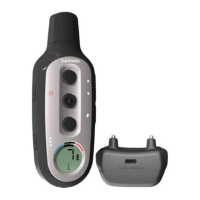
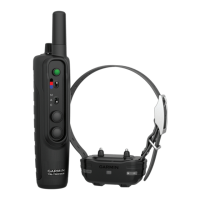
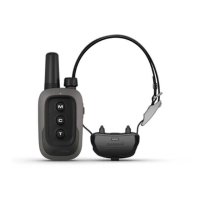
The Garmin Delta SE is a dog training system consisting of a handheld device and a dog collar device, designed to aid in the effective training of dogs. The system utilizes various training methods including momentary stimulation, continuous stimulation, tone, and vibration, offering 10 intensity levels for stimulation to cater to different dog temperaments and training needs.
The primary function of the Delta SE system is to provide a means for dog owners to reinforce training commands and correct unwanted behaviors. The handheld device acts as the controller, allowing the user to select the desired training method and intensity level. It features a radio antenna for communication with the collar, an intensity level selection knob, a status LED, and a dog collar device selection switch. Three dedicated buttons are present for momentary stimulation, continuous stimulation, and tone training. The dog collar device, worn by the dog, receives signals from the handheld device and delivers the chosen training cue (stimulation, tone, or vibration) through contact points. The collar also includes a power button, a status LED, and charging clip contacts. The system is designed to be an integral part of an overall training program, complementing traditional leash-based training.
Setting up the Delta SE system involves several steps to ensure proper functionality. First, the dog collar device must be attached to the collar strap, ensuring the buckle faces outward and the strap is threaded correctly through the slots on the device. Both the handheld device and the dog collar device require charging before initial use. The handheld device charges via a USB port, indicated by a status LED that turns solid red during charging and solid green when fully charged. The dog collar device charges using a snap-on charging clip, with its status LED also indicating charging status (solid red for charging, solid green for full charge).
Turning on the devices is straightforward: the handheld device is always on after its initial connection to a power source for charging, while the dog collar device is turned on by holding its power button until the status LED flashes and the collar beeps. For the devices to communicate, they must be paired. If purchased together, they are typically pre-paired. Otherwise, the pairing process involves turning on the dog collar device, sliding the dog collar device selection switch on the handheld device, and then holding the power button on the collar while pressing a training button on the handheld device after the second beep from the collar. A short beep indicates successful pairing, while a long beep signifies a failed pairing. The handheld device can be paired with up to two dog collar devices, which can be selected using the dog collar device selection switch.
Proper fitting of the collar on the dog is crucial for effective training and to prevent irritation. The contact points, which come in different lengths for various coat types, must be selected and tightened with the included wrench. The device should be positioned at the front of the dog's neck with the status LED facing the chin, and the strap should be snug enough to prevent rotation or sliding, but not so tight as to impede swallowing. The contact points must make good contact with the dog's skin.
Training with the Delta SE system should begin after the dog has a basic understanding of commands like "heel," "sit," and "here" using a leash. The intensity level for stimulation should be chosen carefully, starting at level 1 and gradually increasing until a slight but recognizable reaction from the dog is observed. This baseline intensity should not cause the dog to vocalize more than once. The intensity can be adjusted using the selection knob on the handheld device, or the knob can be set to 'V' for vibration training.
The system supports various training methods:
To prevent "collar-wise" behavior (where the dog only obeys commands when wearing the collar), it's recommended to train the dog without the Delta SE system initially, turn off the collar device during early training sessions, and remove it outside of training sessions. Consistent praise for obedience is also important. The manual provides detailed guidance on integrating collar training with basic commands like "heel," "sit," and "come here," emphasizing patience, consistency, and gradual introduction of distractions.
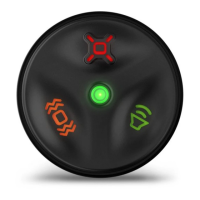
The battery levels of both devices can be checked. For the handheld device, pressing a training button illuminates the status LED: green for a good charge, yellow for needing a charge soon, red for very low battery, and flashing red for a depleted battery. For the dog collar device, its status LED flashes every few seconds when on: green for a good charge, yellow for less than 50% charge, red for needing a charge soon, and flashing red for a depleted battery with disabled training features. The handheld device can be reset by holding the 'M' and 'T' buttons for 12 seconds.
Device care is essential for longevity. Users are advised to prevent prolonged exposure to extreme temperatures to avoid permanent damage. Chemical cleaners, solvents, sunscreen, and insect repellents should be avoided as they can damage plastic components and finishes. The USB port's weather cap should be kept tightly secured to prevent damage. The device should also be protected from extreme shock and harsh treatment.
For cleaning, the device should be wiped with a cloth dampened with a mild detergent solution and then dried completely. It's crucial to thoroughly dry the USB port, weather cap, and surrounding areas before charging or connecting to a computer to prevent corrosion. Similarly, for the collar, contacts and surrounding areas should be dry before connecting the charging clip. To prevent irritation, the collar should be removed for at least eight hours out of every 24-hour period. Any flea or tick spray applied to the dog must be completely dry before placing the collar on the dog.
Product updates and additional support information are available through Garmin Express (garmin.com/express) and the Garmin support website (support.garmin.com). Users can also find information on optional accessories and replacement parts at buy.garmin.com or by contacting a Garmin dealer.
 General
| Stimulation Levels | 10 |
|---|---|
| Device Type | Dog Training System |
| Correction Modes | Tone, Vibration |
| Range | 1/2 mile |
| Water Rating | IPX7 |
| Dog Compatibility | All breeds and sizes |
| Battery Type | Rechargeable lithium-ion |
| Receiver Collar Weight | 65 g |

 To Next Page