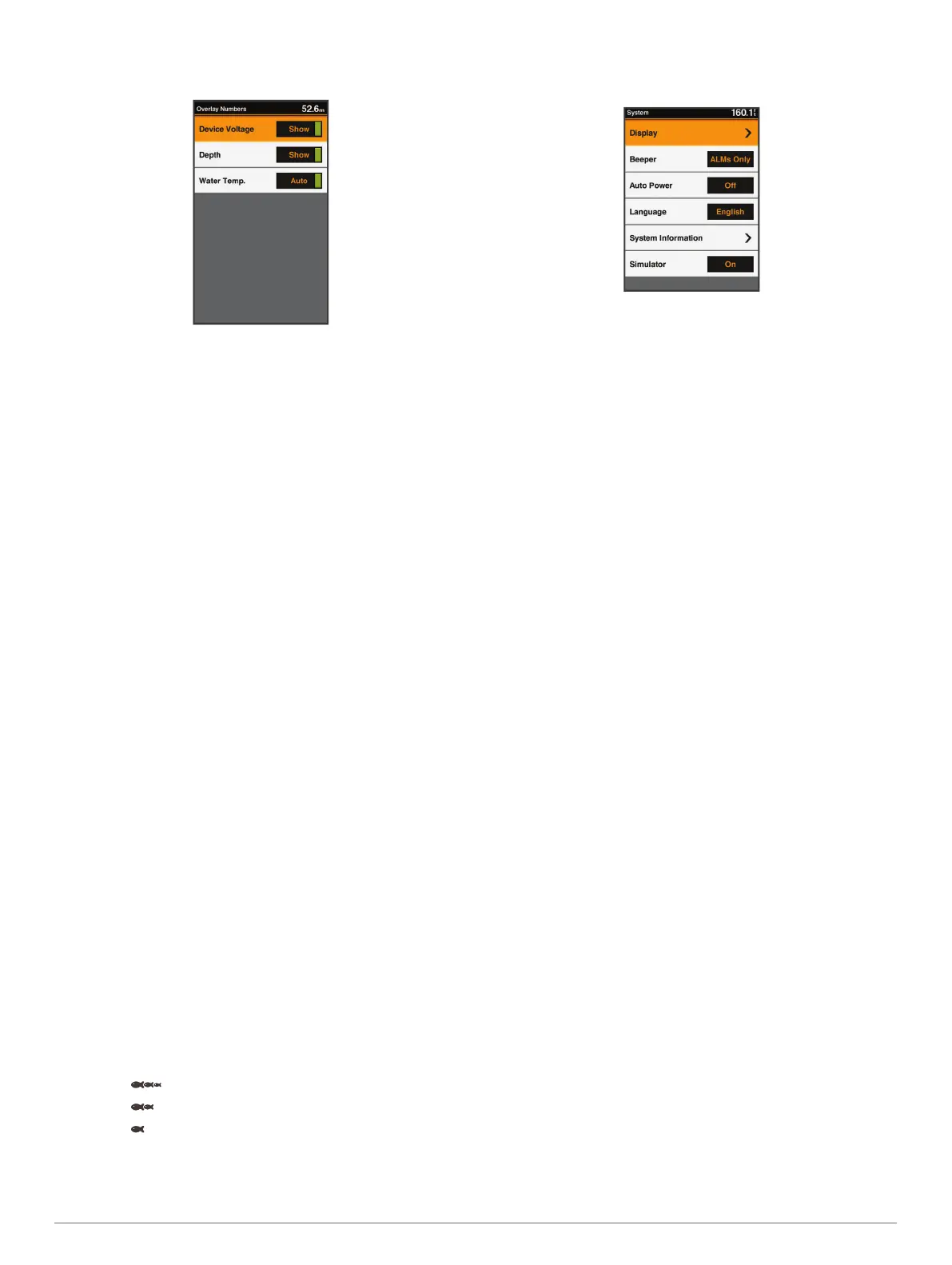
From a sonar screen, select MENU > Sonar Setup > Overlay
Numbers.
Device Voltage: Shows the voltage of the device.
Depth: Shows the transducer's present depth.
Water Temp.: Shows the present water temperature.
Device Configuration
FF 350 Plus Settings Menu Tree
• System
◦ Display
◦ Backlight
◦ Color Mode
◦ Configure Colors
◦ Beeper
◦ Off
◦ Alarms Only
◦ On (Selections and Alarms)
◦ Auto Power
◦ Language
◦ System Information
◦ Event Log
◦ Software Information
◦ Factory Settings
◦ Simulator
• My Vessel
◦ Keel Offset
◦ Temp. Offset
◦ Calibrate Water Speed
• Alarms
◦ System
◦ Device Voltage
◦ Sonar
◦ Shallow Water
◦ Deep Water
◦ Water Temp.
◦ Fish
◦ Off
◦
◦
◦
• Units
◦ System Units
System Settings
Select Settings > System.
Display: Adjusts the backlight brightness (Adjusting the
Backlight, page 1) and color scheme (Changing the Color
Mode, page 1).
Beeper: Turns on and off the tone that sounds for alarms and
selections (Setting the Beeper, page 1).
Auto Power: Turns on the device automatically when power is
applied.
Language: Sets the on-screen language.
System Information: Provides information about the device and
the software version.
Simulator: Turns on the simulator.
System Information
Select Settings > Settings > System Information.
Event Log: Allows you to view a log of system events.
Software Information: Provides information about the device
and the software version.
Garmin Devices: Provides information about connected Garmin
devices.
Factory Settings: Restores the device to factory settings.
NOTE: This deletes any setting information you have
entered.
My Vessel Settings
NOTE: Some settings and options require additional hardware.
Select Settings > My Vessel.
Keel Offset: Offsets the surface reading for the depth of a keel,
making it possible to measure depth from the bottom of the
keel instead of from the transducer location (Setting the Keel
Offset, page 6).
Temp. Offset: Compensates for the water temperature reading
from a temperature-capable transducer (Setting the Water
Temperature Offset, page 7).
Calibrate Water Speed: Calibrates the speed-sensing
transducer or sensor (Calibrating a Water Speed Device,
page 7).
Transducer Type: Displays the type of transducer connected to
the device (Selecting the Transducer Type, page 1).
Setting the Keel Offset
You can enter a keel offset to compensate the surface reading
for the depth of a keel, making it possible to measure water
depth or depth below the keel instead of depth below the
transducer. Enter a positive number to offset for a keel. You can
enter a negative number to compensate for a large vessel that
may draw several feet of water.
NOTE: A buffer of 2 to 3 feet from the bottom of the keel is
recommended to ensure a safe distance from the keel to the
bottom.
6 Device Configuration





 To Next Page