• Keep the original sales receipt, or a photocopy, in a safe
place.
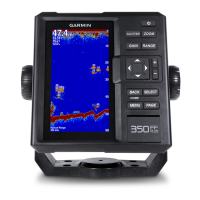
FF 350 Plus Specifications
Item Measurement
Dimensions (W x H x D) 176 x 190 x 81.8 mm (6.94 x 7.5 x 3.25 in.)
Weight 696 g (1.5 lbs)
Screen size 6 inch
Resolution (W x H) 480 x 800 pixels
Temperature range From -15° to 55°C (from 5° to 131°F)
Input power From 10 to 36 Vdc
Typical current draw 0.7 A
Max power usage 15W @ 12 Vdc
Fuse 6 A
Water rating* IEC 60529 IPX7
Frequencies Traditional: 50/77/200 kHz
Garmin ClearVü
™
: 260/455/800 kHz
Transmit power (RMS)** 300 W
Maximum depth*** 1750 ft. freshwater, 830 ft. seawater
Compass-safe distance 30 cm (11.8 in.)
*The device withstands incidental exposure to water of up to 1 m
for up to 30 min. For more information, go to www.garmin.com
/waterrating.
**Dependent upon transducer rating and depth.
***Dependent upon the transducer, water salinity, bottom type,
and other water conditions.
Troubleshooting
My device does not turn on
• Push the power cable all the way into the back of the device.
Even if the cable seems to be connected, you should push
firmly so that it is fully seated.
• Make sure the power source is generating power.
You can check this several ways. For example, you can
check whether other devices powered by the source are
functioning.
• Check the fuse in the power cable.
The fuse should be located in a holder that is part of the red
wire of the power cable. Check that the proper size fuse is
installed. Refer to the label on the cable or the installation
instructions for the exact fuse size needed. Check the fuse to
make sure there is still a connection inside of the fuse. You
can test the fuse using a multimeter. If the fuse is good, the
multimeter reads 0 ohm.
• Check to make sure the device is receiving at least 10 Vdc,
but 12 Vdc is recommended.
To check the voltage, measure the female power and ground
sockets of the power cable for DC voltage. If the voltage is
less than 10 Vdc, the device will not turn on.
My sonar does not work
• Push the transducer cable all the way into the back of the
device.
Even if the cable seems to be connected, you should push
firmly so that it is fully seated.
• Check to make sure the sonar transmission is turned on.
物質宣言
部件名称 有毒有害物质或元素
铅 汞 镉 六价铬 多溴联苯 多溴二苯醚
印刷电路板组件 X O O O O O
屏幕/背光 X X O O O O
金属零件 X O O O O O
电缆 电缆组件 连接器 X O O O O O
本表格依据 SJ/T11364 的规定编制。
O: 代表此种部件的所有均质材料中所含的该种有害物质均低于
(GB/T26572) 规定的限量
X: 代表此种部件所用的均质材料中, 至少有一类材料其所含的有害物质高于
(GB/T26572) 规定的限量
*該產品說明書應提供在環保使用期限和特殊標記的部分詳細講解產品的擔保使用條件。
產品
8 Appendix





 To Next Page