1
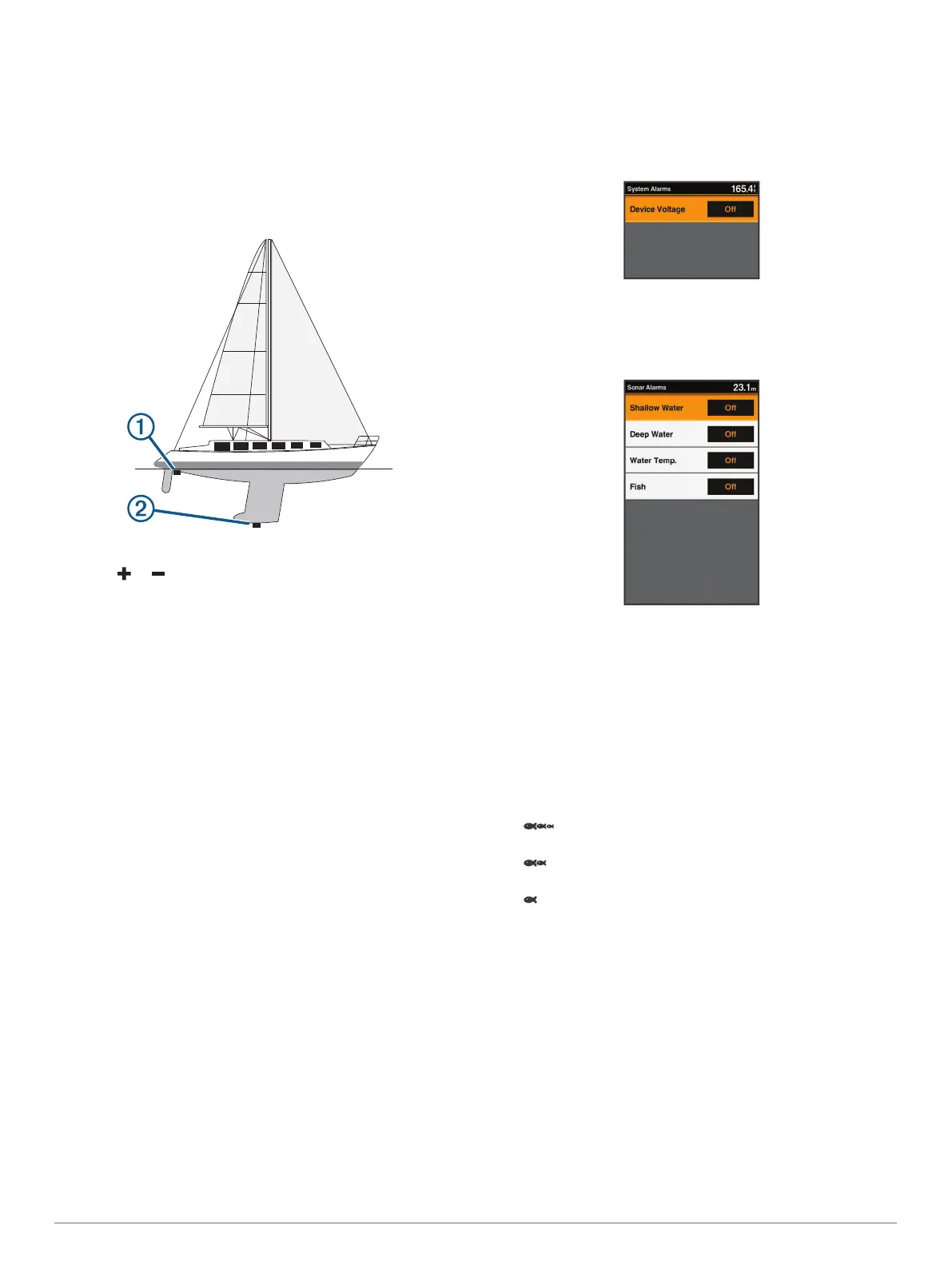
Complete an action, based on the location of the transducer:
• If the transducer is installed at the water line
À
, measure
the distance from the transducer location to the keel of the
boat. Enter this value in steps 3 and 4 as a positive
number to display depth below keel.
• If the transducer is installed at the bottom of the keel
Á
,
measure the distance from the transducer to the water
line. Enter this value in steps 3 and 4 as a negative
number to display water depth. Enter a 0 in this value to
display depth below keel and depth below transducer.
2
Select Settings > My Vessel > Keel Offset.
3
Select or based on the location of the transducer.
4
Enter the distance measured in step 1.
Setting the Water Temperature Offset
You can set the temperature offset to compensate for the
temperature reading from a temperature-capable sensor.
1
Measure the water temperature using the temperature-
capable transducer that is connected to the device.
2
Measure the water temperature using a different
thermometer or temperature sensor that is known to be
accurate.
3
Subtract the water temperature measured in step 1 from the
water temperature measured in step 2.
This is the temperature offset. Enter this value in step 5 as a
positive number if the sensor connected to the device
measures the water temperature as being colder than it
actually is. Enter this value in step 5 as a negative number if
the sensor connected to the device measures the water
temperature as being warmer than it actually is.
4
Select Settings > My Vessel > Temp. Offset.
5
Use the arrow keys to enter water temperature offset
measured in step 3.
Calibrating a Water Speed Device
If you have a speed-sensing transducer connected to the
chartplotter, you can calibrate that speed-sensing device to
improve the accuracy of water-speed data displayed by the
chartplotter.
1
Select Settings > My Vessel > Calibrate Water Speed.
2
Follow the on-screen instructions.
If the boat is not moving fast enough or the speed sensor is
not registering a speed, a message appears.
3
Select OK, and safely increase the boat speed.
4
If the message appears again, stop the boat, and ensure the
speed-sensor wheel is not stuck.
5
If the wheel turns freely, check the cable connections.
6
If you continue to get the message, contact Garmin product
support.
Alarms Settings
System Alarm
Select Settings > Alarms > System.
Device Voltage: Sets an alarm to sound when the battery
reaches a specified low voltage.
Sonar Alarms
Select Settings > Alarms > Sonar.
Shallow Water: Sounds when the water depth is shallower than
the specified depth.
Deep Water: Sounds when the water depth is deeper than the
specified depth.
Water Temp.: Sounds when the water temperature varies more
than ± 2°F (± 1.1°C). Alarm settings are saved when the
device is turned off.
NOTE: You must connect the device to a temperature-
capable transducer to use this alarm.
Fish: Sets an alarm to sound when the device detects a
suspended target.
• sets the alarm to sound when fish of all sizes are
detected.
• sets the alarm to sound only when medium or large
fish are detected.
• sets the alarm to sound only when large fish are
detected.
Restoring the Factory Default Settings
NOTE: This deletes all settings information you have entered.
1
Select MENU > System > System Information > Factory
Settings.
2
Select an option.
Appendix
Registering Your Device
Help us better support you by completing our online registration
today.
• Go to my.garmin.com.
Appendix 7





 To Next Page