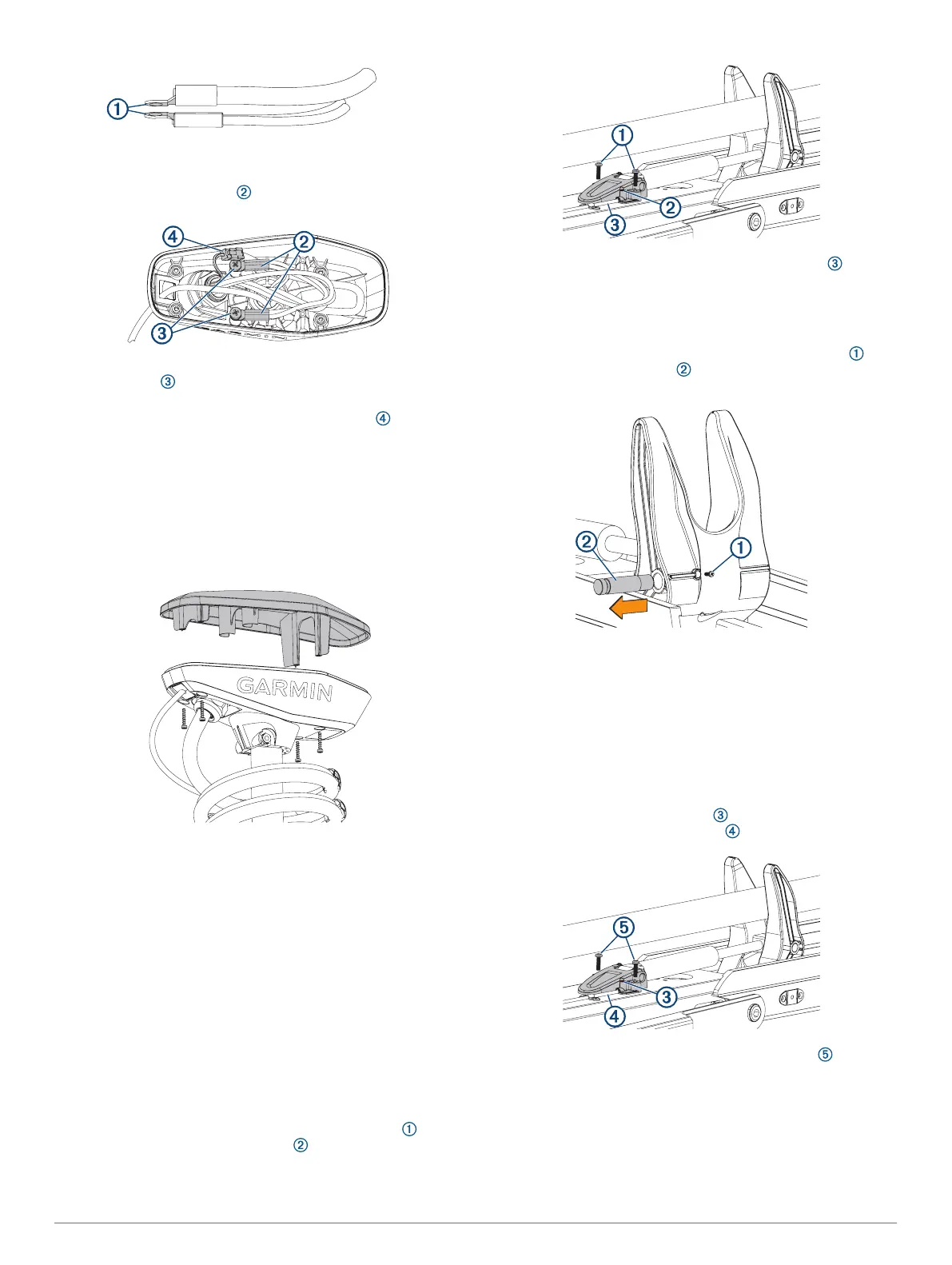
NOTE: If the cables are stacked incorrectly, you cannot close
the shaft cap cover.
2
Place the stacked cables over the stand outs in the shaft
cap.
3
Using a #3 Phillips screwdriver, install the two screws and
lock washers to secure the power cables onto the stand
outs in the shaft cap.
4
Align both sections of the data cable connector , and push
together to connect them.
Closing the Shaft Cap
Before you can close the shaft cap, you must connect the cables
inside the shaft cap (Connecting the Cables in the Shaft Cap,
page 16).
1
Place the lid on the shaft cap.
2
Using a #2 Phillips screwdriver, install the four screws to
secure the lid of the shaft cap.
Removing the Steering Servo from the Mount
Before you can remove the steering servo from the mount, you
must remove the power and transducer cables from the mount
(Removing the Power and Transducer Cables From the Mount,
page 9).
1
Disconnect the lower gas spring (Disconnecting the Lower
Gas Spring, page 17).
2
Disconnect the upper link of the mount (Disconnecting the
Upper Link of the Mount, page 17).
3
Disconnect the upper gas spring (Disconnecting the Upper
Gas Spring, page 18).
4
Disconnect the lower link of the mount (Disconnecting the
Lower Link of the Mount from the Steering Servo, page 18).
Disconnecting the Lower Gas Spring
1
Place the trolling motor in the stowed position.
2
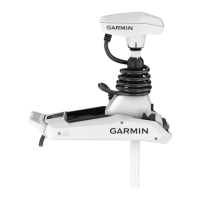
Using a #2 Phillips screwdriver, remove the screws that
secure the lower gas spring clevis to the lower link of the
mount.
3
Lift the lower gas spring clevis off of the safety rod .
Replacing the Lower Gas Spring
Before you can replace the lower gas spring, you must
disconnect it from the mount (Disconnecting the Lower Gas
Spring, page 17).
1
Using a #0 Phillips screwdriver, remove the set screw that
secures the gas spring pin to the shaft stabilizer on the
mount.
2
Slide out the gas spring pin and lift up on the gas spring to
remove it.
3
Place the end of the replacement gas spring into the shaft
stabilizer on the mount.
4
Slide the gas spring pin into the shaft stabilizer, through the
end of the gas spring, until it is flush with the edge of the
shaft stabilizer.
5
Install the set screw in the shaft stabilizer to secure the gas
spring pin.
6
Place the lower gas spring clevis on the lower link of the
mount, fitting it over the safety rod .
7
Using a #2 Phillips screwdriver, install the screws that
secure the lower gas spring clevis to the lower link of the
mount.
Disconnecting the Upper Link of the Mount
Before you can disconnect the upper link of the mount, you must
remove the power and transducer cables from the mount
(Removing the Power and Transducer Cables From the Mount,
page 9).
17




 To Next Page