3
Timer Mode
Using the Timer Mode
MAIN MODES
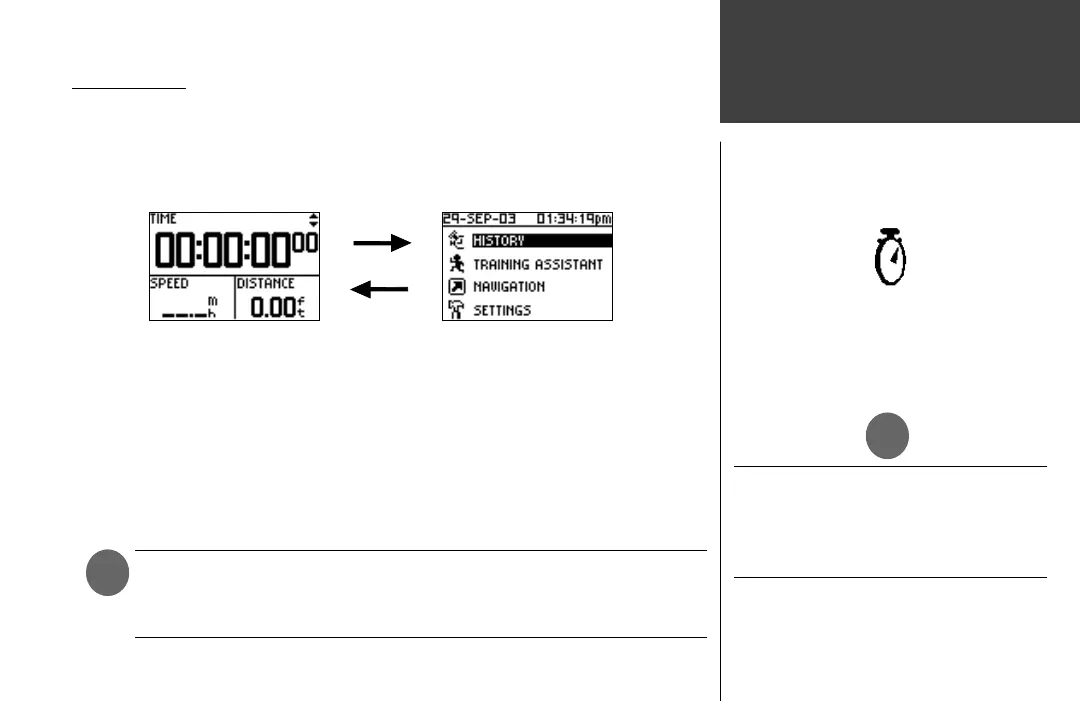
All of the information needed to operate the Forerunner 201 is found on two main modes
(or display screens). These modes are the Timer Mode and Menu Mode. Press the MODE
Button to cycle through the 2 modes.
Using the Timer Mode:
1. In the Timer Mode, press the START/STOP button to start timing and tracking distance.
2. Press the START/STOP button to stop timing and tracking distance data.
3. Press the LAP button to record when a lap is completed.
4. While in Timer Mode, the data you are recording is called your Current Run. When you reset
the Timer, the data is considered your Last Run. When the timer is stopped, press and hold
RESET for 3 seconds to reset all workout data. The unit automatically stores Last Run and
History information.
NOTE: A manual stop and restart of the Timer automatically starts a new lap.
You can also setup the Forerunner to automatically lap and/or pause at a
spe cifi c distance and/or speed (pg. 9-10).
)
Timer Indicator
Menu Mode
Timer Mode
Press the MODE, UP or DOWN buttons
to remove messages or alerts from the
display (or wait until they automatically
time out and disappear.)
)













 To Next Page