4
Timer Mode
Data Screens
Data Screens
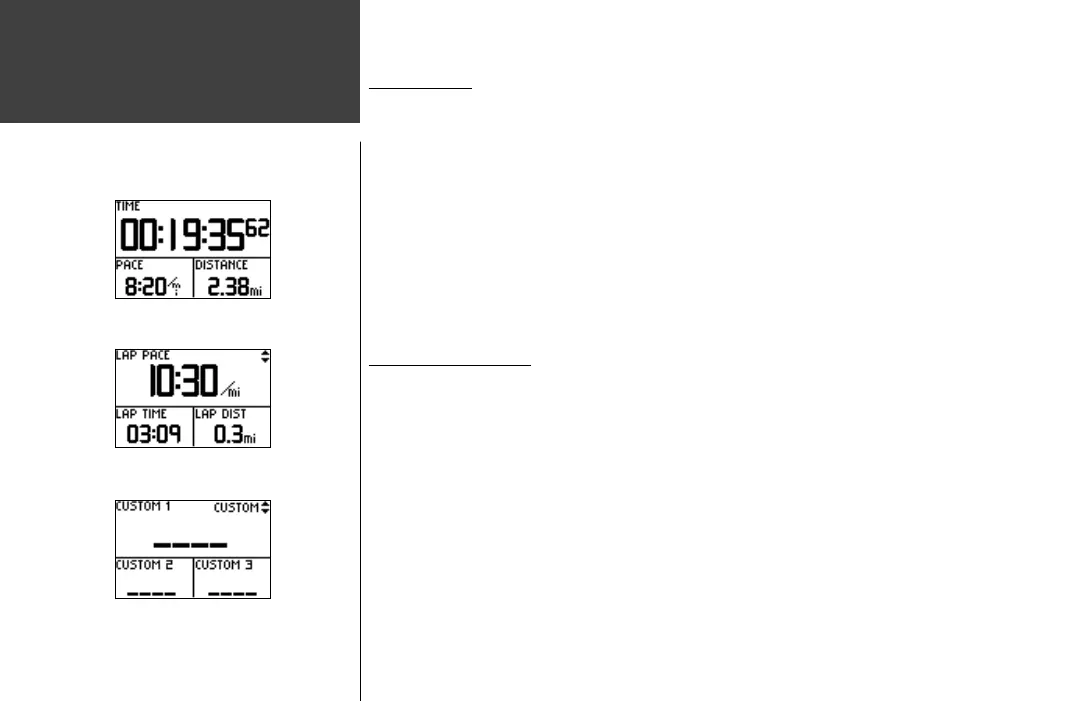
During your workout there are 3 data screens you can access by pressing the DOWN or
UP buttons. These data screens are:
• Timer Screen - Time/Pace(Speed)/Distance
• Current Lap Screen - Lap Pace(Speed)/Lap Time/Lap Dist(ance)
• Custom Screen - Custom 1/Custom 2/Custom3
For information how to select the custom fi elds, see ’Set Cus tom Page’ on page 25. When
’Auto Pause’ is enabled a fourth screen, Rest Time/Rest Dist(ance)/Total Dist(ance), appears
(see page 9). You can also utilize the Timer (stop watch) in this mode. By using a combina-
tion of the GPS and the Timer, you can start running anywhere you want and let the Forerun-
ner 201 track your speed, distance, and time.
Timer Mode Buttons
The MODE Button:
• Press to go to the next main mode
• Press and hold to change Pace to Speed. Repeat to return to Pace setting.
The RESET/LAP Button:
• Press while timer is running to lap.
• With timer stopped, press and hold for 3 seconds to reset the data fi elds.
The START/STOP Button:
• Press to start or stop the Timer.
The Up/DOWN buttons:
• Press to cycle through the data screens: Time/Pace(Speed)/Distance, Lap Pace(Speed)/Lap
Time/Lap Dist(ance), Custom 1/Custom 2/Custom 3, Rest Time/Rest Dist/Total Dist (if Auto
Pause enabled).
Timer Screen
Current Lap Screen
Custom Screen













 To Next Page