Pairing the Radar Device with a Compatible Garmin Watch
This task is for the Forerunner
®
945, fēnix
®
7 series, Venu
®
2 series, and vívoactive
®
4 series watches. If your
watch is not listed, go to buy.garmin.com.
NOTE: Not all Varia RCT715 features are available on all compatible watches. See your watch owner's manual.
1 Bring the watch within range (3 m) of the sensor.
NOTE: Stay 10 m away from other ANT+ sensors while pairing.
2 Turn on the Garmin watch.
3 From the Settings menu, select Sensors > Add New > Search All.
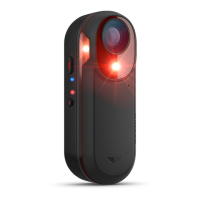
4 While the Varia RCT715 device is turned off, hold the device button for 2 seconds to enter pairing mode.
The status LED flashes purple, and the tail light turns on. The device is in pairing mode for 5 minutes or until
you press the device button.
5 Select your sensor.
When the sensor is paired with your Garmin watch, the radar and bike light status icons appear solid.
14 Other Compatible Devices


 To Next Page
 Loading...